
KYC Verifications Process
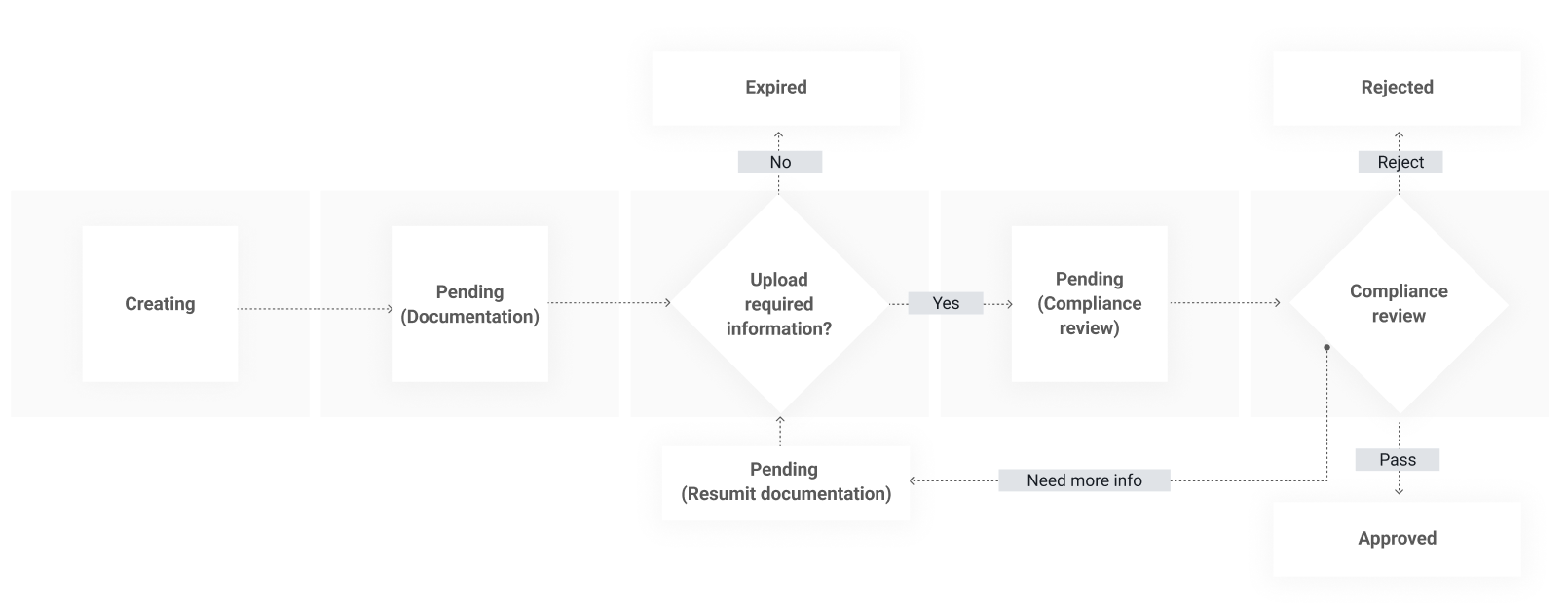
KYC Verification Flow (General Overview)
- Create or receive a verification (depending on the use case).
- Retrieve required physical documents and/ or fields for that verification.
- Upload files and/or provide field values until all items are complete; system advances to compliance review.
- Receive webhook notifications for status changes.
- Handle resubmissions if requested.
- Verification ends in Approved/Rejected or Expired, as it may expire.
Specific use case flows
Payouts On Hold (POH) verifications
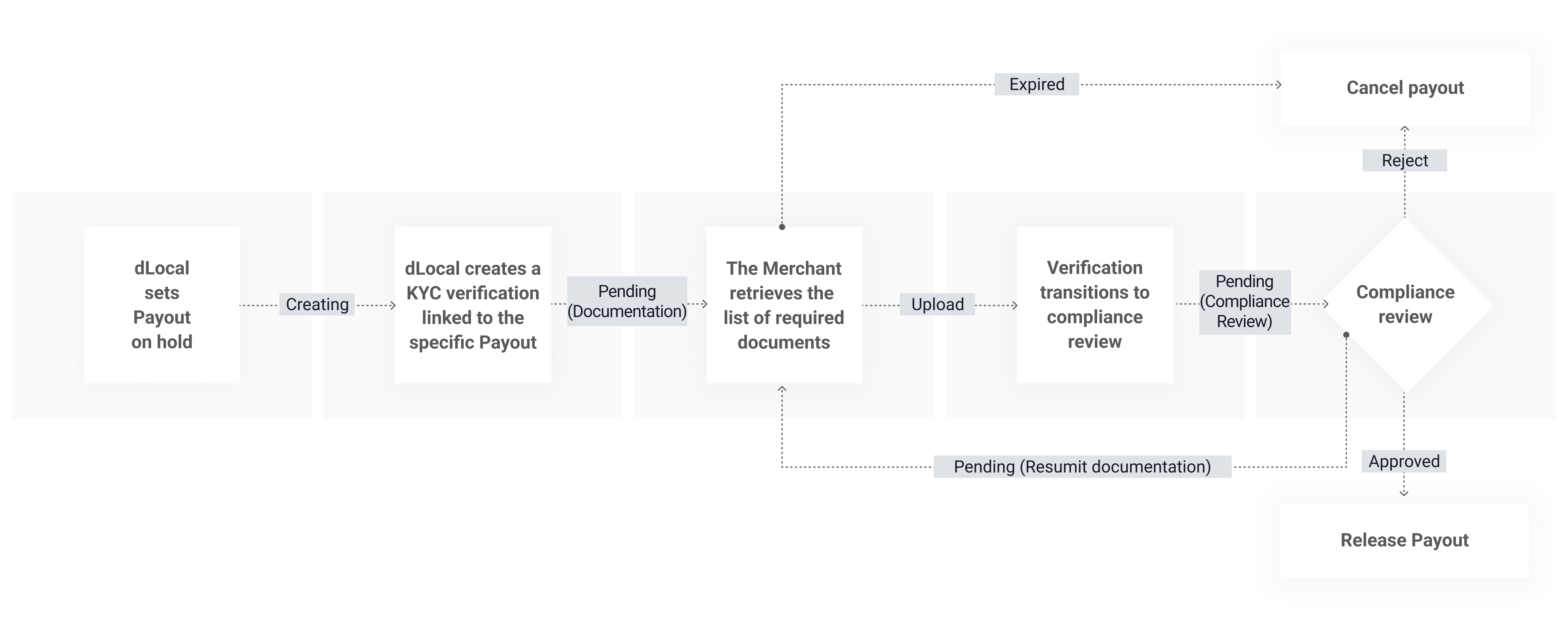
This verification type is created by dLocal when a payout is placed on hold due to fraud compliance concerns. Additional information is required from the merchant to release the funds.
- Dlocal sets payout
ON_HOLD_BY_COMPLIANCE. - Dlocal creates a KYC verification linked to the specific payout.
- The Merchant receives a notification of a KYC verification.
- The Merchant retrieves the list of required documentation for verification, which can be either physical or/fields.
- The Merchant sends the list of required documents.
- Verification transitions to compliance review.
- The Merchant handles resubmissions if requested.
- Verification ends in:
- APPROVED: payouts related to the verification are released.
- REJECTED: payouts related to the verification are canceled.
- EXPIRED: payouts related to the verification are canceled.
API Endpoints
| Method | Endpoint | Description |
|---|---|---|
| GET | /verifications/{verification-id} | Retrieve a verification created by dLocal for a Payout on Hold due to fraud compliance. Verifications will only be created by dLocal when specific information is required to release the funds. |
| GET | /verifications/{verification-id}/documents | Retrieve the required documentation that needs to be sent for a given verification. These documents must be sent and validated by dLocal for the verification to be approved. |
| POST | /verifications/{verification-id}/documents | Create a new document entry for a verification. This operation returns a document_id for file uploads and is only permitted for specific documents during the hold process. |
| PATCH | /verifications/{verification-id}/documents/{document-id} | Update a specific document associated with a given verification using a multipart/form-data request. |
Payins On Hold verifications
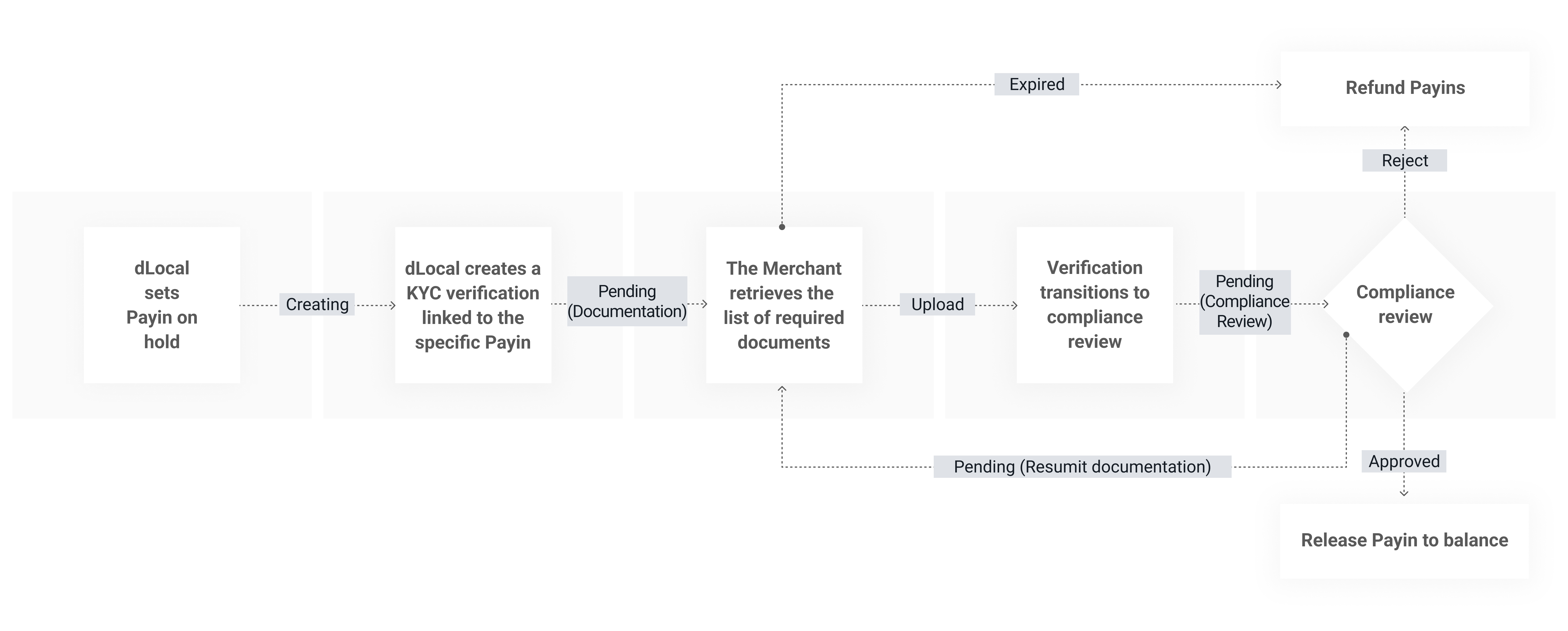
This verification type is created by dLocal when one or more payins are placed on hold due to fraud and/or compliance concerns. Additional information is required from the merchant to release the funds.
- dLocal sets the payin(s) to an internal UNDER INVESTIGATION status.
- dLocal creates a PAYINS_ON_HOLD KYC verification linked to the specific payin or group of payins from the same payer.
- The Merchant receives a notification of a KYC verification.
- The Merchant retrieves the list of required documentation for verification, which can be either physical or/fields.
- The Merchant sends the list of required documents.
- Verification transitions to compliance review.
- The Merchant handles resubmissions if requested.
- Verification ends in:
- APPROVED: payins related to the verification are released.
- REJECTED: payins related to the verification are refunded.
- EXPIRED: payins related to the verification are refunded.
API Endpoints
| Method | Endpoint | Description |
|---|---|---|
| GET | /verifications/{verification-id} | Retrieve a verification created by dLocal for a Payin on Hold due to fraud compliance. Verifications will only be created by dLocal when specific information is required to release the funds. |
| GET | /verifications/{verification-id}/documents | Retrieve the required documentation that needs to be sent for a given verification. These documents must be sent and validated by dLocal for the verification to be approved. |
| PATCH | /verifications/{verification-id}/documents/{document-id} | Update a specific document associated with a given verification using a multipart/form-data request. |
Remittances verifications
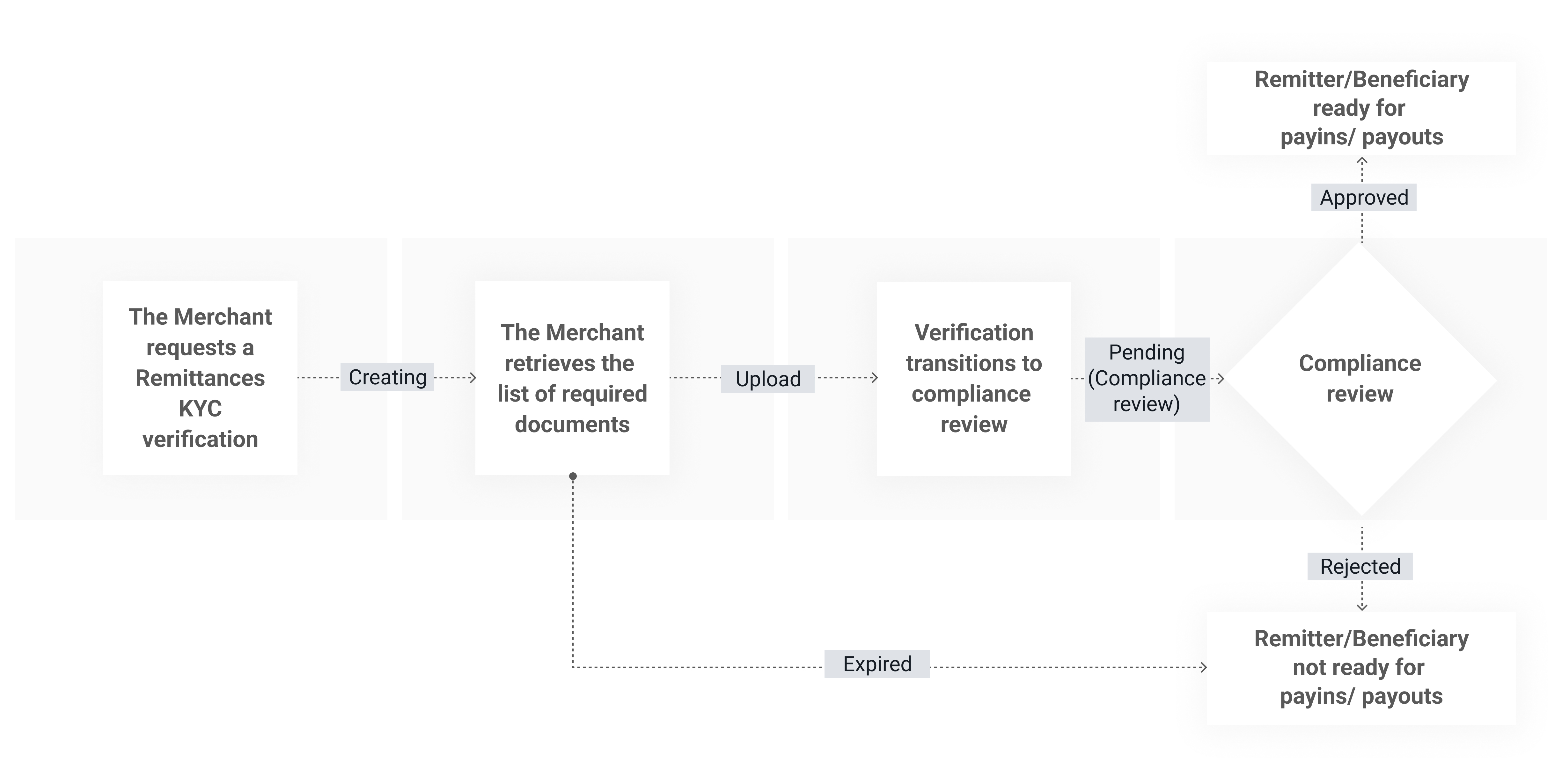
This verification type is used for creating Remitter and Beneficiary verifications required for remittance payments.
- The Merchant creates the verification(s) for REMITTER and/or BENEFICIARY, optionally attaching initial documents in the same multipart request if required.
- The Merchant retrieves the required physical documents and/or fields for each verification, if not sent in the creation of the verification.
- Verification transitions to compliance review; notifications are sent to the configured
notification_url.
The Merchant handles resubmissions if requested. - Verification ends in:
- APPROVED: Remitter or Beneficiary ID can be used for payins or payout transactions.
- REJECTED: The Remitter or Beneficiary verification is rejected.
- EXPIRED: The Remitter or Beneficiary verification has expired.
API Endpoints
| Method | Endpoint | Description |
|---|---|---|
| POST | /verifications | Create a new Remitter and Beneficiary verification required for the remittance flow. The service will return a verification ID, which will be used in the Payins and Payouts API’s services. |
| GET | /verifications/{verification-id}?include=client_data | Retrieve verification details with extended client information. Include the query parameter client_data to access detailed client information. |
| GET | /verifications/{verification-id}/documents | Retrieved documents required for a given verification. These documents must be completed and validated for the verification to be approved. |
| PATCH | /verifications/{verification-id}/documents/{document-id} | Update a specific document associated with a given verification using a multipart/form-data request. |
Standalone verifications
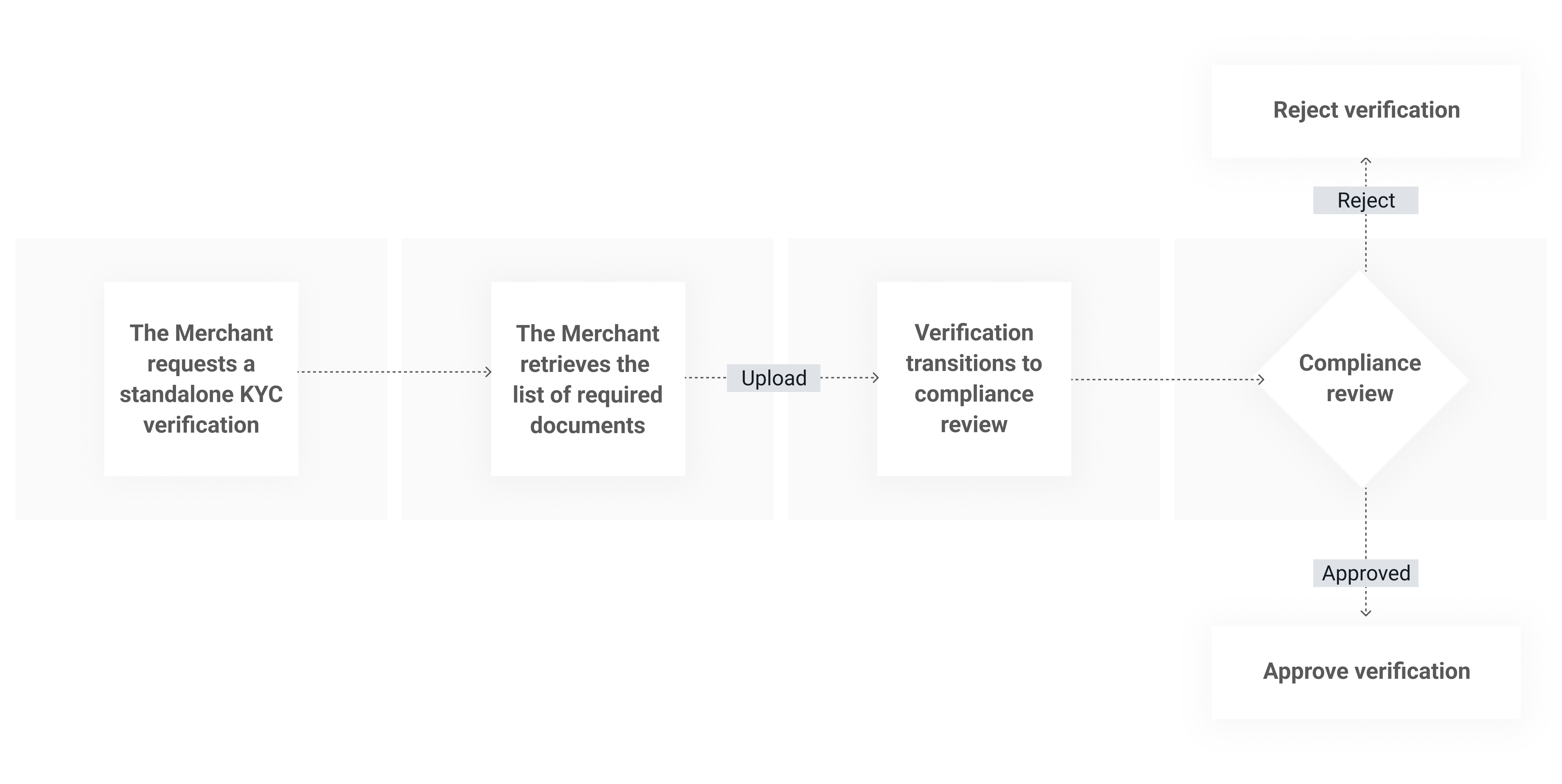
- The Merchant requests a standalone KYC verification for an end user via the API.
- dLocal creates a standalone KYC verification.
- The Merchant receives a notification of a KYC verification, along with a list of required documents, which can be either physical documents or fields.
- The Merchant retrieves the list of required documentation for the verification and submits the requested information via the API.
- Verification transitions to compliance review.
- Verification ends in:
- APPROVED: the result can be used by the Merchant as input to their own flows (for example, to approve or enable features for that end user).
- REJECTED: The standalone verification is rejected.
| Method | Endpoint | Description |
|---|---|---|
| POST | /verifications | Create a new Standalone verification required for your desired flow. The service will return a verification ID, which will be used |
| GET | /verifications/{verification-id}?include=client_data | Retrieve verification details with extended client information. Include the query parameter client_data to access detailed client information. |
Contact your Technical Account Manager to set up your notification URL.
Updated about 1 month ago
What’s Next
Did this page help you?