
Recurring payments
Learn how to integrate Pix with Biometrics for seamless recurring payments with dLocal.
After the user completes the one-time enrollment, merchants can initiate subsequent Pix with Biometrics payments using the enrollment ID returned by dLocal. This identifier links the user to their authorized bank account and must be included in every payment request.
For each payment, the user must complete the biometric challenge (face or fingerprint verification) to authorize the transaction.
Flow
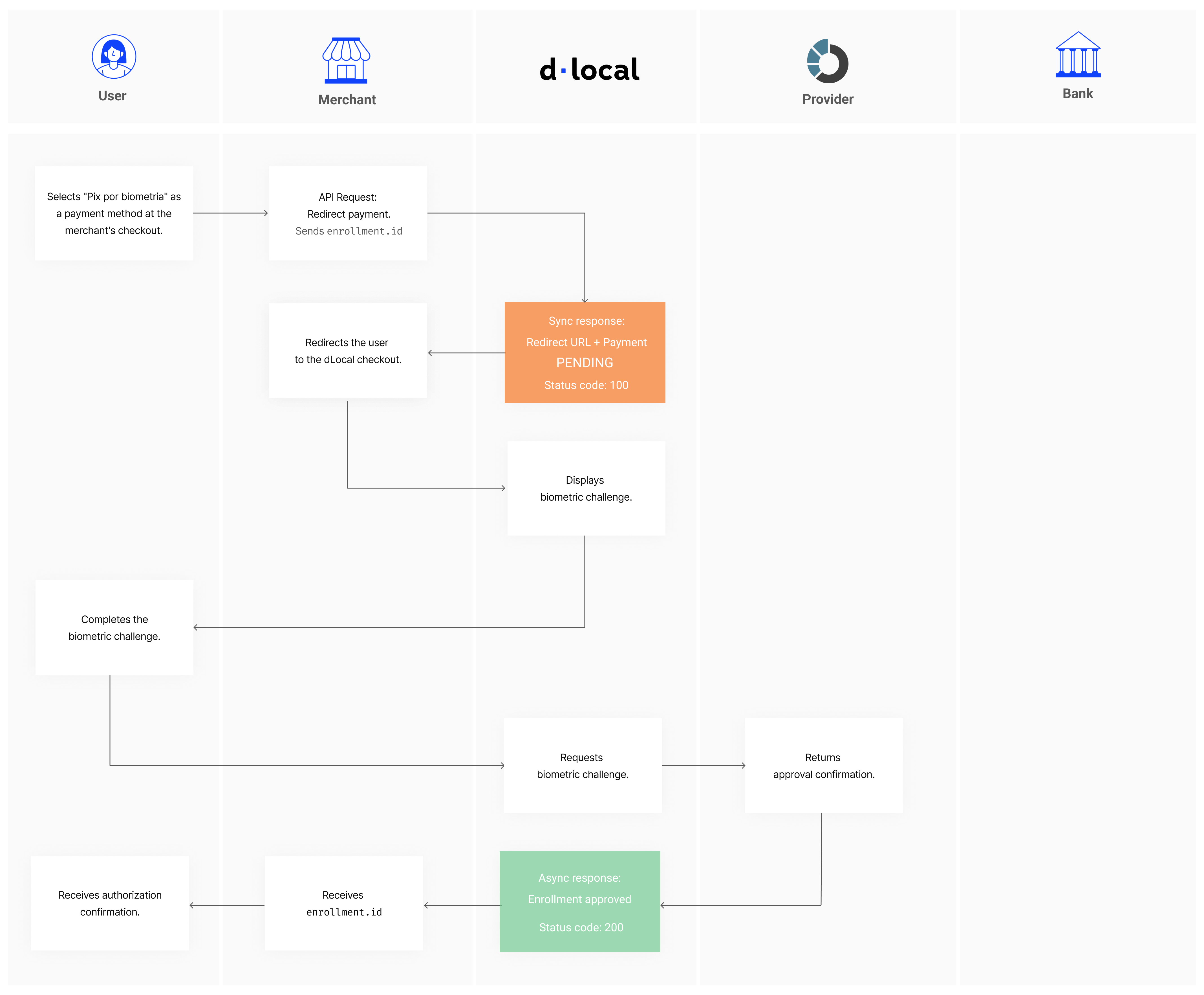
User flow
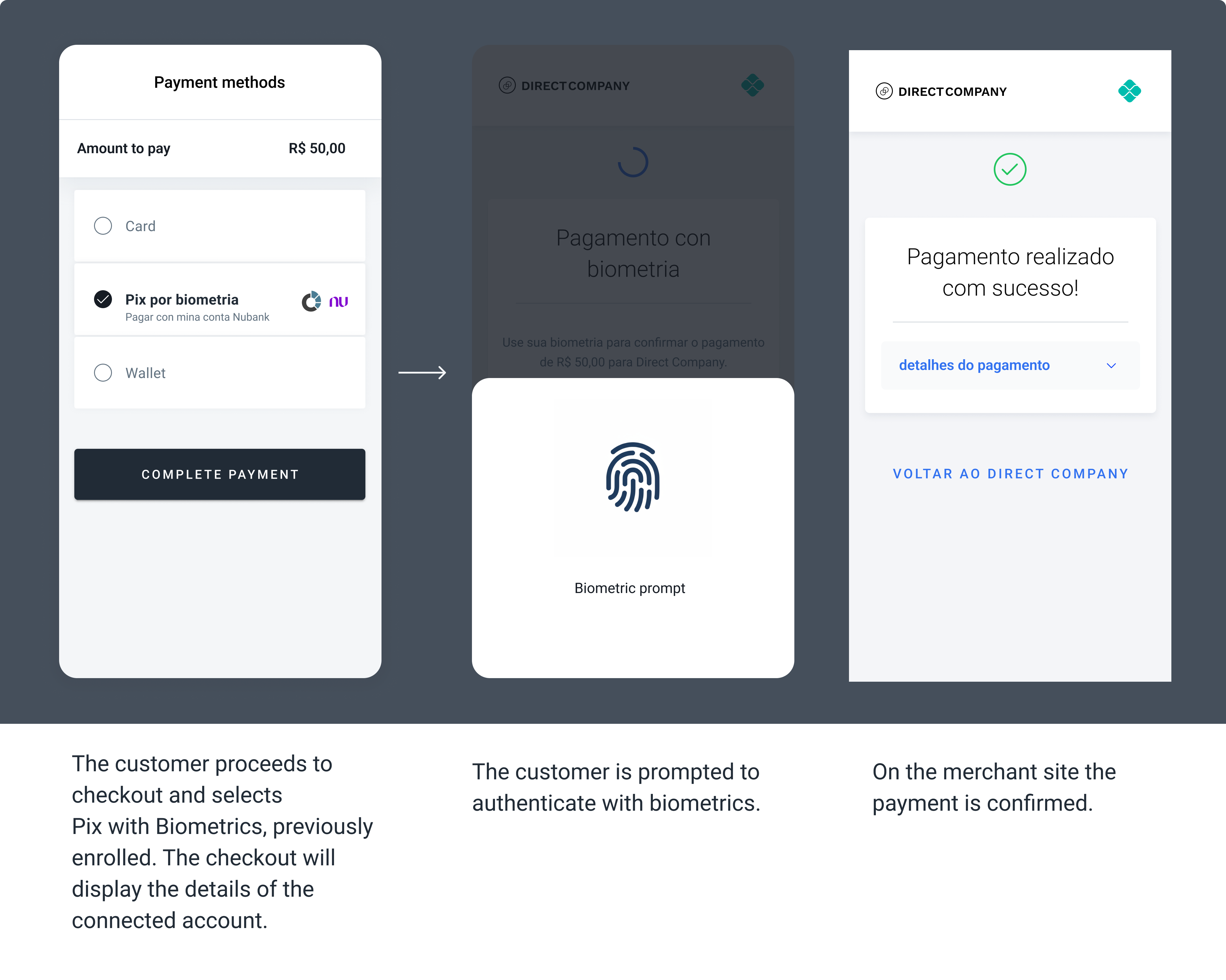
The screenshots illustrate an example of the Pix with Biometrics payment flow.
Example request
curl -X POST \
   -H 'X-Date: {X-Date}' \
   -H 'X-Login: {X-Login}' \
   -H 'X-Trans-Key: {X-Trans-Key}' \
   -H 'Content-Type: application/json' \
   -H 'X-Version: 2.1' \
   -H 'User-Agent: MerchantTest / 1.0 ' \
   -H 'Authorization: V2-HMAC-SHA256, Signature: {Signature}' \
   -d '{body}'
   https://api.dlocal.com/payments

{
  "amount": 100,
  "currency": "BRL",
  "country": "BR",
  "payment_method_id": "XV",
  "payment_method_flow": "REDIRECT",
  "payer": {
    "name": "Thiago Gabriel",
    "document": "53033315550",
    "email": "[email protected]",
    "device_id": "123456789"
  },
  "enrollment": {
    "id": "E-4-32e1218f-b6ec-3f21-13d5-50v12ere2ca4"
  },
  "order_id": "221124442gg",
  "description": "T-shirt",
  "notification_url": "http://www.merchantsite.com/notifications",
  "callback_url": "http://merchantsite.com/callback"
}
{
"id": "R-4-41f8628f-b6ec-4c02-96d5-c5b03cac7cz0",
"amount": 100,
"currency": "BRL",
"payment_method_id": "XV",
"payment_method_type": "TICKET",
"enrollment": {
"id": "E-4-32e1218f-b6ec-3f21-13d5-50v12ere2ca4"
},
"payment_method_flow": "REDIRECT",
"country": "BR",
"created_date": "2025-01-01T20:37:20.000+0000",
"status": "PENDING",
"status_detail": "The payment is pending.",
"status_code": "100",
"order_id": "221124442gg",
"notification_url": "http://merchantsite.com/notifications"
}{
"id": "R-4-41f8628f-b6ec-4c02-96d5-c5b03cac7cz0",
"amount": 100,
"status": "PAID",
"status_detail": "The payment is paid",
"status_code": "200",
"currency": "BRL",
"country": "BR",
"payment_method_id": "XV",
"payment_method_flow": "REDIRECT",
"payment_method_type": "TICKET",
"order_id": "221124442gg",
"enrollment": {
"id": "E-4-32e1218f-b6ec-3f21-13d5-50v12ere2ca4"
}
}Request params
| Field | Type | Description | Required |
|---|---|---|---|
amount | Number | Amount to be charged. | Yes |
currency | String | BRL or USDTransaction currency in ISO 4217. | Yes |
country | ISO 3166-1 alpha-2 code | BRTransaction country in ISO 3166. | Yes |
payment_method_id | String | XVID of the selected payment method. | Yes |
payment_method_flow | String | REDIRECT | Yes |
| Payer Object | |||
payer.name | String (max. 100) | Name of the payer. | Yes |
payer.document | 11–14 digits Full CPF validation | Document of the payer (CPF or CNPJ). | Yes |
payer.email | String (max. 100) | Email of the payer. | Yes |
| Enrollment Object | |||
enrollment.id | String | ID corresponding to the enrollment present in the asynchronous notification of the enrollment flow. | Yes |
order_id | String | ID of the capture given by the merchant in their system (external capture ID). | No |
description | String | Description of the items purchased. | No |
notification_url | String (max. 200) | Notifications will be sent on every status change to the notification_url specified by the merchant. | No |
callback_url | String | URL where the user will be redirected after transaction approval. | Yes |
Updated 7 months ago
Did this page help you?