
Colombia
Learn about the dLocal supported payment methods in Colombia.

Market specifications
Take a look of all the payment methods available.
Country reference Cards supported APM supported
Cards
Find all the information about the card supported capabilities.
Capabilities Process Card Payments
Alternative Payments
Learn how to integrate cash, bank transfer or wallet payment.
Efecty PSE Bancolombia Nequi Push (One-shot & Recurring) Nequi Mixed (Push + QR) Nequi QR Mercado Pago Bre-B Biometrics Bre-B AddiMarket specifications
Do you want to know more information about Colombia's market? Go to the Colombia's economy and eCommerce market article.
Country reference
country code | currency code | amount decimals | document name | document format | document required? |
|---|---|---|---|---|---|
CO | COP | 0 | CC o NIT | Between 6 to 11 digits | Yes |
Cards supported
payment_method_id | Brand ID | Name | payment_method_type | Details | Allowed Flows | Logo |
|---|---|---|---|---|---|---|
CARD | VI | Visa | CARD | Credit Card | DIRECT REDIRECT |  |
CARD | VD | Visa Debit | CARD | Debit Card | DIRECT REDIRECT |  |
CARD | MC | Mastercard | CARD | Credit Card | DIRECT REDIRECT |  |
CARD | MD | Mastercard Debit | CARD | Debit Card | DIRECT REDIRECT |  |
CARD | AE | American Express | CARD | Credit Card | DIRECT REDIRECT |  |
CARD | DC | Diners | CARD | Credit Card | DIRECT REDIRECT |  |
CARD | CZ | Codensa | CARD | Credit Card | DIRECT REDIRECT |  |
To offer all the card options that may be available in your integration, send the
payment_method_idasCARD.
Alternative Payment Method supported
payment_method_id | Name | payment_method_type | Details | Allowed Flows | Logo |
|---|---|---|---|---|---|
EY | Efecty | TICKET | Cash Payment | DIRECT REDIRECT |  |
PC | PSE | BANK_TRANSFER | Bank Transfer Offline | REDIRECT |  |
BN | Bancolombia | TICKET | Cash Payment | REDIRECT |  |
QP | Nequi Push | WALLET | Wallet — one-shot & tokenized | REDIRECT DIRECT |  |
MQ | Nequi Mixed (Push + QR) | WALLET | Wallet — one-shot | REDIRECT | |
QR | Nequi QR | QR | QR payments | DIRECT REDIRECT |  |
MP | Mercado Pago | BANK_TRANSFER | Wallet | DIRECT REDIRECT |  |
EV | Bre-B QR | QR | QR payments | DIRECT REDIRECT |  |
AH | Addi | TICKET | BNPL — Buy Now Pay Later | REDIRECT |  |
Nequi payment method codesdLocal offers three distinct Nequi payment methods in Colombia. They are not interchangeable:
QP— Nequi Push: supports both one-shot payments and tokenized recurring/subscription payments. One-shot uses an emptywalletobject; recurring uses enrollment + recurringDIRECTcharges.MQ— Nequi Mixed (Push + QR): one-shot only. Does not support tokenization or recurring payments.QR— Nequi QR: one-shot QR scan only. Does not support tokenization or recurring payments. Note: in Ecuador,QRroutes to DeUna, not Nequi — always includecountry: "CO"when integrating Nequi QR.
Cards
Capabilities
| Visa Credit | Visa Debit | Mastercard Credit | Mastercard Debit | American Express | Diners | Codensa | |
|---|---|---|---|---|---|---|---|
| Minimum amount | 169 COP | 169 COP | 169 COP | 169 COP | 100 COP | 100 COP | 100 COP |
| Refunds | Yes | Yes | Yes | Yes | Yes | Yes | Yes |
| Recurring | Yes | Yes | Yes | Yes | Yes | Yes | Yes |
| Chargeback option | Yes | Yes | Yes | Yes | Yes | Yes | Yes |
| Chargeback Dispute option | Yes | Yes | Yes | Yes | Yes | Yes | Yes |
| Descriptor | Can be personalized, depending on the provider. | Can be personalized, depending on the provider. | Can be personalized, depending on the provider. | Can be personalized, depending on the provider. | Can be personalized, depending on the provider. | Can be personalized, depending on the provider. | Can be personalized, depending on the provider. |
How to process Card Payments?
Learn how to process payments with credit and debit cards with dLocal in our Card Payments section.
Alternative Payment Method
Efecty
It was created with the aim of facilitating payments in the country. The Efecty voucher is now widely used in Colombia to pay utility bills and online purchases, in cash.
Capabilities
| Efecty | |
|---|---|
| Min. amount | 1000 COP |
| Max. expiration time supported | 5 days |
| Notification delay | Immediate |
| Refunds | Yes |
| Flow | DIRECT REDIRECT |
Request parameters
| Property | Type | Description | Mandatory? |
|---|---|---|---|
amount | Number | Amount to be charged. | Yes |
currency | String | COP Transaction currency. | Yes |
country | String | CO Transaction country in ISO 3166. | Yes |
payment_method_id | String | EY ID of the selected payment method. | Yes |
payment_method_flow | String | DIRECT or REDIRECT | Yes |
payer.name | String | Name of the payer. | Yes |
payer.email | String | Email of the payer. | Yes |
payer.document | String | Document of the payer. | Yes |
order_id | String | ID of the capture given by the merchant in their system. Think of it as an external ID of the capture. | No |
notification_url | String | Notifications will be sent in every change of status of a payment to the notification_url specified by the merchant. | No |
Examples
Request example
Response example
{
    "amount": 15000,
    "currency": "COP",
    "country": "CO",
    "payment_method_id": "EY",
    "payment_method_flow": "DIRECT",
    "payer": {
        "name": "Jane Doe",
        "email": "[email protected]",
        "document": "12345678",
        "address": {
            "country": "CO",
            "state": "Antioquia",
            "city": "Medellin",
            "zip_code": "8858",
            "street": "Av. Principal",
            "number": "5940"
        }
    },
    "order_id": "34545sk3483kqw0",
    "description": "Tshirt",
    "notification_url": "http://merchantsite.com/notification/new",
    "callback_url": "http://merchantsite.com/success_page"
}
{
"id": "D-4-1c9e6c0f-a97f-4fc1-9a65-9a8bf3da3a88",
"amount": 15000,
"currency": "COP",
"payment_method_id": "EY",
"payment_method_type": "TICKET",
"payment_method_flow": "DIRECT",
"country": "CO",
"bank_transfer": {},
"ticket": {
"type": "CUSTOM",
"format": "Code 128",
"number": "1011462900",
"expiration_date": "2022-09-21T02:59:00.000+0000",
"barcode": "41577099989921778020001014972898390020230119",
"company_name": "Dlocal",
"company_id": "111571",
"provider_name": "efecty",
"provider_logo": "https://static.dlocal.com/images/providers/efecty.png",
"image_url": "https://pay.dlocal.com/gmf-apm/payments/M-8a443398-99f8-47d4-83cd-c8e5562aeffc",
"amount": 15000,
"currency": "COP"
},
"created_date": "2022-09-16T17:26:46.000+0000",
"status": "PENDING",
"status_detail": "The payment is pending.",
"status_code": "100",
"order_id": "34545sk3483kqw0",
"notification_url": "http://merchantsite.com/notification/new"
}Example ticket
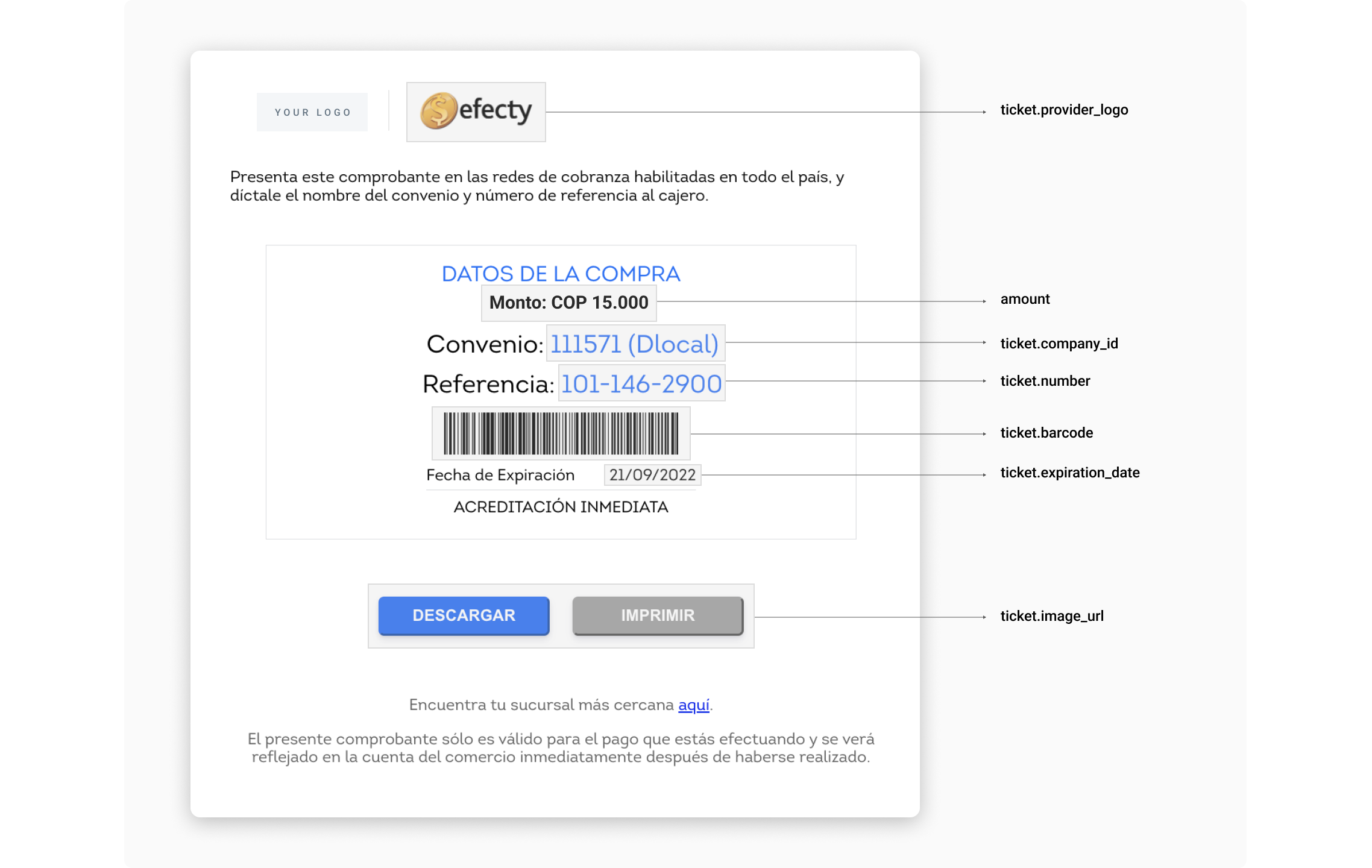
Efecty UI built with the information in the example above.
User Interface Tips UI
If you are using this payment method through a DIRECT integration, follow the tips below in order to make it easier for your customers to complete payments, boosting your conversion rates.
| Element | Tip |
|---|---|
| Ticket Number | It is the number that payers must dictate to the cashiers in order to complete payment. Name it "Referencia" and separate it this way so it is easier to read: 3 digits - 3 digits - 4 digits. |
| Currency and Amount | Should be relevant elements in the ticket. Users need to have that information very clearly. |
| Currency Symbol | $ |
| Convenio | This identifies the payment beneficiary and although it is not usually necessary for payment, sometimes it helps cashiers to find the payment on their system. |
| Barcode | Some cashiers prefer to scan the barcode rather than asking for Reference and "Convenio". Helping cashiers is a way to improve conversion rates. |
| Expiration date | Display this element clearly and visible enough. In Colombia, the date format is DD/MM/YYYY. |
| Accreditation delay | Let users know that their payment will be credited immediately. This brings confidence and a sense of security that helps conversion rates. |
| Payment instructions | Although most users are familiarized with Efecty, it is a good practice to help those who are not. The image above is an example of instructions, but if needed, our team will be happy to help you with more personalized instructions. |
| Store locator | Link it to google.com/maps/search/efecty/. |
| Save button | It helps users to have their tickets always on their phones, making it needless to take notes or keep the browser open. |
| Print button | It is useful for some users who need to have their tickets printed. |
PSE
Pagos Seguros Online (PSE) is a platform enabling consumers to make a direct ACH payment for e-commerce purchases, enabled by the local clearinghouse, ACH Colombia.
Capabilities
| PSE | |
|---|---|
| Min. amount | 1600 COP |
| Max. expiration time supported | 7 days |
| Notification delay | Immediate |
| Refunds | Yes |
| Flow | REDIRECT |
UX Flow
For the payment to proceed, the user needs to select their bank. You can display the bank selector page either through dLocal or within your own integration
Bank selector page rendered by dLocal
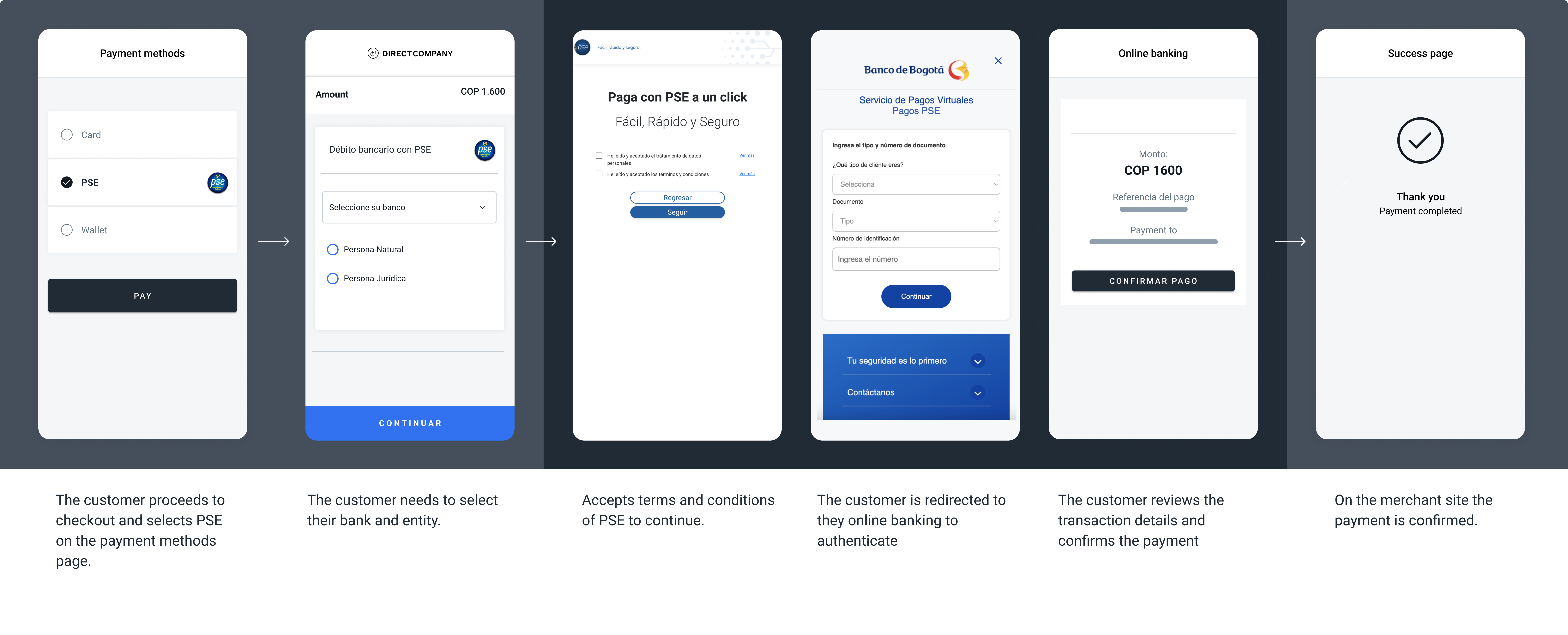
The screenshots illustrate a generic PSE redirect flow.
Bank selector page rendered by merchant
To create your own bank selector page, first call the Search payment methods endpoint for Colombia:
Endpoint: GET https://api.dlocal.com/payments-methods?country=CO
API reference: Search payment methods
In the response, locate the Payment Method Object where id = "IO". This object contains the list of available PSE banks and their corresponding bank_id values. Use this list to render your bank selector page in your own UI.
Request parameters
| Property | Type | Description | Mandatory? |
|---|---|---|---|
amount | Number | Amount to be charged. | Yes |
currency | String | COP Transaction currency. | Yes |
country | String | CO Transaction country in ISO 3166. | Yes |
payment_method_id | String | PC ID of the selected payment method. | Yes |
payment_method_flow | String | REDIRECT | Yes |
payment_method_details.bank_id | String | ID of the bank selected by the customer. This value is used to redirect the customer to their respective bank page. | Yes, for the bank selector page rendered by the merchant. |
payer.name | String | Name of the payer. | Yes |
payer.email | String | Email of the payer. | Yes |
payer.document | String | Document of the payer. | Yes |
order_id | String | ID of the capture given by the merchant in their system. Think of it as an external ID of the capture. | No |
notification_url | String | Notifications will be sent in every change of status of a payment to the notification_url specified by the merchant. | No |
Examples
Request example
Response example
Request example with bank ID
Response example with bank ID
{
  "amount": 1600,
  "currency": "COP",
  "country": "CO",
  "payment_method_id": "PC",
  "payment_method_flow": "REDIRECT",
  "payer": {
      "name": "Jane Doe",
      "email": "[email protected]",
      "document": "12345678",
      "address": {
          "country": "CO",
          "state": "Antioquia",
          "city": "Medellin",
          "zip_code": "8858",
          "street": "Av. Principal",
          "number": "5940"
        }
    },
  "order_id": "34545sk3483kqw0",
  "description": "Tshirt",
  "notification_url": "http://merchantsite.com/notification/new",
  "callback_url": "http://merchantsite.com/success_page"
}
{
"id": "R-4-3692f395-8bb4-4691-9254-97da09bc7dbc",
"amount": 1600,
"currency": "COP",
"payment_method_id": "PC",
"payment_method_type": "BANK_TRANSFER",
"payment_method_flow": "REDIRECT",
"country": "CO",
"created_date": "2023-01-17T17:29:02.000+0000",
"status": "PENDING",
"status_detail": "The payment is pending.",
"status_code": "100",
"order_id": "34545sk3483kqw0",
"description": "Tshirt",
"notification_url": "http://merchantsite.com/notification/new",
"redirect_url": "https://pay.dlocal.com/gmf-apm/payments-continue/M-06dc6503-cb17-4e2e-980c-ce91f02c3e97"
}{
"amount": 1600,
"currency": "COP",
"country": "CO",
"payment_method_id": "PC",
"payment_method_flow": "REDIRECT",
"payment_method_details": {
"bank_id": "1051"
},
"payer": {
"name": "Jane Doe",
"email": "[email protected]",
"document": "12345678",
"address": {
"country": "CO",
"state": "Antioquia",
"city": "Medellin",
"zip_code": "8858",
"street": "Av. Principal",
"number": "5940"
}
},
"order_id": "JXBP5KqC",
"description": "Tshirt",
"notification_url": "http://merchantsite.com/notification/new",
"callback_url": "http://merchantsite.com/success_page"
}{
"id": "R-4-x1kapb7h-nsd996g8d91sn1-6vt6qob3sjss",
"amount": 1600,
"currency": "COP",
"payment_method_id": "PC",
"payment_method_type": "BANK_TRANSFER",
"payment_method_flow": "REDIRECT",
"country": "CO",
"created_date": "2025-08-25T18:35:29.000+0000",
"status": "PENDING",
"status_detail": "The payment is pending.",
"status_code": "100",
"order_id": "JXBP5KqC",
"description": "Tshirt",
"notification_url": "http://merchantsite.com/notification/new",
"redirect_url": "https://pay.dlocal.com/gmf-apm/payments-redirect/N-d81b3a8a-ca6b-4b2d-84d7-333780fe6a6b"
}Bancolombia
Bancolombia is one of the biggest banks in the country, with thousands of collection points throughout the country where the user can pay their bills using cash.
Capabilities
| Bancolombia | |
|---|---|
| Min. amount | 100 COP |
| Max. expiration time supported | 5 days |
| Notification delay | Immediate |
| Refunds | Yes |
| Flow | REDIRECT |
Request parameters
| Property | Type | Description | Mandatory? |
|---|---|---|---|
amount | Number | Amount to be charged. | Yes |
currency | String | COP Transaction currency. | Yes |
country | String | CO Transaction country in ISO 3166. | Yes |
payment_method_id | String | BN ID of the selected payment method. | Yes |
payment_method_flow | String | REDIRECT | Yes |
payer.name | String | Name of the payer. | Yes |
payer.email | String | Email of the payer. | Yes |
payer.document | String | Document of the payer. | Yes |
order_id | String | ID of the capture given by the merchant in their system. Think of it as an external ID of the capture. | No |
notification_url | String | Notifications will be sent in every change of status of a payment to the notification_url specified by the merchant. | No |
Examples
Request example
Response example
{
    "amount": 1000,
    "currency": "COP",
    "country": "CO",
    "payment_method_id": "BN",
    "payment_method_flow": "REDIRECT",
    "payer": {
        "name": "Jane Doe",
        "email": "[email protected]",
        "document": "12345678",
        "address": {
            "country": "CO",
            "state": "Antioquia",
            "city": "Medellin",
            "zip_code": "8858",
            "street": "Av. Principal",
            "number": "5940"
        }
    },
    "order_id": "34545sk3483kqw0",
    "description": "Tshirt",
    "notification_url": "http://merchantsite.com/notification/new",
    "callback_url": "http://merchantsite.com/success_page"
}
{
"id": "R-4-9f359a37-621c-423b-b552-6d464fe890dd",
"amount": 1000,
"currency": "COP",
"payment_method_id": "BN",
"payment_method_type": "BANK_TRANSFER",
"payment_method_flow": "REDIRECT",
"country": "CO",
"created_date": "2023-06-22T17:51:17.000+0000",
"status": "PENDING",
"status_detail": "The payment is pending.",
"status_code": "100",
"order_id": "34545sk3483kqw0",
"description": "Tshirt",
"notification_url": "http://merchantsite.com/notification/new",
"redirect_url": "https://pay.dlocal.com/gmf-apm/payments-redirect/M-d58deef7-df79-4b94-96d1-e664b4652881"
}Example ticket
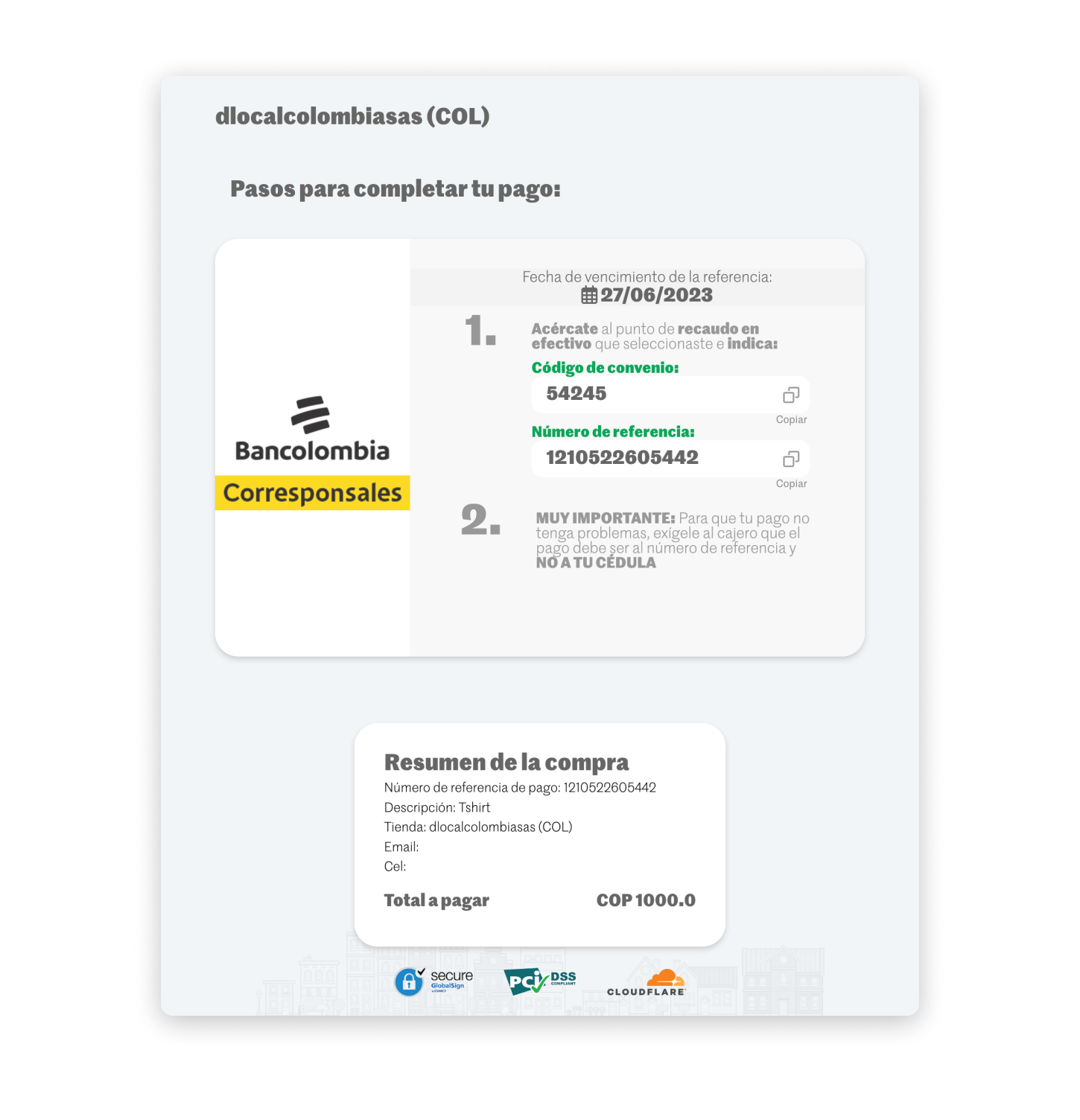
Bancolombia UI built with the information in the example above.
Nequi Push (QP)
QP)
Nequi product family
QPsupports both one-shot payments and tokenized recurring payments / subscriptions. The two flows use different request shapes — see below. If you need a QR-based one-shot experience instead, useMQ(Nequi Mixed — Push + QR) orQR(Nequi QR scan).
Nequi is a widely used payment method in Colombia that enables people to send and receive money through their mobile phones. QP uses a push notification sent to the user's Nequi app — the user approves or rejects directly in the app, with no browser redirect involved.
How it works
QP uses a push notification flow — no redirect URL is returned, for both one-shot and recurring flows:
- The merchant creates a payment with
payment_method_id: "QP"andpayment_method_flow: "REDIRECT". - dLocal sends a push notification to the user's Nequi app using
payer.phone. - The user approves or rejects in the Nequi app. No browser redirect occurs.
- dLocal confirms the result via webhook to
notification_url.
No redirect URL, anywhere in QPNone of the
QPflows — one-shot, enrollment, or recurring — return aredirect_url. Display a "waiting for approval" state in your UI while the push notification is pending. The user has approximately 15 minutes to respond before the request expires.
Capabilities
Nequi Push (QP) — One-shot | Nequi Push (QP) — Recurring | |
|---|---|---|
| Min. amount | 100 COP | 100 COP |
| Max. expiration time supported | 15 minutes (push approval window) | 15 minutes (enrollment push approval window) |
| Notification delay | Immediate | Immediate |
| Refunds | Yes | Yes |
| Tokenization | No | Yes |
| Flow | REDIRECT (single payment, no token created) | REDIRECT (enrollment) → DIRECT (recurring charge) |
| Recurring charge response | N/A | Synchronous PAID |
payment_method_id | QP | QP |
UX Flow
Push notification
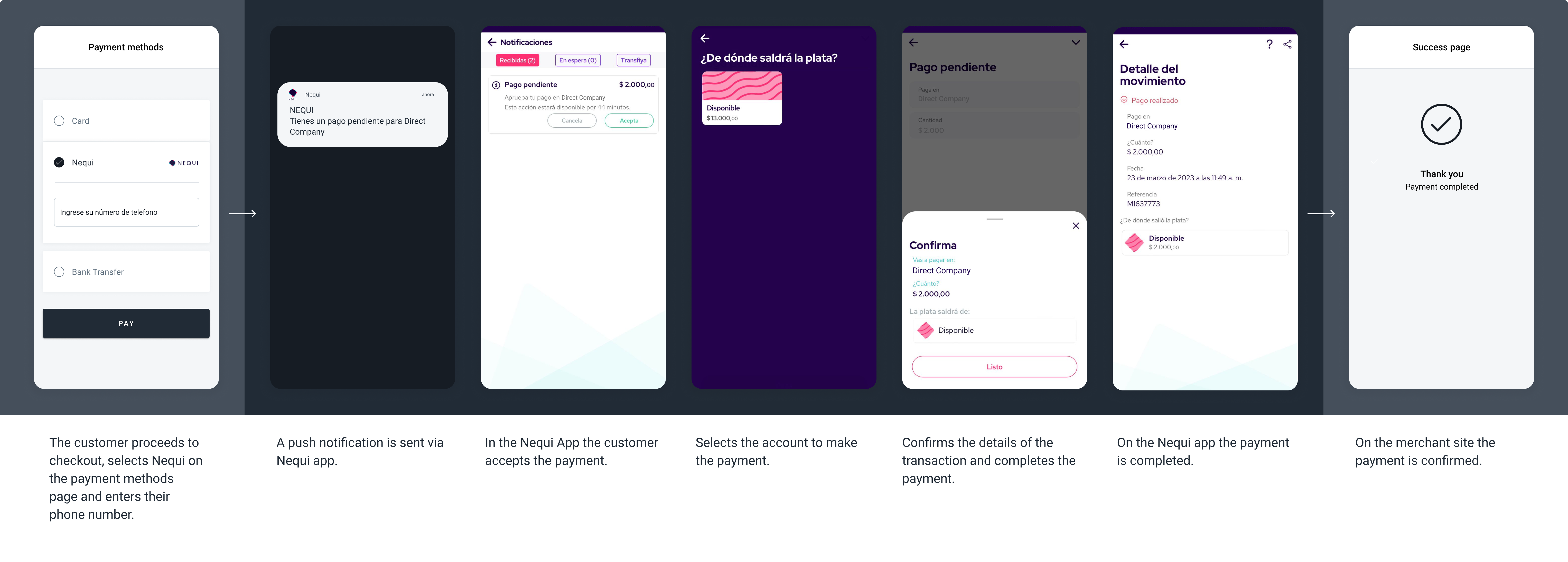
The screenshots illustrate a generic Nequi push notification flow.
Automatic debit (recurring)
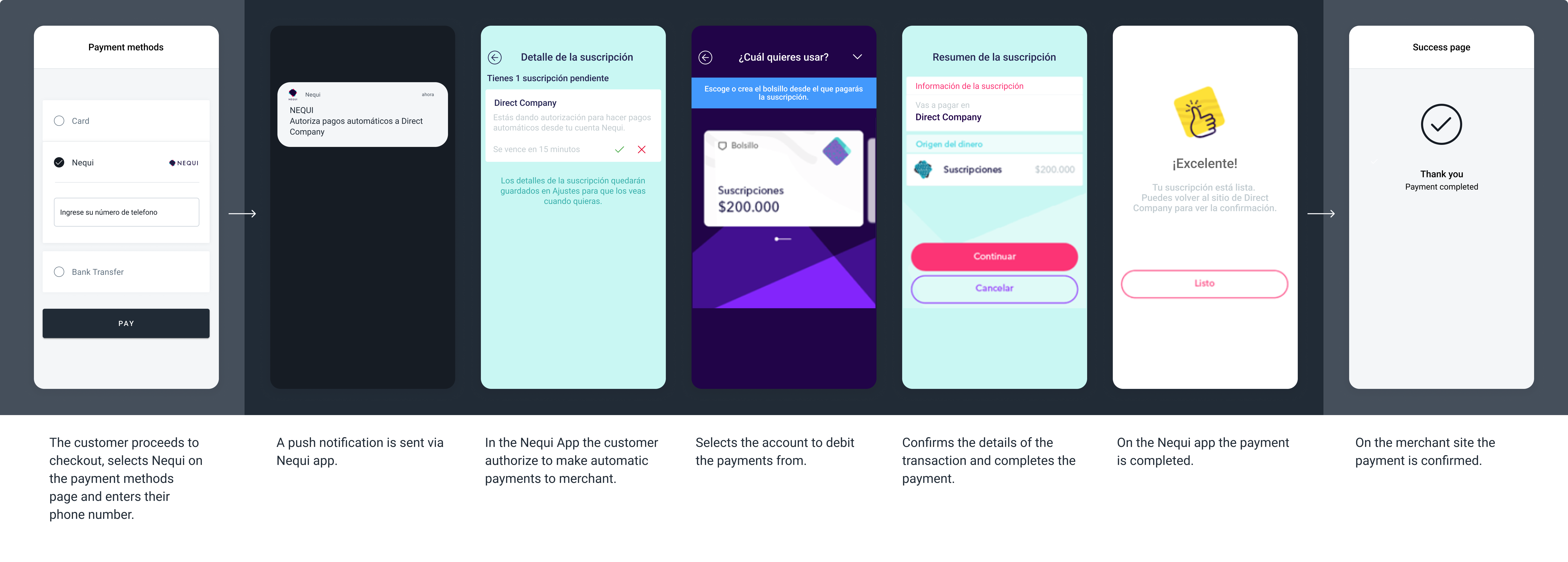
The screenshots illustrate a generic Nequi automatic debit (recurring charge) flow.
QP — One-shot
A single payment with no token or enrollment created. The request includes an empty wallet object ("wallet": {}) to distinguish it from the legacy tokenized save flow.
Empty wallet objectSend
"wallet": {}to indicate a one-shot payment. This distinguishes the request from the legacywallet.save: truetokenization flow — there is no separatepayment_method_idfor QP one-shot.
curl -X POST \
   -H 'X-Date: {X-Date}' \
   -H 'X-Login: {X-Login}' \
   -H 'X-Trans-Key: {X-Trans-Key}' \
   -H 'Content-Type: application/json' \
   -H 'X-Version: 2.1' \
   -H 'Authorization: V2-HMAC-SHA256, Signature: {Signature}' \
   -d '{body}'
   https://api.dlocal.com/payments

{
  "amount": 15000,
  "currency": "COP",
  "country": "CO",
  "payment_method_id": "QP",
  "payment_method_flow": "REDIRECT",
  "payer": {
    "name": "Jane Doe",
    "email": "[email protected]",
    "document": "12345678",
    "phone": "3400100083"
  },
  "wallet": {},
  "order_id": "ord-co-qp-oneshot-001",
  "notification_url": "http://merchantsite.com/notifications"
}
{
"id": "R-4-4f8a2b1c-9d3e-4567-890a-bcdef1234567",
"amount": 15000,
"currency": "COP",
"payment_method_id": "QP",
"payment_method_type": "WALLET",
"payment_method_flow": "REDIRECT",
"country": "CO",
"created_date": "2025-06-01T10:00:00.000+0000",
"status": "PENDING",
"status_detail": "The payment is pending.",
"status_code": "100",
"order_id": "ord-co-qp-oneshot-001",
"notification_url": "http://merchantsite.com/notifications"
}{
"id": "R-4-4f8a2b1c-9d3e-4567-890a-bcdef1234567",
"amount": 15000,
"status": "PAID",
"status_detail": "The payment was paid.",
"status_code": "200",
"currency": "COP",
"country": "CO",
"payment_method_id": "QP",
"payment_method_type": "WALLET",
"payment_method_flow": "REDIRECT",
"payer": {
"name": "Jane Doe",
"email": "[email protected]",
"document": "12345678",
"phone": "3400100083"
},
"order_id": "ord-co-qp-oneshot-001",
"notification_url": "http://merchantsite.com/notifications",
"created_date": "2025-06-01T10:00:00.000+0000"
}
No redirect URLSee No redirect URL, anywhere in QP above — the same applies to this one-shot request.
QP — Recurring
Enrollment — Enrollment API (New)
Do not start new integrations on the legacy wallet token modelNew integrations must use the Enrollment API flows documented below. The legacy
wallet.save / wallet.tokenmodel is supported for existing merchants only. See Nequi Push — Legacy if you are maintaining an existing legacy integration.
The Enrollment API for QP supports two patterns:
| Pattern | When to use |
|---|---|
Enrollment only (POST /enrollments) | Establish the user's authorization without an initial charge. |
Payment + Enrollment in the same request (POST /payments with enrollment object) | Charge the user and establish the authorization simultaneously. |
Once the enrollment is ACTIVE, all subsequent charges are made via POST /payments using enrollment.id inside an enrollment object, with payment_method_flow: "DIRECT". Recurring charges return synchronous PAID — no webhook is needed to confirm final status.
Pattern 1 — Enrollment only
curl -X POST \
   -H 'X-Date: {X-Date}' \
   -H 'X-Login: {X-Login}' \
   -H 'X-Trans-Key: {X-Trans-Key}' \
   -H 'Content-Type: application/json' \
   -H 'X-Version: 2.1' \
   -H 'Authorization: V2-HMAC-SHA256, Signature: {Signature}' \
   -d '{body}'
   https://api.dlocal.com/enrollments

{
  "currency": "COP",
  "country": "CO",
  "type": "ON_DEMAND",
  "payment_method_id": "QP",
  "payment_method_flow": "REDIRECT",
  "payer": {
    "name": "Jane Doe",
    "email": "[email protected]",
    "document": "12345678",
    "phone": "3400100083"
  },
  "external_id": "sub-co-jane-001",
  "description": "Nequi subscription enrollment",
  "notification_url": "http://merchantsite.com/notifications"
}
{
"id": "E-4-7a2b1c3d-4e5f-6789-abcd-ef0123456789",
"external_id": "sub-co-jane-001",
"currency": "COP",
"country": "CO",
"type": "ON_DEMAND",
"payment_method_id": "QP",
"payment_method_flow": "REDIRECT",
"created_date": "2025-06-01T10:00:00.000+0000",
"status": "PENDING",
"status_detail": "The enrollment is pending.",
"status_code": "100",
"notification_url": "http://merchantsite.com/notifications"
}{
"id": "E-4-7a2b1c3d-4e5f-6789-abcd-ef0123456789",
"external_id": "sub-co-jane-001",
"currency": "COP",
"country": "CO",
"type": "ON_DEMAND",
"payment_method_id": "QP",
"payment_method_flow": "REDIRECT",
"created_date": "2025-06-01T10:00:00.000+0000",
"status": "ACTIVE",
"status_detail": "The enrollment is active.",
"status_code": "200",
"notification_url": "http://merchantsite.com/notifications"
}
No redirect URLSee No redirect URL, anywhere in QP above — the same applies to this enrollment request.
Enrollment IDPersist the
idvalue when the webhook reachesACTIVEstatus. This is your enrollment ID for all future recurring charges.To check enrollment status at any time, use the Get enrollment endpoint.
To cancel an enrollment, use the Cancel an enrollment endpoint.
Enrollment status codes:
status | status_code | Description |
|---|---|---|
PENDING | 100 | Enrollment created. Push notification sent to user's Nequi app. |
ACTIVE | 200 | User approved. Enrollment ID is ready for recurring charges. |
CANCELLED | 400 | The enrollment was cancelled. |
REJECTED | 300 | The user rejected or did not respond to the push notification. |
Pattern 2 — Payment + Enrollment in the same request
curl -X POST \
   -H 'X-Date: {X-Date}' \
   -H 'X-Login: {X-Login}' \
   -H 'X-Trans-Key: {X-Trans-Key}' \
   -H 'Content-Type: application/json' \
   -H 'X-Version: 2.1' \
   -H 'Authorization: V2-HMAC-SHA256, Signature: {Signature}' \
   -d '{body}'
   https://api.dlocal.com/payments

{
  "amount": 15000,
  "currency": "COP",
  "country": "CO",
  "payment_method_id": "QP",
  "payment_method_flow": "REDIRECT",
  "payer": {
    "name": "Jane Doe",
    "email": "[email protected]",
    "document": "12345678",
    "phone": "3400100083"
  },
  "enrollment": {
    "external_id": "sub-co-jane-001",
    "type": "ON_DEMAND",
    "description": "Nequi subscription enrollment",
    "notification_url": "http://merchantsite.com/enrollment_notifications"
  },
  "order_id": "ord-co-jane-001",
  "notification_url": "http://merchantsite.com/payments",
  "callback_url": "http://merchantsite.com/callback"
}
{
"id": "R-4-9f359a37-621c-6yt5-b552-6d464fe890dd",
"amount": 15000,
"currency": "COP",
"payment_method_id": "QP",
"payment_method_type": "WALLET",
"payment_method_flow": "REDIRECT",
"country": "CO",
"created_date": "2025-06-01T10:00:00.000+0000",
"status": "PENDING",
"status_detail": "The payment is pending.",
"status_code": "100",
"order_id": "ord-co-jane-001",
"notification_url": "http://merchantsite.com/payments",
"enrollment": {
"id": "E-4-7a2b1c3d-4e5f-6789-abcd-ef0123456789",
"external_id": "sub-co-jane-001",
"created_date": "2025-06-01T10:00:00.000+0000",
"status": "PENDING",
"status_detail": "The enrollment is pending.",
"status_code": "100"
}
}{
"id": "E-4-7a2b1c3d-4e5f-6789-abcd-ef0123456789",
"external_id": "sub-co-jane-001",
"currency": "COP",
"country": "CO",
"type": "ON_DEMAND",
"payment_method_id": "QP",
"payment_method_flow": "REDIRECT",
"created_date": "2025-06-01T10:00:00.000+0000",
"status": "ACTIVE",
"status_detail": "The enrollment is active.",
"status_code": "200",
"notification_url": "http://merchantsite.com/enrollment_notifications"
}{
"id": "R-4-9f359a37-621c-6yt5-b552-6d464fe890dd",
"amount": 15000,
"status": "PAID",
"status_detail": "The payment was paid.",
"status_code": "200",
"currency": "COP",
"country": "CO",
"payment_method_id": "QP",
"payment_method_type": "WALLET",
"payment_method_flow": "REDIRECT",
"payer": {
"name": "Jane Doe",
"email": "[email protected]",
"document": "12345678",
"phone": "3400100083"
},
"enrollment": {
"id": "E-4-7a2b1c3d-4e5f-6789-abcd-ef0123456789",
"external_id": "sub-co-jane-001"
},
"order_id": "ord-co-jane-001",
"notification_url": "http://merchantsite.com/payments",
"created_date": "2025-06-01T10:00:00.000+0000"
}
Single request, dual outcomeThis request produces two independent asynchronous notifications — one for the enrollment (sent to
enrollment.notification_url) and one for the payment (sent tonotification_url). They may arrive in any order. Persistenrollment.idonly after the enrollment notification reachesACTIVE. Grant entitlement only after the payment notification reachesPAID.
Recurring charges
Once the enrollment is ACTIVE, charge the user by passing enrollment.id inside an enrollment object. No push notification is sent to the user. The synchronous response is the final status — no webhook is needed.
curl -X POST \
   -H 'X-Date: {X-Date}' \
   -H 'X-Login: {X-Login}' \
   -H 'X-Trans-Key: {X-Trans-Key}' \
   -H 'Content-Type: application/json' \
   -H 'X-Version: 2.1' \
   -H 'Authorization: V2-HMAC-SHA256, Signature: {Signature}' \
   -d '{body}'
   https://api.dlocal.com/payments

{
  "amount": 15000,
  "currency": "COP",
  "country": "CO",
  "payment_method_id": "QP",
  "payment_method_flow": "DIRECT",
  "payer": {
    "name": "Jane Doe",
    "email": "[email protected]",
    "document": "12345678",
    "phone": "3400100083"
  },
  "enrollment": {
    "id": "E-4-7a2b1c3d-4e5f-6789-abcd-ef0123456789"
  },
  "order_id": "ord-co-jane-jul-2025",
  "notification_url": "http://merchantsite.com/notifications"
}
{
"id": "D-4-b2c8d5e1-3f7a-4c9b-a123-7d8e9f0a1b2c",
"amount": 15000,
"currency": "COP",
"payment_method_id": "QP",
"payment_method_type": "WALLET",
"payment_method_flow": "DIRECT",
"country": "CO",
"created_date": "2025-07-01T10:00:00.000+0000",
"status": "PAID",
"status_detail": "The payment was paid.",
"status_code": "200",
"order_id": "ord-co-jane-jul-2025",
"notification_url": "http://merchantsite.com/notifications"
}
Synchronous PAID for recurring chargesUnlike enrollment (which is async),
QPrecurringDIRECTcharges return the finalPAIDorREJECTEDstatus synchronously. You do not need to wait for a webhook before granting entitlement.
Request parameters
| Property | Type | Description | Mandatory? |
|---|---|---|---|
amount | Number | Amount to be charged. | Yes |
currency | String | COP. Transaction currency. | Yes |
country | String | CO. Transaction country in ISO 3166. | Yes |
payment_method_id | String | QP. ID of the selected payment method. | Yes |
payment_method_flow | String | REDIRECT (enrollment) or DIRECT (recurring charge). | Yes |
payer.name | String | Name of the payer. | Yes |
payer.email | String | Email of the payer. | Yes |
payer.document | String | Document of the payer. | Yes |
payer.phone | String | Nequi-registered phone number. Must be 10 digits and start with 3 (e.g., 3400100083). | Yes — mandatory for QP |
order_id | String | ID given by the merchant in their system. | No |
notification_url | String | dLocal sends notifications for every status change to this URL. | Yes |
enrollment.id | String | Enrollment ID from a previous active enrollment, passed as enrollment.id inside an enrollment object. For recurring charges. | Yes, for recurring charges |
POST /enrollments fields (Pattern 1):
| Property | Type | Description | Mandatory? |
|---|---|---|---|
type | String | Must be ON_DEMAND for QP. | Yes |
external_id | String | Your internal identifier for the enrollment. Appears in enrollment webhooks. | Yes |
notification_url | String | URL where dLocal sends enrollment status notifications. | Yes |
enrollment object fields on POST /payments (Pattern 2):
| Property | Type | Description | Mandatory? |
|---|---|---|---|
enrollment | Object | Include in POST /payments for Pattern 2 (payment + enrollment simultaneously). | Yes, for Pattern 2 |
enrollment.external_id | String | Your internal identifier for the enrollment. Appears in all enrollment webhooks. | Yes |
enrollment.type | String | Must be ON_DEMAND for QP. | Yes |
enrollment.notification_url | String | URL where dLocal sends enrollment status notifications. | Yes |
Token lifecycle and cancellation
One token per user per merchant. Each user has one active enrollment at a time with a given merchant. If a user re-enrolls, the new enrollment replaces the previous one. Any charge against the old enrollment returns status_code 328.
Merchant cancellation. Call the Cancel an enrollment endpoint to cancel an active enrollment programmatically.
User cancellation — no webhook. Users can cancel their Nequi subscription directly from the Nequi app. dLocal does not receive a proactive cancellation notification from Nequi. Your integration discovers the cancellation when the next DIRECT charge attempt returns status_code 328. Stop all future charges against that enrollment and trigger a new enrollment flow.
Rejection codes:
status_code | Description | Retriable? |
|---|---|---|
| 300 | Payment rejected by the user or push notification expired | No — trigger new enrollment or retry with user consent |
| 302 | Insufficient funds in Nequi wallet | No — user must top up |
| 328 | Invalid enrollment — cancelled or replaced by a new one | No — stop using this enrollment. Trigger re-enrollment. |
Nequi Push — Legacy
Legacy integrationThe
wallet.save / wallet.tokenflow below is supported for existing merchants only. New integrations must use the Enrollment API described above.
Legacy request parameters
| Property | Type | Description | Mandatory? |
|---|---|---|---|
amount | Number | Amount to be charged. | Yes |
currency | String | COP Transaction currency. | Yes |
country | String | CO Transaction country in ISO 3166. | Yes |
payment_method_id | String | QP ID of the selected payment method. | Yes |
payment_method_flow | String | DIRECT (For tokenized payments) or REDIRECT | Yes |
payer.name | String | Name of the payer. | Yes |
payer.email | String | Email of the payer. | Yes |
payer.document | String | Document of the payer. | Yes |
payer.phone | String | Phone number of the user (Nequi-registered phone number). | Yes |
wallet.save | Boolean | Set to true to receive a wallet.token in the asynchronous webhook response. This token can be used for future tokenized payments. Default false. | No |
wallet.capture | Boolean | Whether to immediately capture the payment. When false, the payment issues an authorization that must be captured later via a separate API call. Default true. | Yes, for Subscriptions |
wallet.verify | Boolean | Set to true to only enroll/verify the wallet without creating a payment (amount must be 0). Used to obtain a token for future recurring charges. Default false. | Yes, for Subscriptions |
wallet.username | String | Username of the payer's wallet account. | No |
wallet.email | String | Email of the payer's wallet account. | No |
device.type | String | Indicates the type of device/environment the payment is initiated from. Possible values: WEB or MOBILE_APP. | No (Recommended) |
wallet.token | String | Token received from a previous successful payment where wallet.save was true. Use this to charge the wallet directly without redirect. Required when payment_method_flow = DIRECT. | No |
order_id | String | ID of the capture given by the merchant in their system. Think of it as an external ID of the capture. | No |
notification_url | String | Notifications will be sent in every change of status of a payment to the notification_url specified by the merchant. | No |
Legacy enrollment (one-shot with token save)
{
    "amount": 1000,
    "currency": "COP",
    "country": "CO",
    "payment_method_id": "QP",
    "payment_method_flow": "REDIRECT",
    "payer": {
        "name": "Jane Doe",
        "email": "[email protected]",
        "document": "12345678",
        "phone": "3400100083",
        "address": {
            "country": "CO",
            "state": "Antioquia",
            "city": "Medellin",
            "zip_code": "8858",
            "street": "Av. Principal",
            "number": "5940"
        }
    },
    "wallet": {
        "save": true,
        "username": "jane_doe",
        "email": "[email protected]"
    },
    "device": {
        "type": "MOBILE_APP"
    },
    "order_id": "34545sk3483kqw0",
    "description": "Tshirt",
    "notification_url": "http://merchantsite.com/notification/new",
    "callback_url": "http://merchantsite.com/success_page"
}
{
"id": "R-4-9f359a37-621c-6yt5-b552-6d464fe890dd",
"amount": 1000,
"currency": "COP",
"payment_method_id": "QP",
"payment_method_type": "WALLET",
"payment_method_flow": "REDIRECT",
"country": "CO",
"created_date": "2023-01-17T17:51:17.000+0000",
"status": "PENDING",
"status_detail": "The payment is pending.",
"status_code": "100",
"order_id": "34545sk3483kqw0",
"description": "Tshirt",
"notification_url": "http://merchantsite.com/notification/new"
}{
"id": "R-4-9f359a37-621c-6yt5-b552-6d464fe890dd",
"amount": 1000,
"status": "PAID",
"status_detail": "The payment was paid.",
"status_code": "200",
"currency": "COP",
"country": "CO",
"payment_method_id": "QP",
"payment_method_type": "WALLET",
"payment_method_flow": "REDIRECT",
"payer": {
"name": "Jane Doe",
"user_reference": "",
"email": "[email protected]",
"phone": "3400100083",
"document": "12345678"
},
"wallet": {
"token": "<WALLET_TOKEN>"
},
"order_id": "34545sk3483kqw0",
"description": "Tshirt",
"notification_url": "http://merchantsite.com/notification/new",
"callback_url": "http://merchantsite.com/success_page",
"created_date": "2023-01-17T17:51:17.000+0000"
}Legacy recurring charge
{
    "amount": 2500,
    "currency": "COP",
    "country": "CO",
    "payment_method_id": "QP",
    "payment_method_flow": "DIRECT",
    "payer": {
        "name": "Jane Doe",
        "email": "[email protected]",
        "document": "12345678",
        "phone": "3400100083"
    },
    "wallet": {
        "token": "<WALLET_TOKEN>"
    },
    "order_id": "67890xyz",
    "description": "Monthly subscription",
    "notification_url": "http://merchantsite.com/notification/new",
    "callback_url": "http://merchantsite.com/success_page"
}
{
"id": "D-4-b2c8d5e1-3f7a-4c9b-a123-7d8e9f0a1b2c",
"amount": 2500,
"currency": "COP",
"payment_method_id": "QP",
"payment_method_type": "WALLET",
"payment_method_flow": "DIRECT",
"country": "CO",
"created_date": "2023-02-15T10:30:00.000+0000",
"status": "PAID",
"status_detail": "The payment was paid.",
"status_code": "200",
"order_id": "67890xyz",
"description": "Monthly subscription",
"notification_url": "http://merchantsite.com/notification/new"
}Nequi Mixed — Push + QR (MQ)
MQ)
This is a one-shot payment method only.MQdoes not support tokenization or recurring payments. For recurring Nequi payments, useQP.
Nequi Mixed (MQ) is a one-shot wallet payment method in Colombia that presents the user with two simultaneous payment options: a push notification to their Nequi app and a QR code displayed in a redirect page. The user can complete the payment through either option — whichever they complete first finalizes the transaction.
This dual-channel approach is best suited for checkout environments where users may be on desktop (QR scan) or mobile (push notification), without knowing which in advance.
How it works
- The merchant creates a payment with
payment_method_id: "MQ"andpayment_method_flow: "REDIRECT". - dLocal returns a
redirect_url. - The merchant redirects the user to
redirect_url. The page displays a QR code. Simultaneously, dLocal sends a push notification to the user's Nequi app viapayer.phone. - First option to complete wins:
- If the user approves via push notification, the QR code is automatically invalidated.
- If the user scans and pays via QR, the push notification is cancelled.
- dLocal sends a webhook to
notification_urlwith the finalPAIDstatus. Seeextra_info.approving_payment_method_idbelow for how to identify which channel completed the payment.
Duplicate completion handlingIn rare cases where both legs complete simultaneously, dLocal automatically refunds the duplicate. No merchant action is required for the duplicate refund, but merchants with extra IPN info enabled should track
extra_info.approving_payment_method_idin the webhook for reconciliation.
Capabilities
Nequi Mixed — Push + QR (MQ) | |
|---|---|
| Min. amount | 100 COP |
| Max. expiration time supported | Configurable (shared by both options) |
| Notification delay | Immediate |
| Refunds | Yes |
| Tokenization / Recurring | No — one-shot only |
| Flow | REDIRECT |
payment_method_id | MQ |
Request parameters
| Property | Type | Description | Mandatory? |
|---|---|---|---|
amount | Number | Amount to be charged. | Yes |
currency | String | COP. Transaction currency. | Yes |
country | String | CO. Transaction country in ISO 3166. | Yes |
payment_method_id | String | MQ. ID of the selected payment method. | Yes |
payment_method_flow | String | REDIRECT. | Yes |
payer.name | String | Name of the payer. | Yes |
payer.email | String | Email of the payer. | Yes |
payer.document | String | Document of the payer. | Yes |
payer.phone | String | Nequi-registered phone number. Must be 10 digits and start with 3. Required for the push notification option. | Yes |
order_id | String | ID given by the merchant in their system. | No |
notification_url | String | dLocal sends notifications for every status change to this URL. | Yes |
callback_url | String | URL where the user is returned after completing or cancelling the payment in the redirect page. | No |
Examples
{
  "amount": 15000,
  "currency": "COP",
  "country": "CO",
  "payment_method_id": "MQ",
  "payment_method_flow": "REDIRECT",
  "payer": {
    "name": "Jane Doe",
    "email": "[email protected]",
    "document": "12345678",
    "phone": "3400100083"
  },
  "order_id": "ord-co-mq-001",
  "notification_url": "http://merchantsite.com/notifications",
  "callback_url": "http://merchantsite.com/callback"
}
{
"id": "R-4-a1b2c3d4-e5f6-7890-abcd-ef1234567890",
"amount": 15000,
"currency": "COP",
"payment_method_id": "MQ",
"payment_method_type": "WALLET",
"payment_method_flow": "REDIRECT",
"country": "CO",
"created_date": "2025-06-01T10:00:00.000+0000",
"status": "PENDING",
"status_detail": "The payment is pending.",
"status_code": "100",
"order_id": "ord-co-mq-001",
"notification_url": "http://merchantsite.com/notifications",
"redirect_url": "https://pay.dlocal.com/gmf-apm/payments-redirect/M-a1b2c3d4-..."
}{
"id": "R-4-a1b2c3d4-e5f6-7890-abcd-ef1234567890",
"amount": 15000,
"status": "PAID",
"status_detail": "The payment was paid.",
"status_code": "200",
"currency": "COP",
"country": "CO",
"payment_method_id": "MQ",
"payment_method_type": "WALLET",
"payment_method_flow": "REDIRECT",
"payer": {
"name": "Jane Doe",
"email": "[email protected]",
"document": "12345678",
"phone": "3400100083"
},
"extra_info": {
"approving_payment_method_id": "QR"
},
"order_id": "ord-co-mq-001",
"notification_url": "http://merchantsite.com/notifications",
"callback_url": "http://merchantsite.com/callback",
"created_date": "2025-06-01T10:00:00.000+0000"
}
extra_info.approving_payment_method_idIdentify which channel completed the payment via
extra_info.approving_payment_method_idin the webhook:
QR— the user scanned and paid via QR code.QP— the user approved via push notification.This field is only present if extra IPN info is enabled on your account. Contact your dLocal account team to enable it. Without it, the webhook will not include
extra_info, and you cannot distinguish which leg completed the payment from the notification alone.Capture this field for reconciliation and refund routing.
Expiration and cancellation
Expiration: Both the push notification and QR code share the same configurable expiration timer. If neither option is completed before expiry, both expire simultaneously and the payment moves to REJECTED.
Merchant cancellation: If the merchant cancels an MQ payment, dLocal cancels both the push and QR options simultaneously.
No tokenization: MQ does not generate a wallet.token or enrollment ID. Each MQ payment is independent.
Nequi QR
Nequi QR is a payment method in Colombia that allows you to make transactions by scanning a QR code with the Nequi app. It is fast, secure, and does not require cash or cards.
Capabilities
| Nequi QR | |
|---|---|
| Min. amount | 1 COP |
| Max. expiration time supported | 45 minutes |
| Notification delay | Immediate |
| Refunds | Yes |
| Tokenization / Recurring | No — one-shot only |
| Flow | DIRECT REDIRECT |
Request parameters
| Property | Type | Description | Mandatory? |
|---|---|---|---|
amount | Number | Amount to be charged. | Yes |
currency | String | COP Transaction currency. | Yes |
country | String | CO Transaction country in ISO 3166. | Yes |
payment_method_id | String | QR ID of the selected payment method. | Yes |
payment_method_flow | String | DIRECT or REDIRECT | Yes |
payer.name | String | Name of the payer. | No |
payer.email | String | Email of the payer. | No |
payer.document | String | Document of the payer. | Yes |
order_id | String | ID of the capture given by the merchant in their system. | No |
notification_url | String | Notifications will be sent in every change of status of a payment to the notification_url specified by the merchant. | Yes |
Examples
{
  "amount": 60,
  "currency": "COP",
  "country": "CO",
  "payment_method_id": "QR",
  "payment_method_flow": "DIRECT",
  "payer": {
    "name": "Jane Doe",
    "email": "[email protected]",
    "phone": "123456789",
    "address": {
      "country": "CO",
      "state": "Antioquia",
      "city": "Medellin",
      "zip_code": "8858",
      "street": "Av. Principal",
      "number": "5940"
    },
    "document": "123456789"
  },
  "callback_url": "http://merchantsite.com/success_page",
  "order_id": "123456789",
  "description": "Tshirt",
  "notification_url": "http://merchantsite.com/notification/new"
}
{
"id": "D-4-c15a67cb-9eec-4ded-9ce1-559ec5f09816",
"amount": 60,
"currency": "COP",
"payment_method_id": "QR",
"payment_method_type": "TICKET",
"payment_method_flow": "DIRECT",
"country": "CO",
"bank_transfer": {},
"ticket": {
"type": "CUSTOM",
"id": "c15a67cb-9eec-4ded-9ce1-559ec5f09816",
"expiration_date": "2024-12-16T04:59:59.000+0000",
"image_url": "https://pay.dlocal.com/gmf-apm/payments/example",
"amount": 60,
"currency": "COP",
"qr_code": "00020101021226370016A00000067701011201150107536000315080214KB0000016689500320API1675101655190221631690016A00000067701011301030040214KB0000016689500420API1675101655190221653035705802CO5907D Local6009Medellin6304ABCD"
},
"created_date": "2024-12-10T14:19:40.000+0000",
"status": "PENDING",
"status_detail": "The payment is pending.",
"status_code": "100",
"order_id": "90096c2e-4cf1-4431-bda6-9776a7453da9",
"notification_url": "http://merchantsite.com/notification/new"
}{
"id": "D-4-c15a67cb-9eec-4ded-9ce1-559ec5f09816",
"amount": 60,
"status": "PAID",
"status_detail": "The payment was paid.",
"status_code": "200",
"currency": "COP",
"country": "CO",
"payment_method_id": "QR",
"payment_method_type": "TICKET",
"payment_method_flow": "DIRECT",
"payer": {
"name": "Jane Doe",
"email": "[email protected]",
"phone": "123456789",
"document": "123456789"
},
"order_id": "90096c2e-4cf1-4431-bda6-9776a7453da9",
"description": "Tshirt",
"notification_url": "http://merchantsite.com/notification/new",
"callback_url": "http://merchantsite.com/success_page",
"created_date": "2024-12-10T14:19:40.000+0000"
}Example ticket
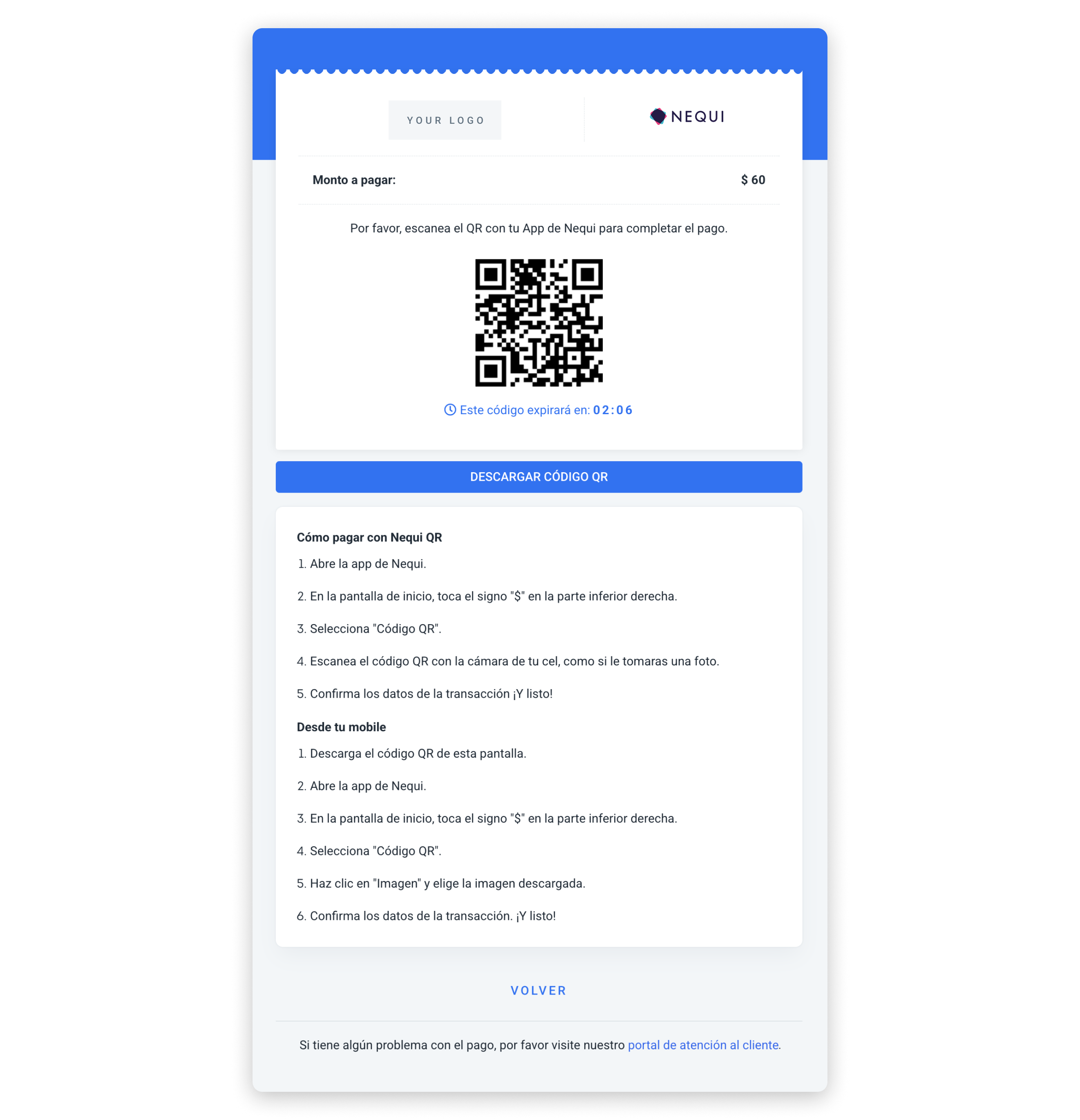
Nequi QR UI built with the information in the example above.
Mercado Pago
dLocal offers two Mercado Pago products in Co:
MY— Mercado Pago Checkout Pro: one-shot payments only. The user completes payment through a Mercado Pago-hosted redirect. No enrollment or tokenization.MP— Mercado Pago Wallet Connect: recurring and tokenized payments. The user authorizes the merchant once via a redirect enrollment, and all subsequent charges are made directly using the enrollment ID.
Wallet Connect activationMercado Pago Wallet Connect (
MP) requires activation per merchant per country. Contact your dLocal account team before integrating the recurring flow.
Mercado Pago Checkout Pro (MY)
MY)Mercado Pago Checkout Pro is a one-shot wallet payment. The user is redirected to Mercado Pago to complete the payment. No token or enrollment is created.
Capabilities
Mercado Pago Checkout Pro (MY) | |
|---|---|
| Min. amount | 100 COP |
| Max. expiration time supported | 5 minutes (authentication) |
| Notification delay | Immediate |
| Refunds | Yes |
| Flow | REDIRECT |
UX Flow
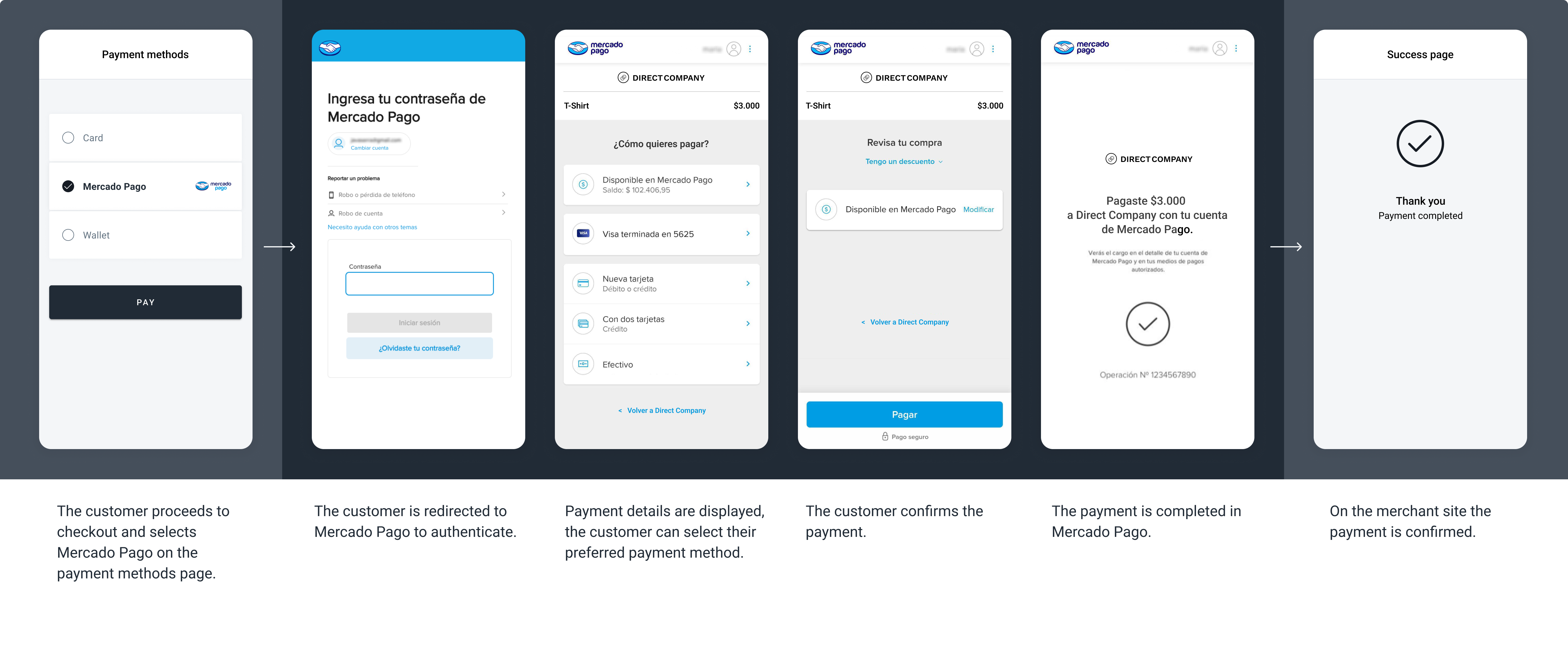
The screenshots illustrate a Mercado Pago one-shot payment redirect flow. The specifics of the flow may vary depending on the payment method selected to complete the payment.
How to process Mercado Pago Checkout Pro payments?
Learn how to process one-shot wallet payments with dLocal in our Wallet payments section.
Mercado Pago Wallet Connect (MP)
MP)Mercado Pago Wallet Connect is the recurring and tokenized wallet product. The user authorizes the merchant once through a redirect enrollment. All subsequent charges use the enrollment ID directly — no redirect or re-authentication required.
Capabilities
Mercado Pago Wallet Connect (MP) | |
|---|---|
| Min. amount | 100 COP |
| Max. expiration time supported | 5 minutes (authentication) |
| Notification delay | Immediate |
| Refunds | Yes |
| Enrollment flow | REDIRECT |
| Recurring charge flow | DIRECT — synchronous PAID |
UX Flow
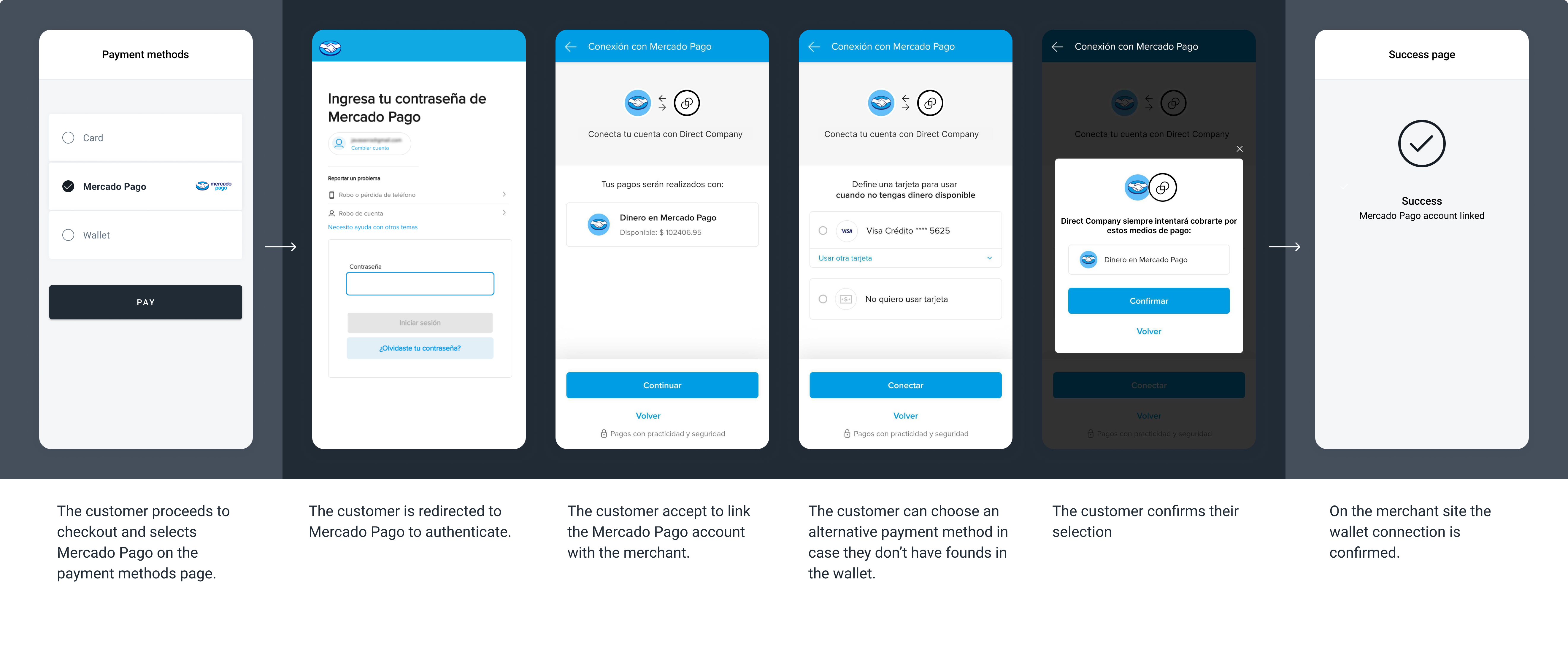
The screenshots illustrate a Mercado Pago tokenized wallet redirect flow.
How it works
The Enrollment API for MP supports two patterns:
| Pattern | When to use |
|---|---|
Enrollment only (POST /enrollments) | Establish the user's authorization without an initial charge. |
Payment + Enrollment in the same request (POST /payments with enrollment object) | Charge the user and establish the authorization simultaneously. |
Once the enrollment is ACTIVE, all subsequent charges are made via POST /payments using enrollment.id inside an enrollment object, with payment_method_flow: "DIRECT". Recurring DIRECT charges return a synchronous PAID response — no webhook is needed to confirm final status.
Enrollment type for Mercado PagoAlways send
"type": "ON_DEMAND"forMP. This is the only valid enrollment type for Mercado Pago Wallet Connect.
Pattern 1 — Enrollment only
Use POST /enrollments to establish the user's authorization without an initial charge.
{
  "external_id": "enroll-co-001",
  "type": "ON_DEMAND",
  "country": "CO",
  "currency": "COP",
  "payment_method_id": "MP",
  "payment_method_flow": "REDIRECT",
  "payer": {
    "name": "Jane Doe",
    "email": "[email protected]",
    "document": "12345678"
  },
  "notification_url": "https://merchantsite.com/enrollment_notifications",
  "callback_url": "https://merchantsite.com/enrollment_callback"
}
{
"id": "E-4-32e1218f-b6ec-3f21-13d5-50v12ere2ca4",
"external_id": "enroll-co-001",
"country": "CO",
"currency": "COP",
"type": "ON_DEMAND",
"payment_method_id": "MP",
"payment_method_flow": "REDIRECT",
"payment_method_type": "WALLET",
"created_date": "2025-06-01T10:00:00.000+0000",
"status": "PENDING",
"status_detail": "The enrollment is pending.",
"status_code": "100",
"redirect_url": "https://pay.dlocal.com/gmf-apm/payments-redirect/M-a1b2c3d4-e5f6-7890-abcd-ef1234567890",
"notification_url": "https://merchantsite.com/enrollment_notifications"
}{
"id": "E-4-32e1218f-b6ec-3f21-13d5-50v12ere2ca4",
"external_id": "enroll-co-001",
"country": "CO",
"currency": "COP",
"type": "ON_DEMAND",
"payment_method_id": "MP",
"payment_method_flow": "REDIRECT",
"payment_method_type": "WALLET",
"created_date": "2025-06-01T10:00:00.000+0000",
"status": "ACTIVE",
"status_detail": "The enrollment is active.",
"status_code": "200",
"notification_url": "https://merchantsite.com/enrollment_notifications"
}
Enrollment IDPersist the
idvalue (e.g.,E-4-32e1218f-...) when the webhook reachesACTIVEstatus. Pass it asenrollment.idinside anenrollmentobject on all future recurring charge requests.To check enrollment status at any time, use the Get enrollment endpoint.
To cancel an enrollment, use the Cancel an enrollment endpoint.
Enrollment status codes:
status | status_code | Description |
|---|---|---|
PENDING | 100 | Enrollment created. User must complete authorization via the redirect URL. |
ACTIVE | 200 | User approved. Enrollment ID is ready for recurring charges. |
CANCELLED | 400 | The enrollment was cancelled. |
REJECTED | 300 | The user did not complete or declined the authorization. |
Pattern 2 — Payment + Enrollment in the same request
Include an enrollment object in POST /payments to create the first charge and enrollment simultaneously.
{
  "amount": 15000,
  "currency": "COP",
  "country": "CO",
  "payment_method_id": "MP",
  "payment_method_flow": "REDIRECT",
  "payer": {
    "name": "Jane Doe",
    "email": "[email protected]",
    "document": "12345678"
  },
  "enrollment": {
    "external_id": "enroll-co-001",
    "type": "ON_DEMAND",
    "notification_url": "https://merchantsite.com/enrollment_notifications",
    "callback_url": "https://merchantsite.com/enrollment_callback"
  },
  "order_id": "ord-co-001",
  "notification_url": "https://merchantsite.com/payments",
  "callback_url": "https://merchantsite.com/payment_callback"
}
{
"id": "F-4-9a8b7c6d-5e4f-3a2b-1c0d-ef1234567890",
"amount": 15000,
"currency": "COP",
"payment_method_id": "MP",
"payment_method_type": "WALLET",
"payment_method_flow": "REDIRECT",
"country": "CO",
"created_date": "2025-06-01T10:00:00.000+0000",
"status": "PENDING",
"status_detail": "The payment is pending.",
"status_code": "100",
"order_id": "ord-co-001",
"notification_url": "https://merchantsite.com/payments",
"redirect_url": "https://pay.dlocal.com/gmf-apm/payments-redirect/M-b2c3d4e5-...",
"enrollment": {
"id": "E-4-32e1218f-b6ec-3f21-13d5-50v12ere2ca4",
"external_id": "enroll-co-001",
"created_date": "2025-06-01T10:00:00.000+0000",
"status": "PENDING",
"status_detail": "The enrollment is pending.",
"status_code": "100"
}
}{
"id": "E-4-32e1218f-b6ec-3f21-13d5-50v12ere2ca4",
"external_id": "enroll-co-001",
"country": "CO",
"currency": "COP",
"type": "ON_DEMAND",
"payment_method_id": "MP",
"payment_method_flow": "REDIRECT",
"payment_method_type": "WALLET",
"created_date": "2025-06-01T10:00:00.000+0000",
"status": "ACTIVE",
"status_detail": "The enrollment is active.",
"status_code": "200",
"notification_url": "https://merchantsite.com/enrollment_notifications"
}{
"id": "F-4-9a8b7c6d-5e4f-3a2b-1c0d-ef1234567890",
"amount": 15000,
"status": "PAID",
"status_detail": "The payment was paid.",
"status_code": "200",
"currency": "COP",
"country": "CO",
"payment_method_id": "MP",
"payment_method_type": "WALLET",
"payment_method_flow": "REDIRECT",
"payer": {
"name": "Jane Doe",
"email": "[email protected]",
"document": "12345678"
},
"enrollment": {
"id": "E-4-32e1218f-b6ec-3f21-13d5-50v12ere2ca4",
"external_id": "enroll-co-001"
},
"order_id": "ord-co-001",
"notification_url": "https://merchantsite.com/payments",
"created_date": "2025-06-01T10:00:00.000+0000"
}
Single request, dual outcomeThis request produces two independent asynchronous notifications — one for the enrollment (sent to
enrollment.notification_url) and one for the payment (sent tonotification_url). They may arrive in any order. Persistenrollment.idonly after the enrollment notification reachesACTIVE. Grant entitlement only after the payment notification reachesPAID.
Recurring charges
Once the enrollment is ACTIVE, charge the user by passing enrollment.id inside an enrollment object. The synchronous response is the final status — no webhook is needed.
{
  "amount": 15000,
  "currency": "COP",
  "country": "CO",
  "payment_method_id": "MP",
  "payment_method_flow": "DIRECT",
  "payer": {
    "name": "Jane Doe",
    "email": "[email protected]",
    "document": "12345678"
  },
  "enrollment": {
    "id": "E-4-32e1218f-b6ec-3f21-13d5-50v12ere2ca4"
  },
  "order_id": "ord-co-recurring-001",
  "notification_url": "https://merchantsite.com/payments"
}
{
"id": "F-4-b2c8d5e1-3f7a-4c9b-a123-7d8e9f0a1b2c",
"amount": 15000,
"currency": "COP",
"country": "CO",
"payment_method_id": "MP",
"payment_method_type": "WALLET",
"payment_method_flow": "DIRECT",
"created_date": "2025-07-01T10:00:00.000+0000",
"status": "PAID",
"status_detail": "The payment was paid.",
"status_code": "200",
"order_id": "ord-co-recurring-001",
"notification_url": "https://merchantsite.com/payments"
}
Synchronous PAID for recurring charges
MPrecurringDIRECTcharges return the finalPAIDorREJECTEDstatus synchronously. You do not need to wait for a webhook before granting entitlement.
result_infoThe recurring charge response may include a
result_infoobject withuser_idandsub_payment_methodfields for reconciliation purposes. This field requires enablement — contact your dLocal account team to activate it.
Request parameters
| Property | Type | Description | Mandatory? |
|---|---|---|---|
amount | Number | Amount to be charged. | Yes |
currency | String | COP. Transaction currency. | Yes |
country | String | CO. Transaction country. | Yes |
payment_method_id | String | MP. ID of the selected payment method. | Yes |
payment_method_flow | String | REDIRECT (enrollment) or DIRECT (recurring charge). | Yes |
payer.name | String | Name of the payer. | Yes |
payer.email | String | Email of the payer. | Yes |
payer.document | String | Document of the payer. | Yes |
enrollment.id | String | Enrollment ID from a previous active enrollment, passed as enrollment.id inside an enrollment object. | Yes, for recurring charges |
enrollment | Object | Include in POST /payments for Pattern 2 (payment + enrollment simultaneously). | Yes, for Pattern 2 |
enrollment.external_id | String | Your internal identifier for the enrollment. | Yes |
enrollment.type | String | Must be ON_DEMAND for MP. | Yes |
enrollment.notification_url | String | URL where dLocal sends enrollment status notifications. | Yes |
enrollment.callback_url | String | URL where the user lands after completing the enrollment redirect. | No |
wallet.deviceId | String | Device fingerprint for anti-fraud. Recommended for all MP integrations. See Device ID for the web script and mobile SDK fingerprint structure. | Recommended |
order_id | String | ID given by the merchant in their system. | No |
notification_url | String | dLocal sends notifications for every status change to this URL. | Yes |
callback_url | String | URL where the user lands after completing the enrollment redirect. | No |
Cancellation and invalid enrollment
Mercado Pago Wallet Connect supports cancellation from both sides:
User-initiated cancellation: The user can cancel their authorization directly from the Mercado Pago app. When this happens, Mercado Pago sends a cancellation notification to dLocal, which expires the saved authorization internally and sends a cancel-wallet IPN to the merchant with status: "CANCELLED". Treat this webhook as the signal to stop any scheduled charges against that enrollment.
Merchant-initiated cancellation: The merchant can cancel an active enrollment at any time using the Cancel an enrollment endpoint.
In both cases, treat a cancelled enrollment as a terminal state. The user must complete a new enrollment flow before any future recurring charges can be processed.
Bre-B Biometrics
Offer bank transfers built for repeat business in Colombia. Bre-B Biometrics lets customers authorize payments through a chosen Bre-B key using a face, fingerprint, or passkey. Once customers enroll with your business, you can initiate future recurring charges server-to-server through dLocal—without requiring another bank redirect or customer action each billing cycle. It’s designed for subscriptions, recurring bills, and repeat purchases, and also supports biometric one-time payments. Learn more in the Bre-B Biometric section.
Bre-B
Bre-B is a payment method in Colombia that enables transactions by scanning a QR code or copying paste a Key (account alias) using any bank's mobile app or digital wallet. The keys are dynamic per transaction and the payment gets refunded to the payer if the amount does not match the original transaction.
It is a secure, real-time payment system developed by Colombia's central bank.
Capabilities
| Bre-B QR/Key | |
|---|---|
| Min. amount | 1 COP |
| Notification delay | Immediate |
| Refunds | Yes, by payment links. |
| Flow | DIRECT REDIRECT |
| Expiration time | 10 minutes |
Overall flow
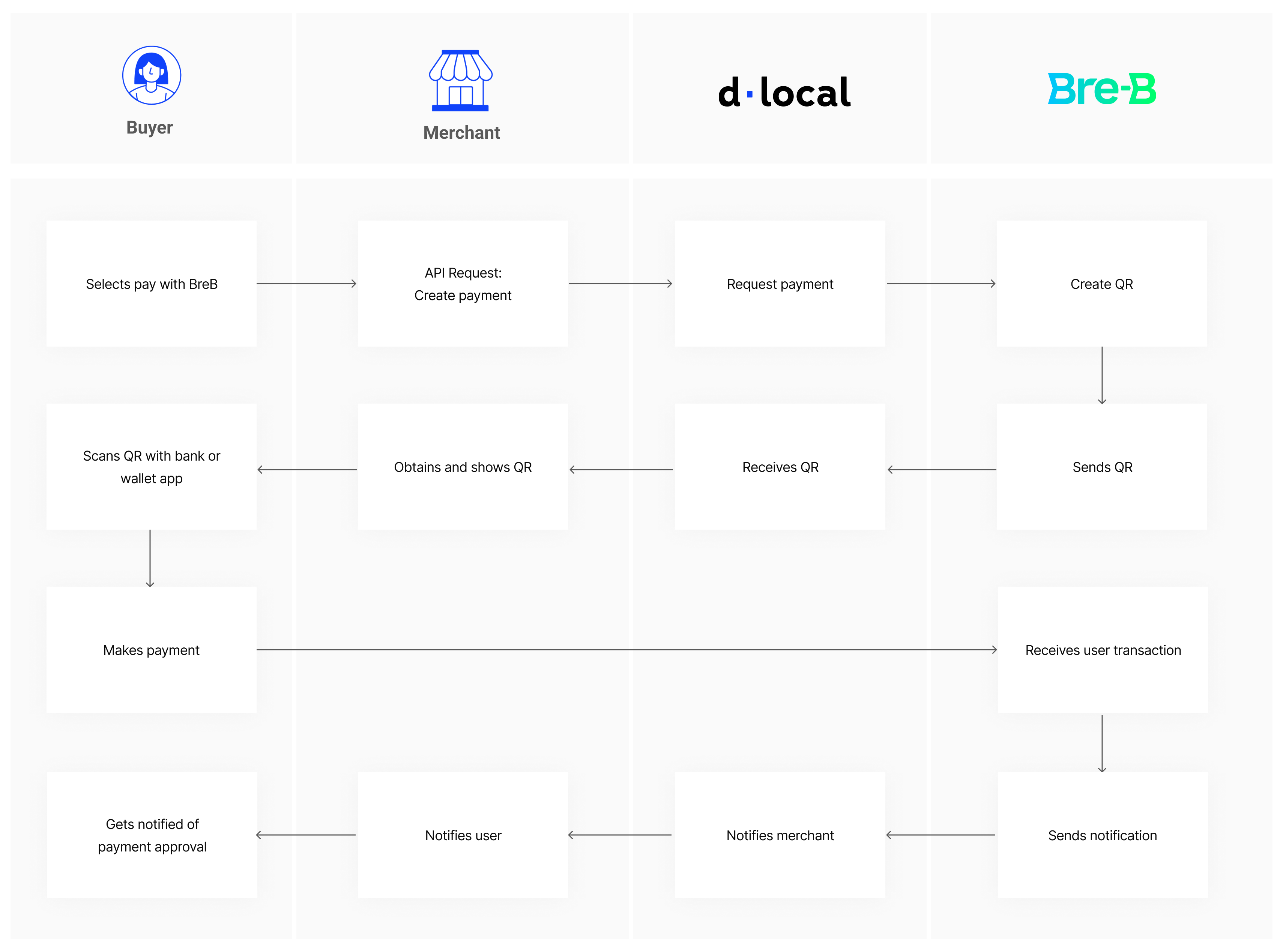
UX Flow
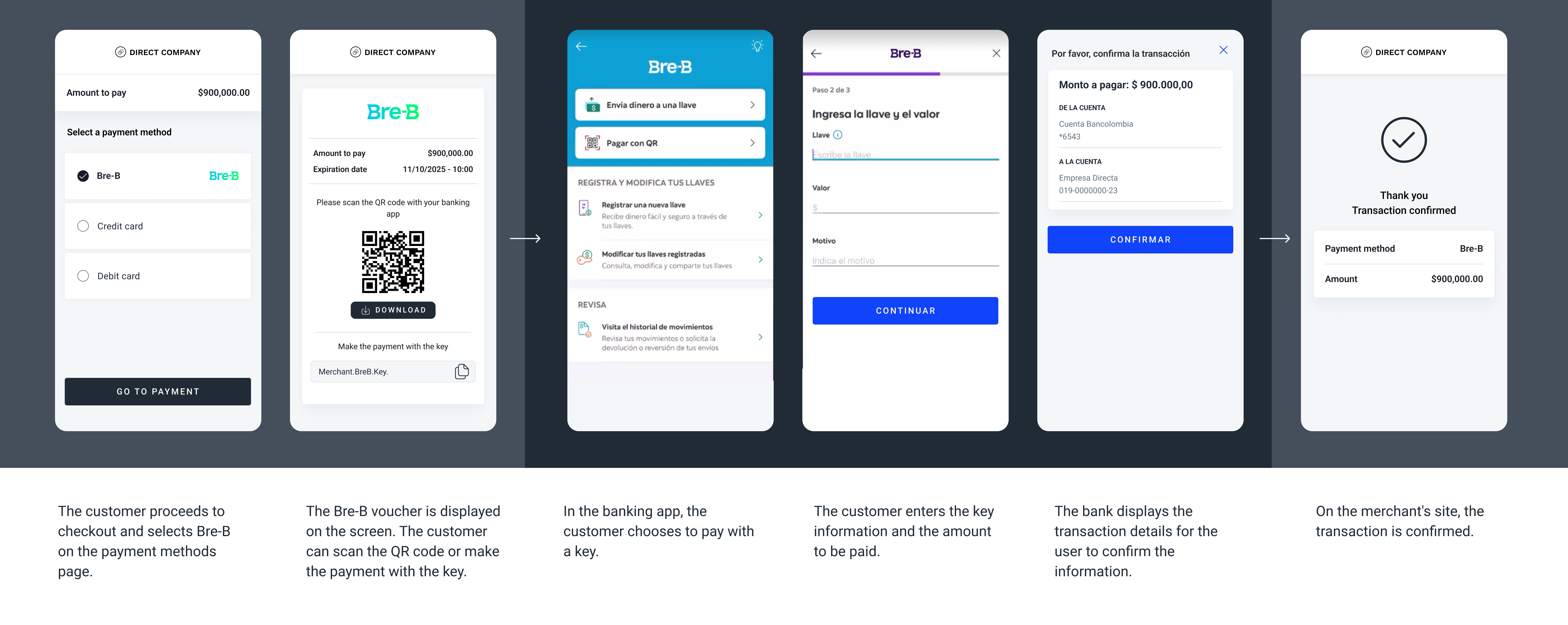
The screenshots illustrate a generic Bre-B flow.
Request parameters
| Property | Type | Description | Mandatory? |
|---|---|---|---|
amount | Number | Amount to be charged. | Yes |
currency | String | COP Transaction currency. | Yes |
country | String | CO Transaction country in ISO 3166. | Yes |
payment_method_id | String | EV ID of the selected payment method. | Yes |
payment_method_flow | String | DIRECT or REDIRECT | Yes |
payer.name | String | Name of the payer. | No |
payer.email | String | Email of the payer. | No |
payer.phone | String | Phone of the payer. | No |
payer.document | Number | Document of the payer. | Yes |
order_id | Number | ID of the capture given by the merchant in their system. | No |
notification_url | String | Notifications will be sent in every change of status of a payment to the notification_url specified by the merchant. | Yes |
Examples
Request example
Response example
Example asynchronous webhook
{
  "amount": 1000,
  "currency": "COP",
  "country": "CO",
  "payment_method_id": "EV",
  "payment_method_flow": "DIRECT",
  "payer": {
    "name": "Jane Doe",
    "email": "[email protected]",
    "phone": "3832696773",
    "document": "1234567"
  },
  "order_id": "5346523564",
  "notification_url": "http://merchantsite.com/notifications",
  "callback_url": "http://merchantsite.com/callback"
}
{
"id": "D-4-c15a67cb-9eec-4ded-9ce1-559ec5f09816",
"amount": 1000,
"currency": "COP",
"payment_method_id": "EV",
"payment_method_type": "TICKET",
"payment_method_flow": "DIRECT",
"country": "CO",
"ticket": {
"type": "CUSTOM",
"id": "c15a67cb-9eec-4ded-9ce1-559ec5f09816",
"number": "@TESTKEY01",
"expiration_date": "2026-12-10T14:29:49.000+0000",
"provider_logo": "https://static.dlocal.com/images/providers/breb.png",
"image_url": "https://pay.dlocal.com/gmf-apm/payments/example",
"amount": 1000,
"currency": "COP",
"qr_code": "iVBORw0KGgoAAAANSUhEUgAAAAEAAAAB"
},
"created_date": "2026-12-10T14:19:40.000+0000",
"status": "PENDING",
"status_detail": "The payment is pending.",
"status_code": "100",
"order_id": "5346523564",
"notification_url": "http://merchantsite.com/notification/new"
}{
"id": "D-4-c15a67cb-9eec-4ded-9ce1-559ec5f09816",
"amount": 1000,
"status": "PAID",
"status_detail": "The payment was paid",
"status_code": "200",
"currency": "COP",
"country": "CO",
"payment_method_id": "EV",
"payment_method_type": "TICKET",
"payment_method_flow": "DIRECT",
"payer": {
"name": "Jane Doe",
"email": "[email protected]",
"phone": "3832696773",
"document": "1234567"
},
"order_id": "5346523564",
"notification_url": "http://merchantsite.com/notification/new",
"callback_url": "http://merchantsite.com/callback",
"created_date": "2026-12-10T14:19:40.000+0000"
}For Bre-B,
ticket.numberis the copy/paste account alias (Key) — it is not the QR image.ticket.qr_codeis a Base64-encoded QR image — it is not an EMV text payload in this response family.
Addi
Addi is Colombia's leading Buy Now Pay Later (BNPL) method. Customers pay in installments (2 to 6 months) without a credit card. Addi evaluates credit in real time during checkout. The merchant receives funds upfront — Addi assumes the credit risk. No card chargebacks; refunds via standard dLocal Refunds API.
Capabilities
| Addi | |
|---|---|
| Min. amount | 50,000 COP |
| Max. amount | 5,000,000 COP (configurable) |
| Notification delay | Immediate (24h callback retry) |
| Refunds | Yes, Partial and Multiple Partial. |
| Flow | REDIRECT |
| Expiration time | 30 minutes |
UX Flow
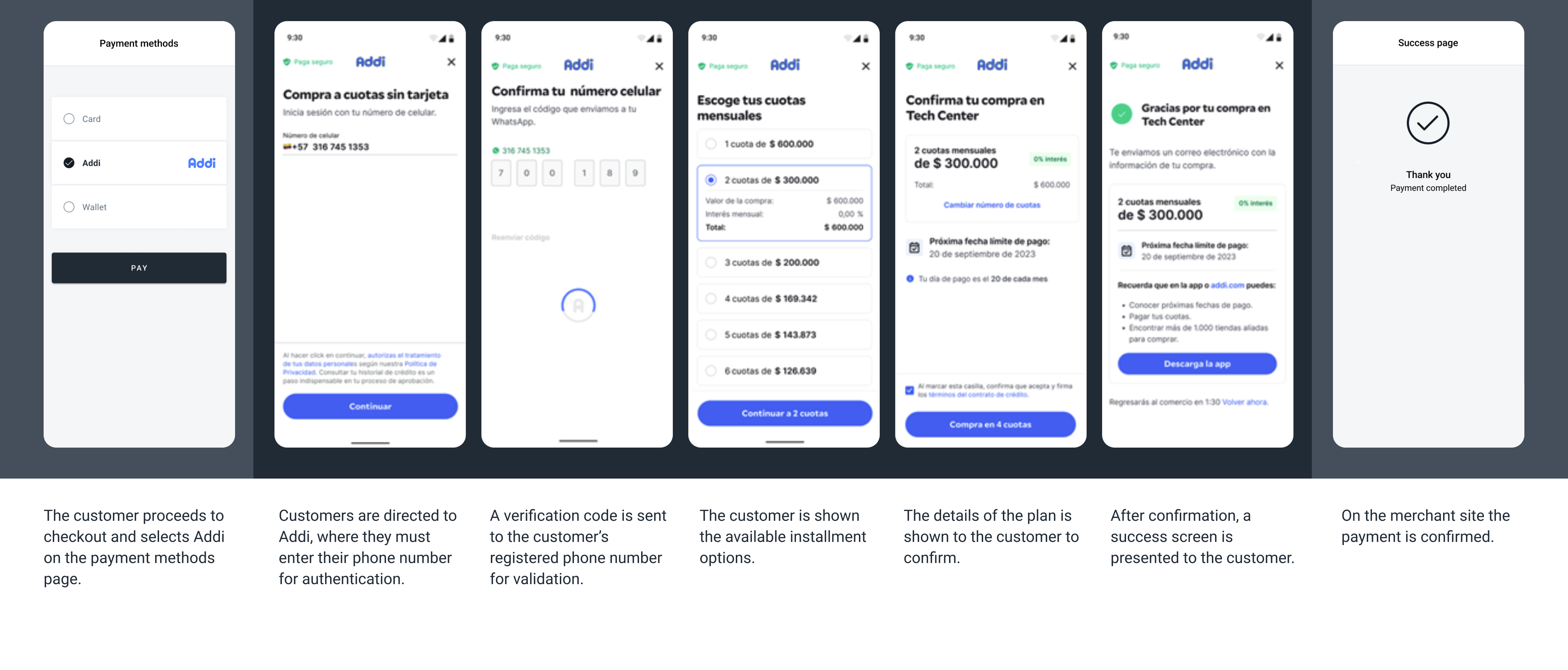
This screenshot illustrate a generic flow from an existing user
Installment plans
Addi offers flexible installment options that the customer selects during checkout. The available plans depend on the customer's credit profile as evaluated by Addi in real time.
| Plan | Plan Monthly Payment |
|---|---|
| 1-3 months | 0% (some shoppers might bear interests) |
| 3 to 24 months | Interest-bearing |
Request parameters
| Property | Type | Description | Mandatory? |
|---|---|---|---|
amount | Number | Amount to be charged. | Yes |
currency | String | COP Transaction currency. | Yes |
country | String | CO Transaction country in ISO 3166. | Yes |
payment_method_id | String | AH ID of the selected payment method. | Yes |
payment_method_flow | String | REDIRECT | Yes |
payer.name | String | Name of the payer. | Yes |
payer.last_name | String | Surname of the payer. | Yes |
payer.email | String | Email of the payer. | Yes |
payer.phone | String | Phone of the payer. including country code +57 | Yes |
payer.document | String | Payer's Cédula de Ciudadanía (CC) number. | Yes |
payer.address.country | String | CO Country of the payer. | No |
payer.address.city | String | City of the payer. | No |
payer.address.street | String | Street of the payer. | No |
order_id | Number | ID of the capture given by the merchant in their system. | Yes |
notification_url | String | Notifications will be sent in every change of status of a payment to the notification_url specified by the merchant. | Yes |
callback_url | String | URL to redirect the customer after completing or canceling the payment. | Yes |
description | String | Description of the items purchased. | No |
payer.user_reference | String | Merchant's unique identifier for the user. | No |
payer.device_id | String | User's unique device identifier. | No |
Examples
Request Example
Synchronous response
Asynchronous response
{
    "amount": 255000,
    "currency": "COP",
    "country": "CO",
    "payment_method_id": "AH",
    "payment_method_flow": "REDIRECT",
    "payer": {
        "name": "Marcela Griselda",
        "last_name": "Lopez Lopez",
        "email": "[email protected]",
        "phone": "+573211236584",
        "document": "555061079",
        "address": {
            "country": "CO",
            "city": "Bogotá D.C",
            "street": "cr 48 156 25 25"
        }
    },
    "order_id": "<merchant_order_uid>",
    "notification_url": "http://merchantsite.com/notification/new",
    "callback_url": "https://merchantsite.com/callback"
}
{
"id": "R-4-70b68e57-ab12-42e7-af95-e0833358d62f",
"amount": 255000,
"currency": "COP",
"payment_method_id": "AH",
"payment_method_type": "TICKET",
"payment_method_flow": "REDIRECT",
"country": "CO",
"created_date": "2026-03-04T14:09:53.000+0000",
"status": "PENDING",
"status_detail": "The payment is pending.",
"status_code": "100",
"order_id": "<merchant_order_uid>",
"redirect_url": "https://pay.dlocal.com/gmf-apm/payments-redirect/M-f7c634d9-3d05-4658-abee-4d29305e4d85"
}{
"id": "R-4-70b68e57-ab12-42e7-af95-e0833358d62f",
"amount": 255000,
"currency": "COP",
"payment_method_id": "AH",
"payment_method_type": "TICKET",
"payment_method_flow": "REDIRECT",
"country": "CO",
"created_date": "2026-03-04T14:09:53.000+0000",
"status": "PAID",
"status_detail": "The payment was paid.",
"status_code": "200",
"order_id": "<merchant_order_uid>"
}Updated 27 days ago