
Checkout redirect
Easily activate payments with dLocal’s Checkout solution.
Save time by integrating dLocal's Checkout, a pre-built workflow with all payment methods.
In this type of integration, the customer is redirected to a secure dLocal page, where the payment is completed. It doesn’t require PCI certification.
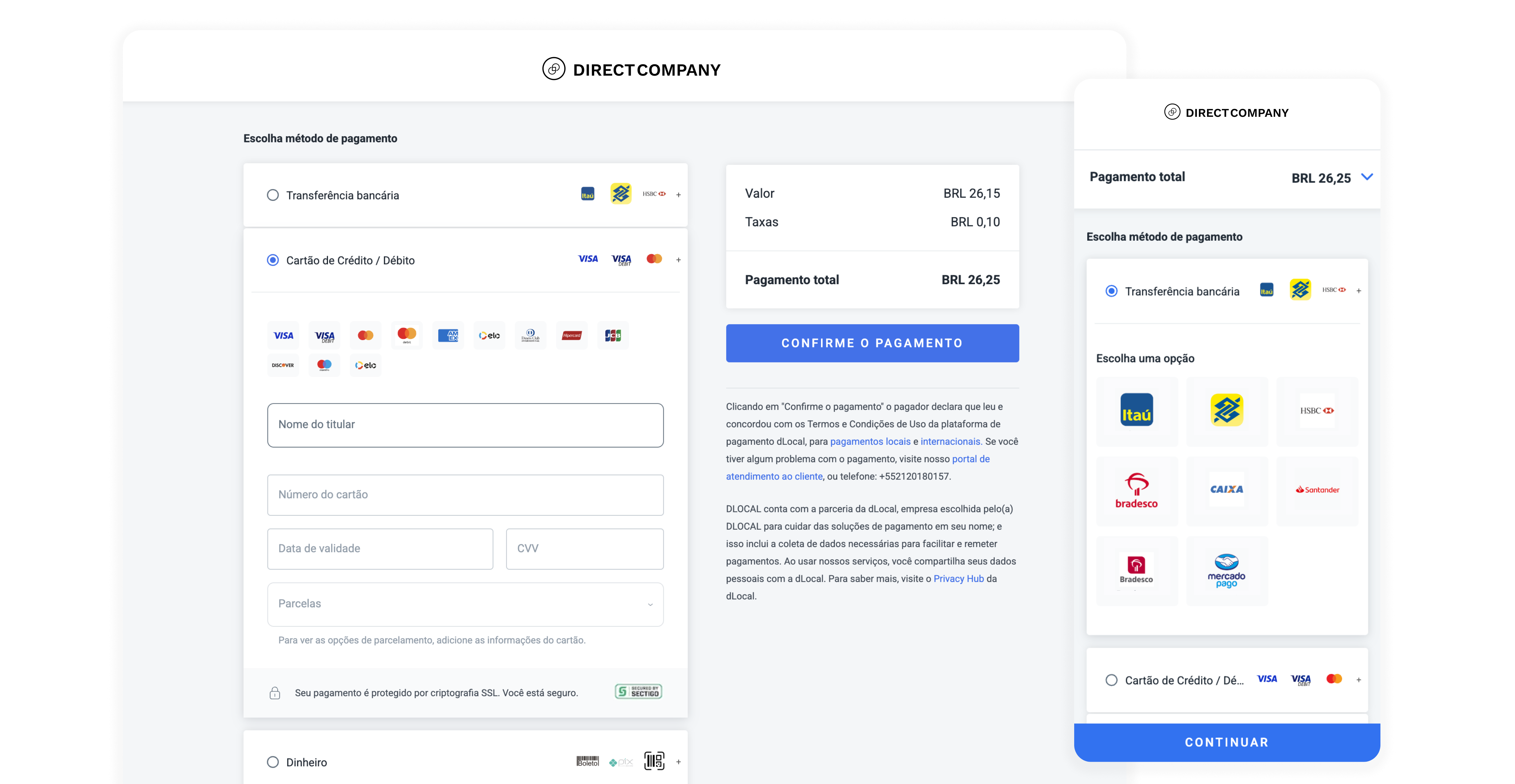
How does it work
1. Create a payment request
Make a POST request to the payments endpoint with the JSON body. Include all necessary information: amount, currency, payer details, etc.
2. Redirect the customer
Upon successful request, you will receive a response that contains a unique link (redirect_url). Redirect your customers to that link so they can enter payment details.
By default, the Redirect URL can only be used one time.
3. Customer completes payment
The customer fills in their details (for the method you specified or any method, depending on your configuration), and our system processes the payment.
4. Get payment notification
Your notification_url receives asynchronous updates about the transaction status. Upon completion, you can confirm the status (e.g., approved, declined) in your system.
When the payment status changes, an IPN is triggered, notifying the new status. The endpoint listening to this status can either be specified dynamically on a transaction level or statically at dLocal’s dashboard.
Checkout available configurations
Choose the best checkout experience for your customer based on their preferred payment flow.
- 1-Step Checkout. Redirects the customer directly to the payment flow for a specific payment method (e.g., Cards).
- 2-Step Checkout. Redirects the customer to a page where they can select from any available payment method (e.g., Cards, Banks, Wallets, etc.).
1-Step Checkout: Default payment method
Redirect the customer directly to the payment flow for a specific payment method (e.g. Cards).
Integration steps
- Set
payment_method_flowtoREDIRECT.
This indicates that the customer should be redirected to the dLocal-hosted payment page. - Include a
payment_method_id, such asCARD.
This tells the API that the payment page should preselect and process the transaction using the specified payment method. - Send the JSON request to the payment API endpoint and retrieve the redirect URL.
Example request
All payment requests should be made to the /payments endpoint.
You can find more information about this request on the Create payment page.
curl -X POST \
    -H 'X-Date: {x-date}' \
    -H 'X-Login: {x-login}' \
    -H 'X-Trans-Key: {x-trans-key}' \
    -H 'Content-Type: application/json' \
    -H 'X-Version: 2.1' \
    -H 'User-Agent: MerchantTest / 1.0 ' \
    -H 'Authorization: V2-HMAC-SHA256, Signature: {Signature}' \
    -d '{body}'
   https://api.dlocal.com/payments

{
    "amount": 120.00,
    "currency" : "BRL",
    "country": "BR",
    "payment_method_id" : "CARD",
    "payment_method_flow" : "REDIRECT",
    "payer":{
        "name" : "Thiago Gabriel",
        "email" : "[email protected]",
        "document" : "53033315550",
        "address": {
            "state"  : "Rio de Janeiro",
            "city" : "Volta Redonda",
            "zip_code" : "27275-595",
            "street" : "Servidao B-1",
            "number" : "1106"
        }
    },
    "order_id": "657434343",
    "notification_url": "http://merchantsite.com/notifications"
}
{
    "id": "D-4-086e1efe-c391-4226-992f-5e1d8664a297",
    "amount": 120.00,
    "currency": "BRL",
    "payment_method_type": "CARD",
    "payment_method_flow": "REDIRECT",
    "country": "BR",
    "created_date": "2019-01-09T20:08:49.000+0000",
    "status": "PENDING",
    "status_detail": "The payment is pending",
    "status_code": "100",
    "order_id": "Zh3gb4jhbg34Vj",
    "notification_url": "http://merchantsite.com/notifications",
    "redirect_url": "https://pay.dlocal.com/checkout/R-4-8b4f332f-b2fe-4f35-9cc1-632533d8..."
}
2-Step Checkout: Display payment methods
Redirect the customer to a page where they can pick any available payment method (e.g., Cards, Banks, Wallets, etc.).
Integration steps
- Set
payment_method_flowtoREDIRECT.
This indicates that the customer should be redirected to the dLocal-hosted payment page. The checkout page will list all available payment methods. - Send the JSON request to the payment API endpoint and retrieve the redirect URL.
Example request
All payment requests should be made to the /payments endpoint.
You can find more information about this request on the Create payment page.
curl -X POST \
    -H 'X-Date: {x-date}' \
    -H 'X-Login: {x-login}' \
    -H 'X-Trans-Key: {x-trans-key}' \
    -H 'Content-Type: application/json' \
    -H 'X-Version: 2.1' \
    -H 'User-Agent: MerchantTest / 1.0 ' \
    -H 'Authorization: V2-HMAC-SHA256, Signature: {Signature}' \
    -d '{body}'
   https://api.dlocal.com/payments

{
    "amount": 120.00,
    "currency" : "BRL",
    "country": "BR",
    "payment_method_flow" : "REDIRECT",
    "payer":{
        "name" : "Thiago Gabriel",
        "email" : "[email protected]",
        "document" : "53033315550",
        "address": {
            "state"  : "Rio de Janeiro",
            "city" : "Volta Redonda",
            "zip_code" : "27275-595",
            "street" : "Servidao B-1",
            "number" : "1106"
        }
    },
    "order_id": "657434343",
    "notification_url": "http://merchantsite.com/notifications"
}
{
"id": "D-4-086e1efe-c391-4226-992f-5e1d8664a297",
"amount": 120.00,
"currency": "BRL",
"payment_method_flow": "REDIRECT",
"country": "BR",
"created_date": "2019-01-09T20:08:49.000+0000",
"status": "PENDING",
"status_detail": "The payment is pending",
"status_code": "100",
"order_id": "Zh3gb4jhbg34Vj",
"notification_url": "http://merchantsite.com/notifications",
"redirect_url": "https://pay.dlocal.com/checkout/R-4-8b4f332f-b2fe-4f35-9cc1-632533d8..."
}Save a card or set up recurring payments
When the customer pays with a card through Checkout Redirect (no payment_method_id in the request), you can also save the card for future use. Include one of these two objects on the same /payments request. They are mutually exclusive.
save_payment_method: saves the card so you can charge it again later, either by the customer (on_file) or by you (unscheduled).subscription: saves the card and sets up a fixed, recurring charge on it.
On_file: save the card for future payments
Use this when the customer will come back to pay again themselves, so they can reuse the card in one click instead of entering it again.
Example request
All payment requests should be made to the /payments endpoint.
You can find more information about this request on the Create payment page.
curl -X POST \
    -H 'X-Date: {x-date}' \
    -H 'X-Login: {x-login}' \
    -H 'X-Trans-Key: {x-trans-key}' \
    -H 'Content-Type: application/json' \
    -H 'X-Version: 2.1' \
    -H 'User-Agent: MerchantTest / 1.0 ' \
    -H 'Authorization: V2-HMAC-SHA256, Signature: {Signature}' \
    -d '{body}'
   https://api.dlocal.com/payments
{
    "amount": 45.00,
    "currency": "BRL",
    "country": "BR",
    "payment_method_flow": "REDIRECT",
    "payer": {
        "name": "Thiago Gabriel",
        "email": "[email protected]",
        "document": "53033315550"
    },
    "order_id": "657434344",
    "notification_url": "http://merchantsite.com/notifications",
    "save_payment_method": {
        "mode": "on_file",
        "ask_consent": true
    }
}
{
"id": "D-4-086e1efe-c391-4226-992f-5e1d8664a298",
"amount": 45.00,
"currency": "BRL",
"payment_method_flow": "REDIRECT",
"country": "BR",
"created_date": "2026-09-25T10:15:00.000+0000",
"status": "PENDING",
"status_detail": "The payment is pending",
"status_code": "100",
"order_id": "657434344",
"notification_url": "http://merchantsite.com/notifications",
"redirect_url": "https://pay.dlocal.com/checkout/R-4-8b4f332f-b2fe-4f35-9cc1-632533d8..."
}ask_consent: true shows a consent checkbox to the customer on the checkout page. Use false only if you already collected consent yourself. The customer will still see the terms disclaimer, without a checkbox.
Subscription: fixed amount and schedule
Use this when the charge amount and frequency are known upfront, for example a monthly plan.
Example request
All payment requests should be made to the /payments endpoint.
You can find more information about this request on the Create payment page.
curl -X POST \
    -H 'X-Date: {x-date}' \
    -H 'X-Login: {x-login}' \
    -H 'X-Trans-Key: {x-trans-key}' \
    -H 'Content-Type: application/json' \
    -H 'X-Version: 2.1' \
    -H 'User-Agent: MerchantTest / 1.0 ' \
    -H 'Authorization: V2-HMAC-SHA256, Signature: {Signature}' \
    -d '{body}'
   https://api.dlocal.com/payments
{
    "amount": 29.90,
    "currency": "BRL",
    "country": "BR",
    "payment_method_flow": "REDIRECT",
    "payer": {
        "name": "Thiago Gabriel",
        "email": "[email protected]",
        "document": "53033315550"
    },
    "order_id": "657434345",
    "notification_url": "http://merchantsite.com/notifications",
    "subscription": {
        "frequency": "MONTHLY",
        "start_date": "2026-11-01",
        "amount": 29.90,
        "end_date": "2027-11-01"
    }
}
{
"id": "D-4-086e1efe-c391-4226-992f-5e1d8664a299",
"amount": 29.90,
"currency": "BRL",
"payment_method_flow": "REDIRECT",
"country": "BR",
"created_date": "2026-09-25T10:15:00.000+0000",
"status": "PENDING",
"status_detail": "The payment is pending",
"status_code": "100",
"order_id": "657434345",
"notification_url": "http://merchantsite.com/notifications",
"redirect_url": "https://pay.dlocal.com/checkout/R-4-8b4f332f-b2fe-4f35-9cc1-632533d8..."
}frequency accepts WEEKLY, MONTHLY, QUARTERLY, SEMI_ANNUAL, or ANNUAL. end_date is optional.
Unscheduled: variable amount or timing
Use this when you are the one who triggers future charges, and the amount or timing can vary, for example usage based billing.
Example request
All payment requests should be made to the /payments endpoint.
You can find more information about this request on the Create payment page.
curl -X POST \
    -H 'X-Date: {x-date}' \
    -H 'X-Login: {x-login}' \
    -H 'X-Trans-Key: {x-trans-key}' \
    -H 'Content-Type: application/json' \
    -H 'X-Version: 2.1' \
    -H 'User-Agent: MerchantTest / 1.0 ' \
    -H 'Authorization: V2-HMAC-SHA256, Signature: {Signature}' \
    -d '{body}'
   https://api.dlocal.com/payments
{
    "amount": 15.00,
    "currency": "BRL",
    "country": "BR",
    "payment_method_flow": "REDIRECT",
    "payer": {
        "name": "Thiago Gabriel",
        "email": "[email protected]",
        "document": "53033315550"
    },
    "order_id": "657434346",
    "notification_url": "http://merchantsite.com/notifications",
    "save_payment_method": {
        "mode": "unscheduled",
        "ask_consent": true
    }
}
{
"id": "D-4-086e1efe-c391-4226-992f-5e1d8664a300",
"amount": 15.00,
"currency": "BRL",
"payment_method_flow": "REDIRECT",
"country": "BR",
"created_date": "2026-09-25T10:15:00.000+0000",
"status": "PENDING",
"status_detail": "The payment is pending",
"status_code": "100",
"order_id": "657434346",
"notification_url": "http://merchantsite.com/notifications",
"redirect_url": "https://pay.dlocal.com/checkout/R-4-8b4f332f-b2fe-4f35-9cc1-632533d8..."
}After the payment
Once the customer finishes on the checkout page and the payment reaches PAID, the card ID is included as card.card_id in the IPN sent to your notification_url, same as any other saved card. For the Subscription case, call Retrieve a payment to read back the subscription details you set. save_payment_method is write only, it is not echoed back by any endpoint.
Use the returned card.card_id to charge the card again later with a direct payment (payment_method_flow: DIRECT, card.card_id instead of raw card data).
See Create payment and Retrieve a payment for the full field reference.
Considerations
- After making the request, you can get the result
REJECTEDorPENDING. If the response isPENDING, you will get the URL to redirect the customer. - Once the customer completes the payment (or the payment expires), you will receive a notification with the final status of the payment. You can get the result
REJECTEDorPAID. - By default, redirect payments expire after up to 7 days.
- If the customer selects any card payment method (Visa, Mastercard, or any other card), all card payments will be processed with the security code of the card (CVV).
- The Checkout page must be opened in a top-level browser context. Embedding it inside an iframe, WebView, or other container is not an officially supported integration and is not covered by support commitments. See Embedding dLocal payment pages.
Updated 29 days ago