
One-Shot Payments
Learn how to make one-time payments with BreB Biometrics. With this payment method, users can pay by selecting one BreB key and using their device biometrics to complete a payment.
UX Flow
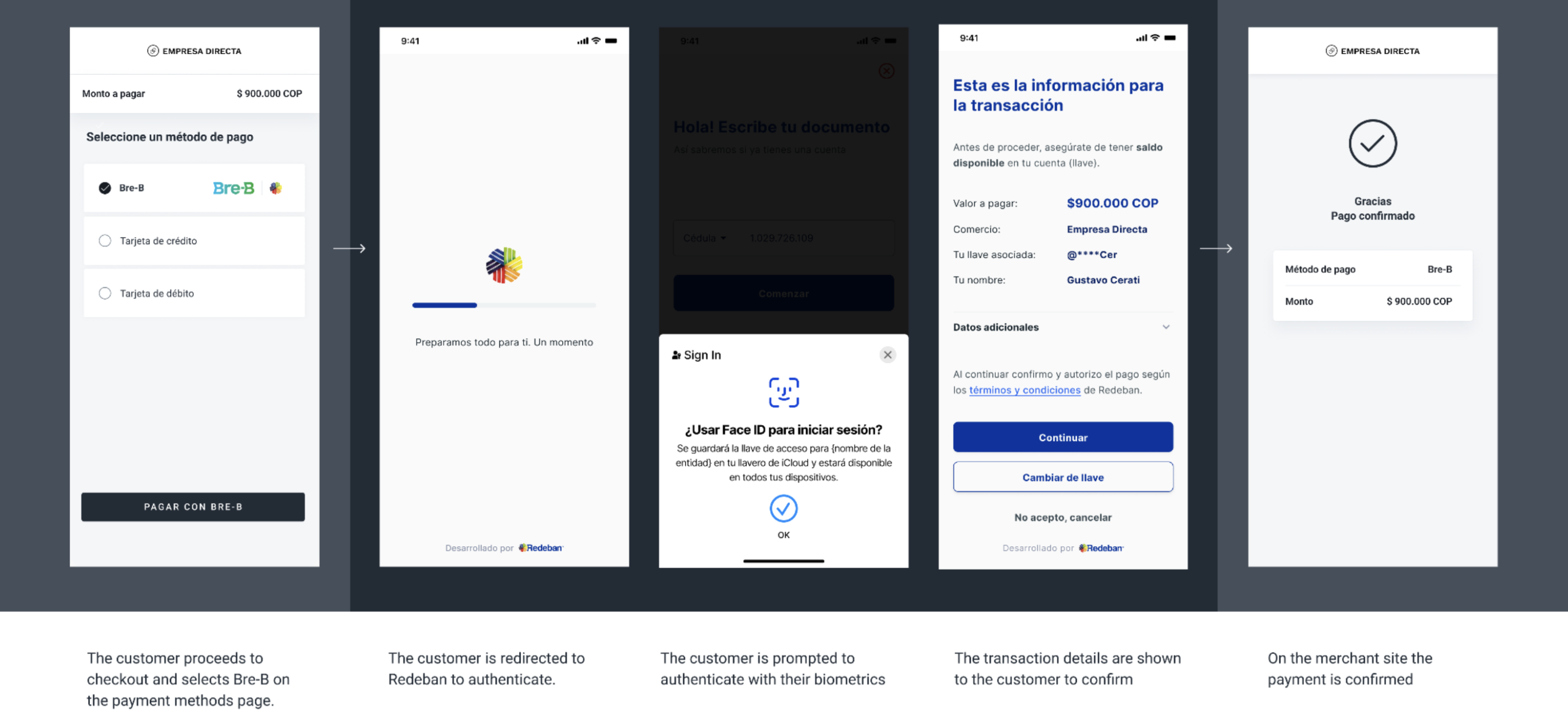
Request parameters
| Field | Type | Description | Required |
|---|---|---|---|
amount | Number | Amount to be charged. | Yes |
currency | String | COP Transaction currency in ISO 4217. | Yes |
country | String | COTransaction country in ISO 3166. | Yes |
payment_method_id | String | QFID of the selected payment method. | Yes |
payment_method_flow | String | REDIRECT | Yes |
| Payer Object | |||
payer.name | String | Name of the payer. | No |
payer.email | String | Email of the payer. | No |
payer.phone | String | Phone of the payer. | Yes |
payer.document_type | String | CC: Cédula de ciudadanía → Citizenship ID card / National ID cardCE: Cédula de Extranjería → Foreigner ID cardNUIP: Número único de identificación → Unique identification numberPPT: Permiso de Protección Temporal → Temporary Protection PermitNIT: Número de Identificación Tributaria, sin dígito de verificación → Tax Identification Number, without check digitPEP: Permiso Especial de Permanencia → Special Permit of PermanencePAS: Número de Pasaporte → Passport numberTDI: Tarjeta de identidad → Identity card (for minors) | No If not detailed, it will be required to the user in the redirect flow. |
payer.document | Number | Document number of the payer | No If not detailed, it will be required to the user in the redirect flow. |
order_id | Number | ID of the capture given by the merchant in their system. Think of it as an external ID of the capture. | No |
notification_url | String (max. 200) | Notifications will be sent on every change of status to the notification_url specified by the merchant. | Yes |
callback_url | String | URL where the user will be redirected after approval of the transaction. | Yes |
Example
POST
{
  "amount": 30000,
  "currency": "COP",
  "country": "CO",
  "payment_method_id": "QO",
  "payment_method_flow": "REDIRECT",
  "payer": {
    "document": "123456789",
    "document_type": "CC",
    "phone": "3001112233"
  },
  "order_id": "12345678",
  "notification_url": "https://merchant.com/payment_notifications",
  "callback_url": "https://merchant.com/breb/payment_callback"
}
{
"id": "D-4-41f8628f-b6ec-4c02-96d5-c5b03cac7cb4",
"amount": 30000,
"currency": "COP",
"payment_method_id": "QO",
"payment_method_type": "TICKET",
"payment_method_flow": "REDIRECT",
"country": "CO",
"created_date": "2025-09-10T20:37:20.000+0000",
"status": "PENDING",
"status_detail": "The payment is pending.",
"status_code": "100",
"order_id": "12345678",
"notification_url": "https://merchant.com/payment_notifications",
"redirect_url": "https://pay.dlocal.com/gmf-apm/payments/D-4-41f8628f-b6ec-4c02-96d5-c5b03cac7cb4"
}{
"id": "D-4-41f8628f-b6ec-4c02-96d5-c5b03cac7cb4",
"amount": 30000,
"status": "PAID",
"status_detail": "The payment was paid.",
"status_code": "200",
"currency": "COP",
"country": "CO",
"payment_method_id": "QO",
"payment_method_type": "TICKET",
"payment_method_flow": "REDIRECT",
"payer": {
"document": "123456789",
"document_type": "CC",
"phone": "3001112233"
},
"order_id": "12345678",
"notification_url": "https://merchant.com/payment_notifications",
"callback_url": "https://merchant.com/breb/payment_callback",
"created_date": "2025-09-10T20:37:20.000+0000"
}Updated 2 days ago
Did this page help you?