
Chile
Learn about the dLocal supported payment methods in Chile.

Market specifications
Take a look of all the payment methods available.
Country reference Cards supported APM supported
Cards
Find all the information about the card supported capabilities.
Capabilities Process Card Payments
Alternative Payments
Learn how to integrate cash, bank transfer or wallet payment.
Webpay Sencillito Khipu Bank Transfers High-Ticket Bank Transfer Mercado Pago ServipagMarket specifications
Do you want to know more information about Chile's market? Go to the Chile’s economy and eCommerce market article.
Country reference
country code | currency code | amount decimals | document name | document format | document required? |
|---|---|---|---|---|---|
CL | CLP | 0 | CI or RUT | Between 8 to 9 characters | Yes |
Multi-currency support available for cardsSupports charging in either USD or local currency for debit card transactions. To charge in USD, use the
currency_to_chargeparameter with the valueUSD; otherwise, the transaction will be processed in local currency by default.
Cards supported
payment_method_id | Brand ID | Name | payment_method_type | Details | Allowed Flows | Logo |
|---|---|---|---|---|---|---|
CARD | VI | Visa | CARD | Credit Card | DIRECT REDIRECT |  |
CARD | VD | Visa Debit | CARD | Debit Card | DIRECT REDIRECT |  |
CARD | MC | Mastercard | CARD | Credit Card | DIRECT REDIRECT |  |
CARD | MD | Mastercard Debit | CARD | Debit Card | DIRECT REDIRECT |  |
CARD | AE | American Express | CARD | Credit Card | DIRECT REDIRECT |  |
CARD | CM | CMR | CARD | Credit Card | DIRECT REDIRECT |  |
CARD | MH | Mach | CARD | Prepaid Card | DIRECT REDIRECT |  |
To offer all the card options that may be available in your integration, send the
payment_method_idasCARD.
Alternative Payment Method supported
payment_method_id | Name | payment_method_type | Details | Allowed Flows | Logo |
|---|---|---|---|---|---|
WP | Webpay | BANK_TRANSFER | Bank Transfer Online | REDIRECT |  |
SK | Sencillito | TICKET | Cash Payment | DIRECT REDIRECT |  |
IO | Khipu | BANK_TRANSFER | Bank Transfer Online | REDIRECT |  |
MP | Mercado Pago | WALLET | Wallet | DIRECT REDIRECT |  |
MY | Mercado Pago Checkout Pro | BANK_TRANSFER | Wallet Checkout | REDIRECT | |
SP | Servipag | TICKET | Cash Payment | DIRECT REDIRECT |  |
Cards
Capabilities
To view the information for all the cards, position the cursor over the table and use the horizontal scroll to navigate.
| Visa Credit | Mastercard Credit | Visa Debit | Mastercard Debit | American Express | CMR | Mach | |
|---|---|---|---|---|---|---|---|
| Minimum amount | 50 CLP | 50 CLP | 50 CLP | 50 CLP | 50 CLP | 50 CLP | 50 CLP |
| Refunds | Yes | Yes | Yes | Yes | Yes | Yes | Yes |
| Recurring | Yes | Yes | Yes | Yes | Yes | Yes | Yes |
| Chargeback option | Yes | Yes | Yes | Yes | Yes | Yes | Yes |
| Chargeback Dispute option | Yes | Yes | Yes | Yes | Yes | Yes | Yes |
| Charge in USD | Yes | Yes | Yes | Yes | Yes | Yes | Yes |
| Descriptor | Can be personalized, depending on the provider. | Can be personalized, depending on the provider. | Can be personalized, depending on the provider. | Can be personalized, depending on the provider. | Can be personalized, depending on the provider. | Can be personalized, depending on the provider. | Can be personalized, depending on the provider. |
How to process Card Payments?
Learn how to process payments with credit and debit cards with dLocal in our Card Payments section.
Alternative Payment Method
Webpay
Webpay is the most popular payment platform in Chile.
When paying with Webpay, users will be able to choose between credit or debit cards, after which they will be redirected to the card's issuer bank in order to validate/authorize the payment.
Capabilities
| Webpay | |
|---|---|
| Min. amount | 50 CLP |
| Max. expiration time supported | 5 days |
| Notification delay | Immediate |
| Refunds | Yes |
| Flow | REDIRECT |
UX Flow
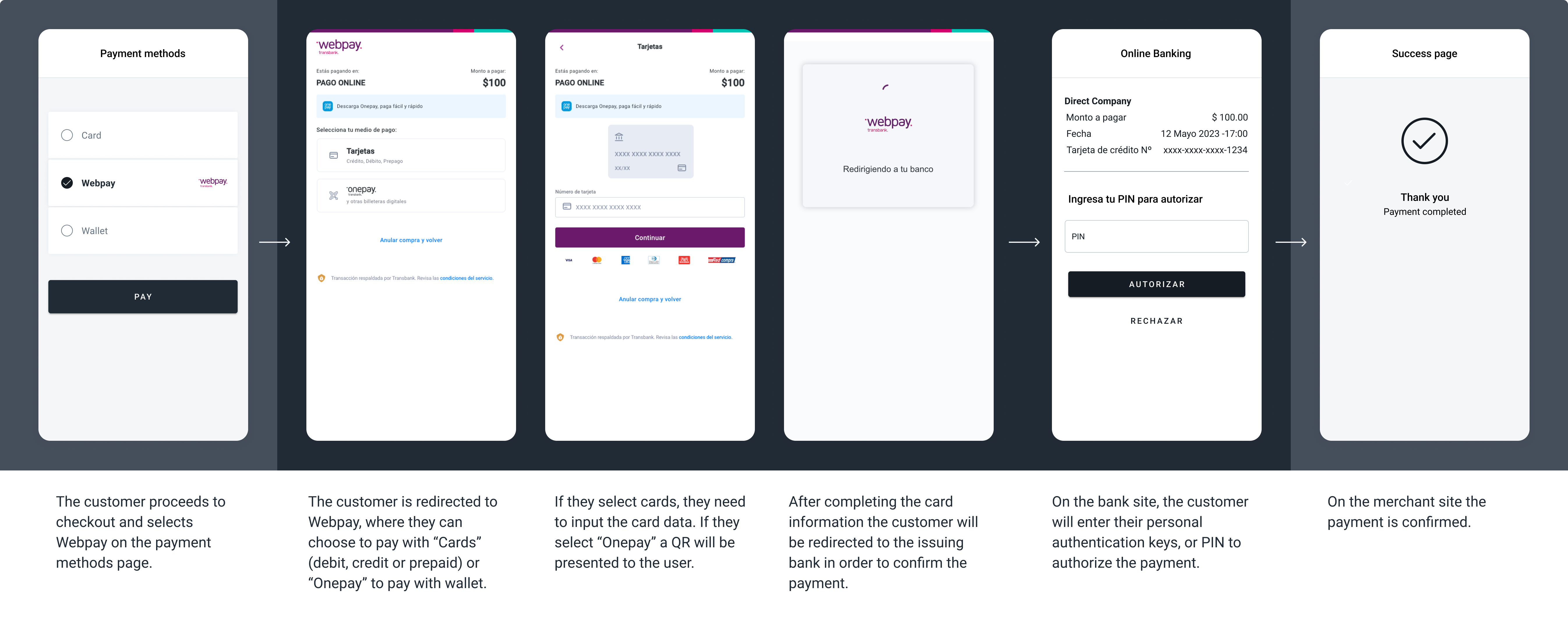
The screenshots illustrate a generic Webpay redirect flow, choosing cards as the payment method.
Request parameters
| Property | Type | Description | Mandatory? |
|---|---|---|---|
amount | Number | Amount to be charged. | Yes |
currency | String | CLPTransaction currency in ISO 4217. | Yes |
country | String | CL Transaction country in ISO 3166. | Yes |
payment_method_id | String | WP ID of the selected payment method. | Yes |
payment_method_flow | String | REDIRECT | Yes |
payer.name | String | Name of the payer. | Yes |
payer.email | String | Email of the payer. | Yes |
payer.document | String | Document of the payer. | Yes |
order_id | String | ID of the capture given by the merchant in their system. Think of it as an external ID of the capture. | No |
notification_url | String | Notifications will be sent in every change of status of a payment to the notification_url specified by the merchant. | No |
Examples
{
    "amount": 100,
    "currency": "CLP",
    "country": "CL",
    "payment_method_id": "WP",
    "payment_method_flow": "REDIRECT",
    "payer": {
        "name": "Jane Doe",
        "email": "[email protected]",
        "document": "12345678",
        "address": {
            "country": "CL",
            "state": "Santiago",
            "city": "Santiago",
            "zip_code": "8858",
            "street": "Av. Principal",
            "number": "5940"
        }
    },
    "order_id": "34545sk3483kqw0",
    "description": "Tshirt",
    "notification_url": "http://merchantsite.com/notification/new",
    "callback_url": "http://merchantsite.com/success_page"
}
{
"id": "R-4-aa96606a-aad8-4112-b9b7-238e8ca88d52",
"amount": 100,
"currency": "CLP",
"payment_method_id": "WP",
"payment_method_type": "BANK_TRANSFER",
"payment_method_flow": "REDIRECT",
"country": "CL",
"created_date": "2023-01-17T15:37:04.000+0000",
"status": "PENDING",
"status_detail": "The payment is pending.",
"status_code": "100",
"order_id": "34545sk1483kqw0",
"description": "Tshirt",
"notification_url": "http://merchantsite.com/notification/new",
"redirect_url": "https://pay.dlocal.com/gmf-apm/payments-redirect/M-a2f0585e-6bfc-4e15-8665-a5fcc343789d"
}Sencillito
A solution used mainly to pay utilities and bills.
Sencillito provides vouchers that users can use to make cash payments at a wide range of stores across the country and also to pay online with debit/prepaid cards or bank transfers.
Capabilities
| Sencillito | |
|---|---|
| Min. amount | 50 CLP |
| Max. expiration time supported | 7 days |
| Notification delay | Immediate |
| Refunds | Yes |
| Flow | DIRECT REDIRECT |
Request parameters
| Property | Type | Description | Mandatory? |
|---|---|---|---|
amount | Number | Amount to be charged. | Yes |
currency | String | CLPTransaction currency in ISO 4217. | Yes |
country | String | CL Transaction country in ISO 3166. | Yes |
payment_method_id | String | SK ID of the selected payment method. | Yes |
payment_method_flow | String | DIRECT or REDIRECT | Yes |
payer.name | String | Name of the payer. | Yes |
payer.email | String | Email of the payer. | Yes |
payer.document | String | Document of the payer. | Yes |
order_id | String | ID of the capture given by the merchant in their system. Think of it as an external ID of the capture. | No |
notification_url | String | Notifications will be sent in every change of status of a payment to the notification_url specified by the merchant. | No |
Examples
{
    "amount": 10000,
    "currency": "CLP",
    "country": "CL",
    "payment_method_id": "SK",
    "payment_method_flow": "DIRECT",
    "payer": {
        "name": "Jane Doe",
        "email": "[email protected]",
        "document": "12345678",
        "address": {
            "country": "CL",
            "state": "Santiago",
            "city": "Santiago",
            "zip_code": "8858",
            "street": "Av. Principal",
            "number": "5940"
        }
    },
    "order_id": "34545sk3483kqw0",
    "description": "Tshirt",
    "notification_url": "http://merchantsite.com/notification/new",
    "callback_url": "http://merchantsite.com/success_page"
}
{
"id": "D-4-77c8f76f-5f12-463f-9176-1ad56ebfbb1e",
"amount": 10000,
"currency": "CLP",
"payment_method_id": "SK",
"payment_method_type": "TICKET",
"payment_method_flow": "DIRECT",
"country": "CL",
"bank_transfer": {},
"ticket": {
"type": "CUSTOM",
"number": "134216",
"expiration_date": "2023-06-17T02:59:00.000+0000",
"provider_logo": "https://static.dlocal.com/images/providers/sencillito.png",
"image_url": "https://pay.dlocal.com/gmf-apm/payments/M-0e85fa4f-c613-4995-b9bb-c489712643a1",
"amount": 10000,
"currency": "CLP"
},
"created_date": "2023-06-10T15:32:33.000+0000",
"status": "PENDING",
"status_detail": "The payment is pending.",
"status_code": "100",
"order_id": "34545sk3483kqw0",
"notification_url": "http://merchantsite.com/notification/new"
}Example ticket
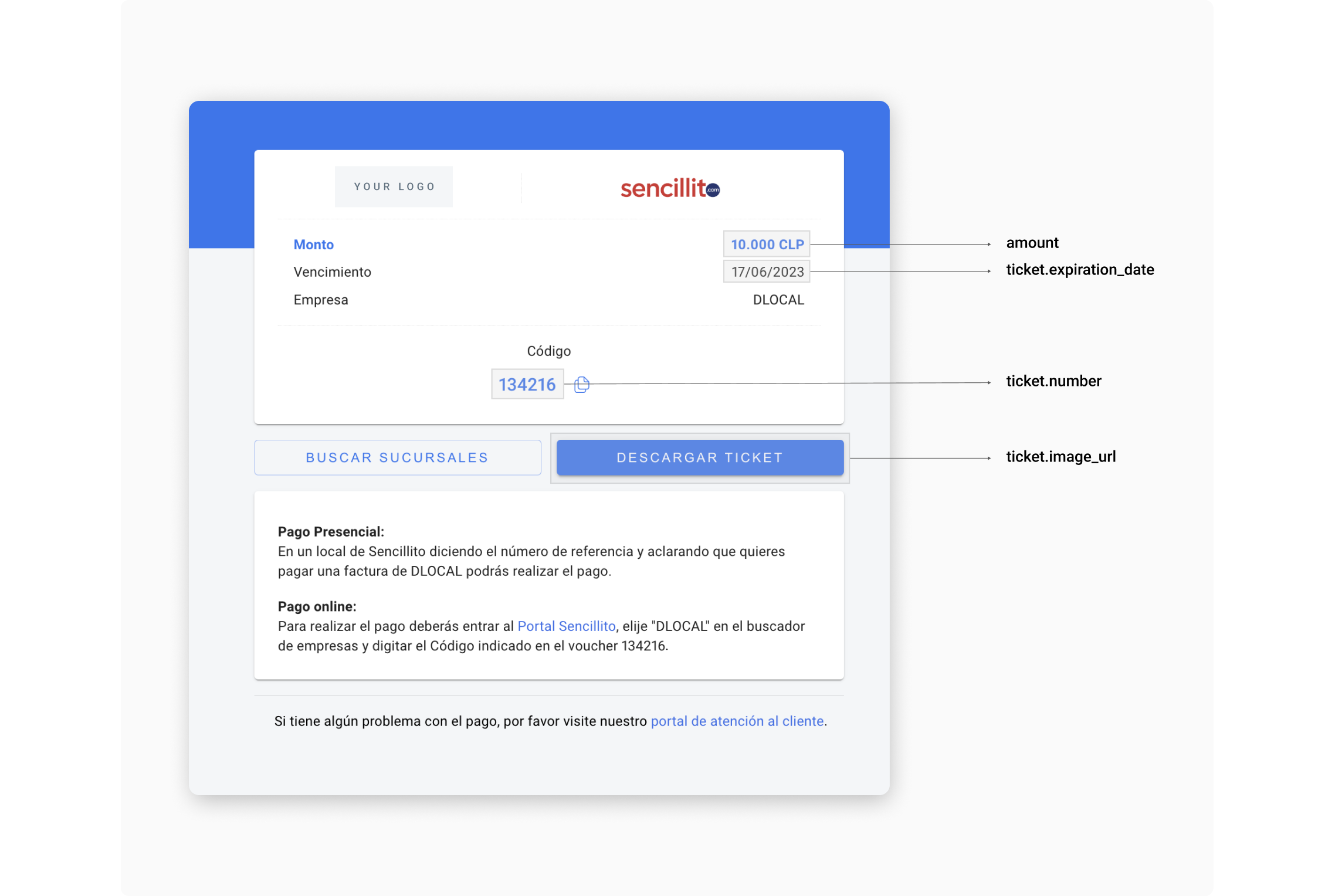
Sencillito UI built with the information in the example above.
User Interface Tips UI
If you are using these payment methods through a DIRECT integration, follow the tips below in order to make it easier for your customers to complete payments, boosting your conversion rates.
| Element | Tip |
|---|---|
| Ticket Number | It is the number that payers must dictate the cashiers in order to complete payment. Name it "Código". |
| Currency and Amount | Should be relevant elements in the ticket. Users need to have that information very clear. |
| Currency Symbol | $ |
| Expiration date | Display this element clearly and visible enough. In Chile, the date format is DD/MM/YYYY. |
| Payment instructions | Although most users are familiarized with payment methods such as Sencillito, it is a good practice to help those who are not. The image above is an example of instructions, but if needed, our team will be happy to help you with more personalized instructions. |
| Portal Sencillito | Most users prefer to pay Sencillito transactions using cash, but some of them prefer to pay them digitally. In order to do so, they need to visit the Sencillito page and input the Ticket Number. |
| Store locator | Link it to https://www.google.com/maps/search/sencillito/. |
| Save button | It helps users to have their tickets always on their phones, making it needless to take notes or keep the browser open. |
| Print button | It is useful for some users who need to have their tickets printed. |
Khipu Bank Transfers
Redirect solution that processes online transfers for all Chilean banks.
Capabilities
| Khipu | |
|---|---|
| Min. amount | 2000 CLP |
| Max. expiration time supported | 5 days |
| Notification delay | Immediate |
| Refunds | Yes |
| Flow | REDIRECT |
UX Flow
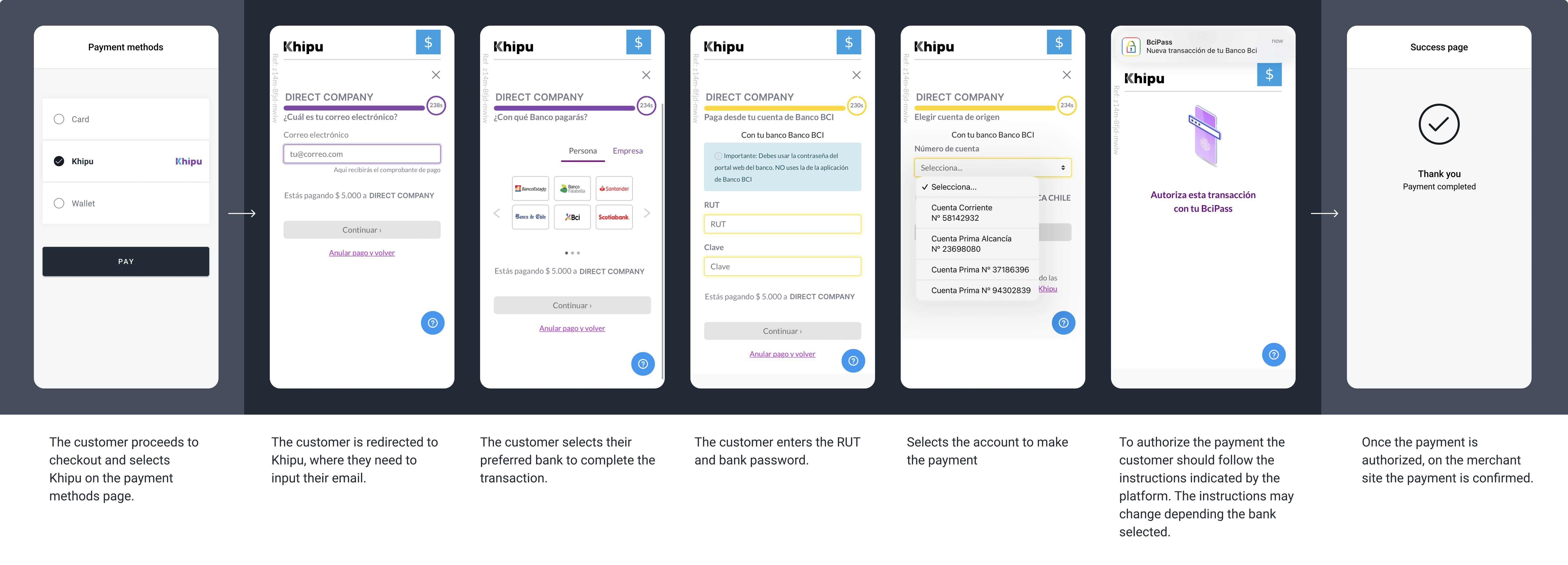
The screenshots illustrate a generic Khipu redirect flow.
Request parameters
| Property | Type | Description | Mandatory? |
|---|---|---|---|
amount | Number | Amount to be charged. | Yes |
currency | String | CLPTransaction currency in ISO 4217. | Yes |
country | String | CL Transaction country in ISO 3166. | Yes |
payment_method_id | String | IO ID of the selected payment method. | Yes |
payment_method_flow | String | REDIRECT | Yes |
payer.name | String | Name of the payer. | Yes |
payer.email | String | Email of the payer. | Yes |
payer.document | String | Document of the payer. | Yes |
order_id | String | ID of the capture given by the merchant in their system. Think of it as an external ID of the capture. | No |
notification_url | String | Notifications will be sent in every change of status of a payment to the notification_url specified by the merchant. | No |
Examples
{
    "amount": 100,
    "currency": "CLP",
    "country": "CL",
    "payment_method_id": "IO",
    "payment_method_flow": "REDIRECT",
    "payer": {
        "name": "Jane Doe",
        "email": "[email protected]",
        "document": "12345678",
        "address": {
            "country": "CL",
            "state": "Santiago",
            "city": "Santiago",
            "zip_code": "8858",
            "street": "Av. Principal",
            "number": "5940"
        }
    },
    "order_id": "34545sk3483kqw0",
    "description": "Tshirt",
    "notification_url": "http://merchantsite.com/notification/new",
    "callback_url": "http://merchantsite.com/success_page"
}
{
"id": "R-4-asaf2e49-7a13-4148-b148-6e912ec612d4",
"amount": 100,
"currency": "CLP",
"payment_method_id": "IO",
"payment_method_type": "BANK_TRANSFER",
"payment_method_flow": "REDIRECT",
"country": "CL",
"created_date": "2023-01-17T15:37:59.000+0000",
"status": "PENDING",
"status_detail": "The payment is pending.",
"status_code": "100",
"order_id": "345411483kqw0",
"description": "Tshirt",
"notification_url": "http://merchantsite.com/notification/new",
"redirect_url": "https://pay.dlocal.com/gmf-apm/payments-redirect/M-63350f10-e7db-405c-be64-1c5d97be45e1"
}High-Ticket Bank Transfer
Accept bank transfers in Chile through Fintoc's redirect-based payment solution. This option is designed for high-value transactions and lets payers authenticate with their bank and authorize a transfer without leaving the dLocal payment flow permanently.
At checkout, this solution may be presented as a generic bank-transfer option with supported bank names and logos. The processor name shown to the payer can vary by checkout configuration.
Capabilities
| High-Ticket Bank Transfer | |
|---|---|
| Min. amount | 1 CLP |
| Max. amount | Up to CLP 15M depending on bank and account type |
| Notification | Asynchronous |
| Refunds | Yes (full and partial) |
| Flow | REDIRECT |
| Bank coverage | 100% of Chilean banks. For high tickets (between 5M CLP up to CLP 15M), solution is available for Santander, Banco de Chile, Banco Estado, and BCI/MACH. |
UX Flow
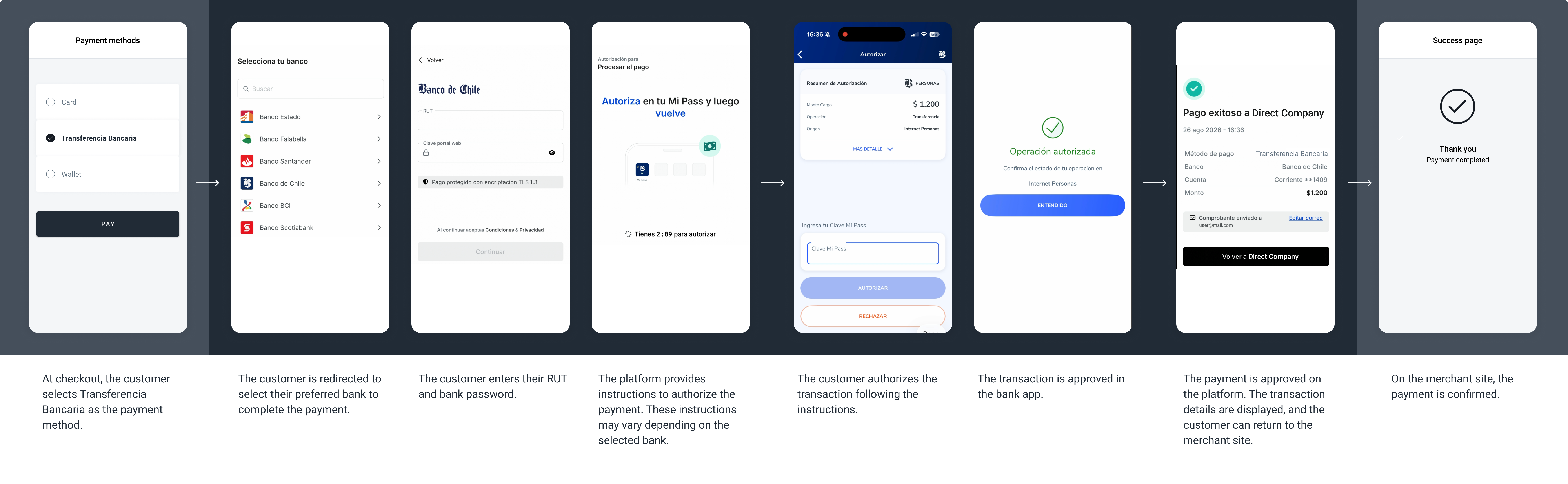
The screenshots illustrate a generic High-Ticket Bank Transfer flow
How it works
- The payer selects the bank-transfer payment option at checkout.
- Your system creates a payment through the dLocal Payments API.
- dLocal returns a
redirect_url. - Your system redirects the payer to that URL.
- The payer selects an available Chilean bank, signs in through the bank's authentication flow, selects the account to debit, and authorizes the transfer.
- The payer is returned to the URL configured in
callback_url. - dLocal sends an asynchronous notification to
notification_urlwhen the payment status changes. - Your system confirms the final result using the dLocal notification and payment status — not only the browser redirect.
The payer does not create a separate account for this payment option. Authentication is completed through the payer's bank.
Request parameters
| Property | Type | Description | Mandatory? |
|---|---|---|---|
amount | Number | Amount to charge in CLP. Send whole-number amounts only; decimals are not supported. | Yes |
currency | String | CLPTransaction currency in ISO 4217. | Yes |
country | String | CLTransaction country in ISO 3166. | Yes |
payment_method_id | String | IOID of the selected payment method. | Yes |
payment_method_flow | String | REDIRECT | Yes |
payer.name | String | Name of the payer. | No |
payer.email | String | Email address of the payer. | Yes |
payer.document | String | Payer's Chilean tax or identity document, when available. | No |
order_id | String | ID of the capture given by the merchant in their system. Think of it as an external ID of the capture. | No |
description | String | Description of the goods or services. | No |
notification_url | String | Notifications will be sent in every change of status of a payment to the notification_url specified by the merchant. | No |
callback_url | String | URL where the payer is returned after completing or cancelling the hosted payment flow. | No |
Examples
{
    "amount": 10000000,
    "currency": "CLP",
    "country": "CL",
    "payment_method_id": "IO",
    "payment_method_flow": "REDIRECT",
    "payer": {
        "name": "Jane Doe",
        "email": "[email protected]"
    },
    "order_id": "34545sk3483kqw0",
    "description": "International transfer",
    "notification_url": "https://merchant.example.com/notifications/payments",
    "callback_url": "https://merchant.example.com/payments/return"
}
{
"id": "R-4-asaf2e49-7b23-4148-b148-6e912ec612d4",
"amount": 10000000,
"currency": "CLP",
"payment_method_id": "IO",
"payment_method_type": "BANK_TRANSFER",
"payment_method_flow": "REDIRECT",
"country": "CL",
"created_date": "2026-01-17T15:37:59.000+0000",
"status": "PENDING",
"status_detail": "The payment is pending.",
"status_code": "100",
"order_id": "34545sk3483kqw0",
"description": "International transfer",
"notification_url": "https://merchant.example.com/notifications/payments",
"redirect_url": "https://pay.dlocal.com/gmf-apm/payments-redirect/M-63350f10-e7db-405c-be64-1c5d97be45e1"
}{
"id": "R-4-asaf2e49-7b23-4148-b148-6e912ec612d4",
"amount": 10000000,
"status": "PAID",
"status_detail": "The payment was paid.",
"status_code": "200",
"currency": "CLP",
"country": "CL",
"payment_method_id": "IO",
"payment_method_type": "BANK_TRANSFER",
"payment_method_flow": "REDIRECT",
"payer": {
"name": "Jane Doe",
"email": "[email protected]"
},
"order_id": "34545sk3483kqw0",
"description": "International transfer",
"notification_url": "https://merchant.example.com/notifications/payments",
"created_date": "2026-01-17T15:37:59.000+0000"
}Mercado Pago
dLocal offers two Mercado Pago products in CL:
MY— Mercado Pago Checkout Pro: one-shot payments only. The user completes payment through a Mercado Pago-hosted redirect. No enrollment or tokenization.MP— Mercado Pago Wallet Connect: recurring and tokenized payments. The user authorizes the merchant once via a redirect enrollment, and all subsequent charges are made directly using the enrollment ID.
Wallet Connect activationMercado Pago Wallet Connect (
MP) requires activation per merchant per country. Contact your dLocal account team before integrating the recurring flow.
Mercado Pago Checkout Pro (MY)
MY)Mercado Pago Checkout Pro is a one-shot wallet payment. The user is redirected to Mercado Pago to complete the payment. No token or enrollment is created.
Capabilities
Mercado Pago Checkout Pro (MY) | |
|---|---|
| Min. amount | 50 CLP |
| Max. expiration time supported | 5 minutes (authentication) |
| Notification delay | Immediate |
| Refunds | Yes |
| Flow | REDIRECT |
UX Flow
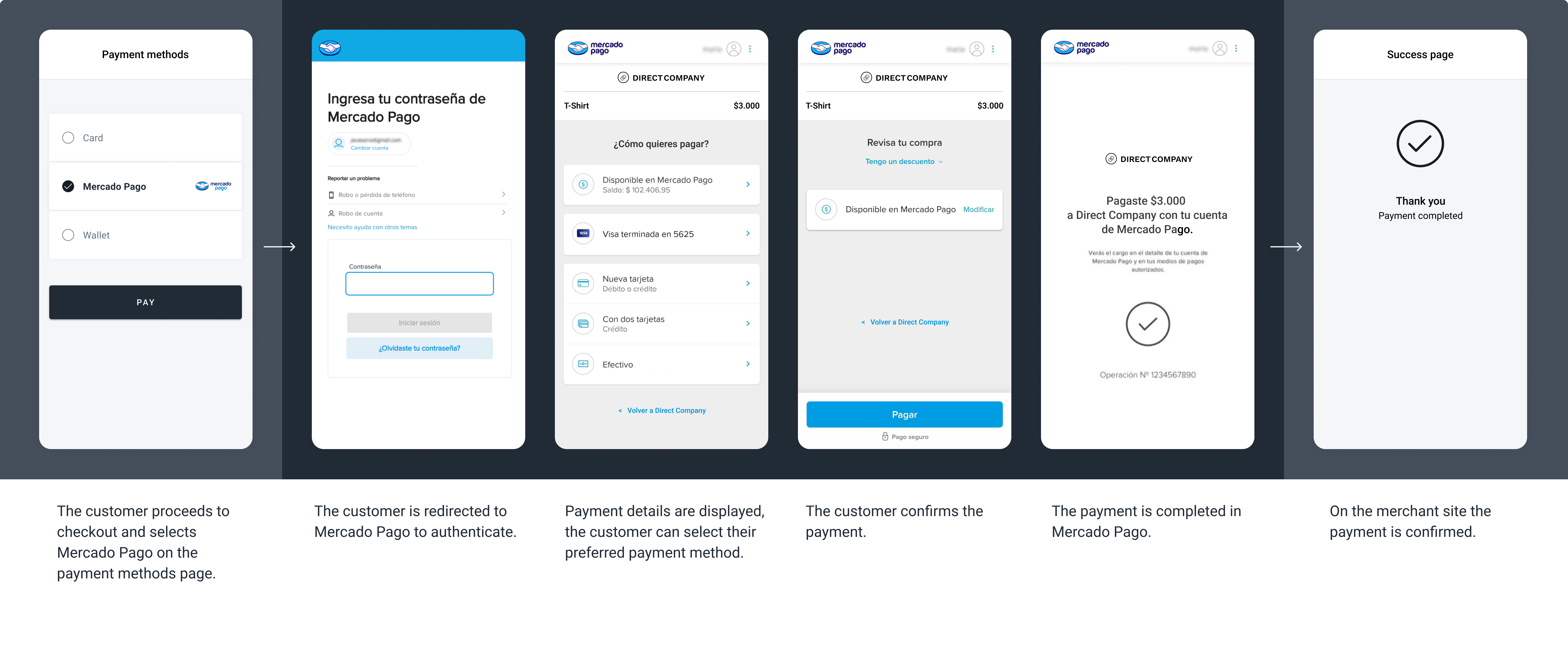
The screenshots illustrate a Mercado Pago one-shot payment redirect flow. The specifics of the flow may vary depending on the payment method selected to complete the payment.
How to process Mercado Pago Checkout Pro payments?
Learn how to process one-shot wallet payments with dLocal in our Wallet payments section.
Mercado Pago Wallet Connect (MP)
MP)Mercado Pago Wallet Connect is the recurring and tokenized wallet product. The user authorizes the merchant once through a redirect enrollment. All subsequent charges use the enrollment ID directly — no redirect or re-authentication required.
Capabilities
Mercado Pago Wallet Connect (MP) | |
|---|---|
| Min. amount | 50 CLP |
| Max. expiration time supported | 5 minutes (authentication) |
| Notification delay | Immediate |
| Refunds | Yes |
| Enrollment flow | REDIRECT |
| Recurring charge flow | DIRECT — synchronous PAID |
UX Flow
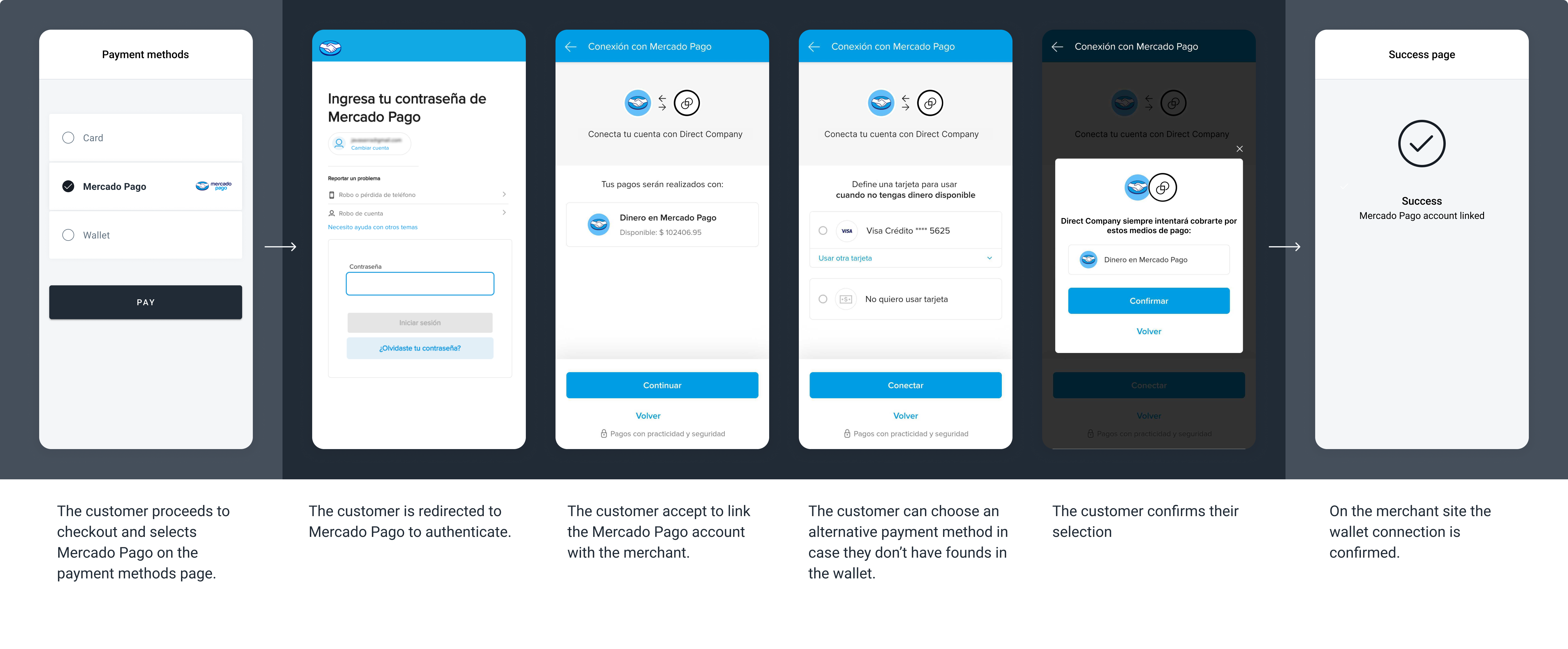
The screenshots illustrate a Mercado Pago tokenized wallet redirect flow.
How it works
The Enrollment API for MP supports two patterns:
| Pattern | When to use |
|---|---|
Enrollment only (POST /enrollments) | Establish the user's authorization without an initial charge. |
Payment + Enrollment in the same request (POST /payments with enrollment object) | Charge the user and establish the authorization simultaneously. |
Once the enrollment is ACTIVE, all subsequent charges are made via POST /payments using enrollment.id inside an enrollment object, with payment_method_flow: "DIRECT". Recurring DIRECT charges return a synchronous PAID response — no webhook is needed to confirm final status.
Enrollment type for Mercado PagoAlways send
"type": "ON_DEMAND"forMP. This is the only valid enrollment type for Mercado Pago Wallet Connect.
Pattern 1 — Enrollment only
Use POST /enrollments to establish the user's authorization without an initial charge.
{
  "external_id": "enroll-cl-001",
  "type": "ON_DEMAND",
  "country": "CL",
  "currency": "CLP",
  "payment_method_id": "MP",
  "payment_method_flow": "REDIRECT",
  "payer": {
    "name": "Jane Doe",
    "email": "[email protected]",
    "document": "12345678"
  },
  "notification_url": "https://merchantsite.com/enrollment_notifications",
  "callback_url": "https://merchantsite.com/enrollment_callback"
}
{
"id": "E-4-32e1218f-b6ec-3f21-13d5-50v12ere2ca4",
"external_id": "enroll-cl-001",
"country": "CL",
"currency": "CLP",
"type": "ON_DEMAND",
"payment_method_id": "MP",
"payment_method_flow": "REDIRECT",
"payment_method_type": "WALLET",
"created_date": "2025-06-01T10:00:00.000+0000",
"status": "PENDING",
"status_detail": "The enrollment is pending.",
"status_code": "100",
"redirect_url": "https://pay.dlocal.com/gmf-apm/payments-redirect/M-a1b2c3d4-e5f6-7890-abcd-ef1234567890",
"notification_url": "https://merchantsite.com/enrollment_notifications"
}{
"id": "E-4-32e1218f-b6ec-3f21-13d5-50v12ere2ca4",
"external_id": "enroll-cl-001",
"country": "CL",
"currency": "CLP",
"type": "ON_DEMAND",
"payment_method_id": "MP",
"payment_method_flow": "REDIRECT",
"payment_method_type": "WALLET",
"created_date": "2025-06-01T10:00:00.000+0000",
"status": "ACTIVE",
"status_detail": "The enrollment is active.",
"status_code": "200",
"notification_url": "https://merchantsite.com/enrollment_notifications"
}
Enrollment IDPersist the
idvalue (e.g.,E-4-32e1218f-...) when the webhook reachesACTIVEstatus. Pass it asenrollment.idinside anenrollmentobject on all future recurring charge requests.To check enrollment status at any time, use the Get enrollment endpoint.
To cancel an enrollment, use the Cancel an enrollment endpoint.
Enrollment status codes:
status | status_code | Description |
|---|---|---|
PENDING | 100 | Enrollment created. User must complete authorization via the redirect URL. |
ACTIVE | 200 | User approved. Enrollment ID is ready for recurring charges. |
CANCELLED | 400 | The enrollment was cancelled. |
REJECTED | 300 | The user did not complete or declined the authorization. |
Pattern 2 — Payment + Enrollment in the same request
Include an enrollment object in POST /payments to create the first charge and enrollment simultaneously.
{
  "amount": 10000,
  "currency": "CLP",
  "country": "CL",
  "payment_method_id": "MP",
  "payment_method_flow": "REDIRECT",
  "payer": {
    "name": "Jane Doe",
    "email": "[email protected]",
    "document": "12345678"
  },
  "enrollment": {
    "external_id": "enroll-cl-001",
    "type": "ON_DEMAND",
    "notification_url": "https://merchantsite.com/enrollment_notifications",
    "callback_url": "https://merchantsite.com/enrollment_callback"
  },
  "order_id": "ord-cl-001",
  "notification_url": "https://merchantsite.com/payments",
  "callback_url": "https://merchantsite.com/payment_callback"
}
{
"id": "F-4-9a8b7c6d-5e4f-3a2b-1c0d-ef1234567890",
"amount": 10000,
"currency": "CLP",
"payment_method_id": "MP",
"payment_method_type": "WALLET",
"payment_method_flow": "REDIRECT",
"country": "CL",
"created_date": "2025-06-01T10:00:00.000+0000",
"status": "PENDING",
"status_detail": "The payment is pending.",
"status_code": "100",
"order_id": "ord-cl-001",
"notification_url": "https://merchantsite.com/payments",
"redirect_url": "https://pay.dlocal.com/gmf-apm/payments-redirect/M-b2c3d4e5-...",
"enrollment": {
"id": "E-4-32e1218f-b6ec-3f21-13d5-50v12ere2ca4",
"external_id": "enroll-cl-001",
"created_date": "2025-06-01T10:00:00.000+0000",
"status": "PENDING",
"status_detail": "The enrollment is pending.",
"status_code": "100"
}
}{
"id": "E-4-32e1218f-b6ec-3f21-13d5-50v12ere2ca4",
"external_id": "enroll-cl-001",
"country": "CL",
"currency": "CLP",
"type": "ON_DEMAND",
"payment_method_id": "MP",
"payment_method_flow": "REDIRECT",
"payment_method_type": "WALLET",
"created_date": "2025-06-01T10:00:00.000+0000",
"status": "ACTIVE",
"status_detail": "The enrollment is active.",
"status_code": "200",
"notification_url": "https://merchantsite.com/enrollment_notifications"
}{
"id": "F-4-9a8b7c6d-5e4f-3a2b-1c0d-ef1234567890",
"amount": 10000,
"status": "PAID",
"status_detail": "The payment was paid.",
"status_code": "200",
"currency": "CLP",
"country": "CL",
"payment_method_id": "MP",
"payment_method_type": "WALLET",
"payment_method_flow": "REDIRECT",
"payer": {
"name": "Jane Doe",
"email": "[email protected]",
"document": "12345678"
},
"enrollment": {
"id": "E-4-32e1218f-b6ec-3f21-13d5-50v12ere2ca4",
"external_id": "enroll-cl-001"
},
"order_id": "ord-cl-001",
"notification_url": "https://merchantsite.com/payments",
"created_date": "2025-06-01T10:00:00.000+0000"
}
Single request, dual outcomeThis request produces two independent asynchronous notifications — one for the enrollment (sent to
enrollment.notification_url) and one for the payment (sent tonotification_url). They may arrive in any order. Persistenrollment.idonly after the enrollment notification reachesACTIVE. Grant entitlement only after the payment notification reachesPAID.
Recurring charges
Once the enrollment is ACTIVE, charge the user by passing enrollment.id inside an enrollment object. The synchronous response is the final status — no webhook is needed.
{
  "amount": 10000,
  "currency": "CLP",
  "country": "CL",
  "payment_method_id": "MP",
  "payment_method_flow": "DIRECT",
  "payer": {
    "name": "Jane Doe",
    "email": "[email protected]",
    "document": "12345678"
  },
  "enrollment": {
    "id": "E-4-32e1218f-b6ec-3f21-13d5-50v12ere2ca4"
  },
  "order_id": "ord-cl-recurring-001",
  "notification_url": "https://merchantsite.com/payments"
}
{
"id": "F-4-b2c8d5e1-3f7a-4c9b-a123-7d8e9f0a1b2c",
"amount": 10000,
"currency": "CLP",
"country": "CL",
"payment_method_id": "MP",
"payment_method_type": "WALLET",
"payment_method_flow": "DIRECT",
"created_date": "2025-07-01T10:00:00.000+0000",
"status": "PAID",
"status_detail": "The payment was paid.",
"status_code": "200",
"order_id": "ord-cl-recurring-001",
"notification_url": "https://merchantsite.com/payments"
}
Synchronous PAID for recurring charges
MPrecurringDIRECTcharges return the finalPAIDorREJECTEDstatus synchronously. You do not need to wait for a webhook before granting entitlement.
result_infoThe recurring charge response may include a
result_infoobject withuser_idandsub_payment_methodfields for reconciliation purposes. This field requires enablement — contact your dLocal account team to activate it.
Request parameters
| Property | Type | Description | Mandatory? |
|---|---|---|---|
amount | Number | Amount to be charged. | Yes |
currency | String | CLP. Transaction currency. | Yes |
country | String | CL. Transaction country. | Yes |
payment_method_id | String | MP. ID of the selected payment method. | Yes |
payment_method_flow | String | REDIRECT (enrollment) or DIRECT (recurring charge). | Yes |
payer.name | String | Name of the payer. | Yes |
payer.email | String | Email of the payer. | Yes |
payer.document | String | Document of the payer. | Yes |
enrollment.id | String | Enrollment ID from a previous active enrollment, passed as enrollment.id inside an enrollment object. | Yes, for recurring charges |
enrollment | Object | Include in POST /payments for Pattern 2 (payment + enrollment simultaneously). | Yes, for Pattern 2 |
enrollment.external_id | String | Your internal identifier for the enrollment. | Yes |
enrollment.type | String | Must be ON_DEMAND for MP. | Yes |
enrollment.notification_url | String | URL where dLocal sends enrollment status notifications. | Yes |
enrollment.callback_url | String | URL where the user lands after completing the enrollment redirect. | No |
wallet.deviceId | String | Device fingerprint for anti-fraud. Recommended for all MP integrations. See Device ID for the web script and mobile SDK fingerprint structure. | Recommended |
order_id | String | ID given by the merchant in their system. | No |
notification_url | String | dLocal sends notifications for every status change to this URL. | Yes |
callback_url | String | URL where the user lands after completing the enrollment redirect. | No |
Cancellation and invalid enrollment
Mercado Pago Wallet Connect supports cancellation from both sides:
User-initiated cancellation: The user can cancel their authorization directly from the Mercado Pago app. When this happens, Mercado Pago sends a cancellation notification to dLocal, which expires the saved authorization internally and sends a cancel-wallet IPN to the merchant with status: "CANCELLED". Treat this webhook as the signal to stop any scheduled charges against that enrollment.
Merchant-initiated cancellation: The merchant can cancel an active enrollment at any time using the Cancel an enrollment endpoint.
In both cases, treat a cancelled enrollment as a terminal state. The user must complete a new enrollment flow before any future recurring charges can be processed.
Servipag
Servipag offers physical and online payments. Users can pay with a card or cash.
For the physical alternative, Servipag has over a thousand stores, both under the SERVIPAG brand and other brands.
Capabilities
| Servipag | |
|---|---|
| Min. amount | 50 CLP |
| Max. expiration time supported | 7 days |
| Notification delay | Immediate |
| Refunds | Yes |
| Flow | DIRECT REDIRECT |
Request parameters
| Property | Type | Description | Mandatory? |
|---|---|---|---|
amount | Number | Amount to be charged. | Yes |
currency | String | CLPTransaction currency in ISO 4217. | Yes |
country | String | CL Transaction country in ISO 3166. | Yes |
payment_method_id | String | SP ID of the selected payment method. | Yes |
payment_method_flow | String | DIRECT or REDIRECT | Yes |
payer.name | String | Name of the payer. | Yes |
payer.email | String | Email of the payer. | Yes |
payer.document | String | Document of the payer. | Yes |
order_id | String | ID of the capture given by the merchant in their system. Think of it as an external ID of the capture. | No |
notification_url | String | Notifications will be sent in every change of status of a payment to the notification_url specified by the merchant. | No |
Examples
{
    "amount": 10000,
    "currency": "CLP",
    "country": "CL",
    "payment_method_id": "SP",
    "payment_method_flow": "DIRECT",
    "payer": {
        "name": "Jane Doe",
        "email": "[email protected]",
        "document": "12345678",
        "address": {
            "country": "CL",
            "state": "Santiago",
            "city": "Santiago",
            "zip_code": "8858",
            "street": "Av. Principal",
            "number": "5940"
        }
    },
    "order_id": "34545sk3483kqw0",
    "description": "Tshirt",
    "notification_url": "http://merchantsite.com/notification/new",
    "callback_url": "http://merchantsite.com/success_page"
}
{
"id": "D-4-c89f518f-87dd-4938-76b1-ed66f307a6ea",
"amount": 10000,
"currency": "CLP",
"payment_method_id": "SP",
"payment_method_type": "TICKET",
"payment_method_flow": "DIRECT",
"country": "CL",
"bank_transfer": {},
"ticket": {
"type": "CUSTOM",
"number": "1000863245",
"expiration_date": "2023-06-18T02:59:00.000+0000",
"company_name": "dLocal",
"company_id": "50283",
"company_id2": "50284",
"provider_name": "SERVIPAG",
"provider_logo": "https://pay.dlocal.com/views/2.0/images/payments/SP.png",
"image_url": "https://pay.dlocal.com/gmf-apm/payments/M-9f44955d-a6c5-4ffb-a397-47c6411922b0"
},
"created_date": "2023-06-11T15:34:11.000+0000",
"status": "PENDING",
"status_detail": "The payment is pending.",
"status_code": "100",
"order_id": "34545sk3483kqw0",
"notification_url": "http://merchantsite.com/notification/new"
}Example ticket
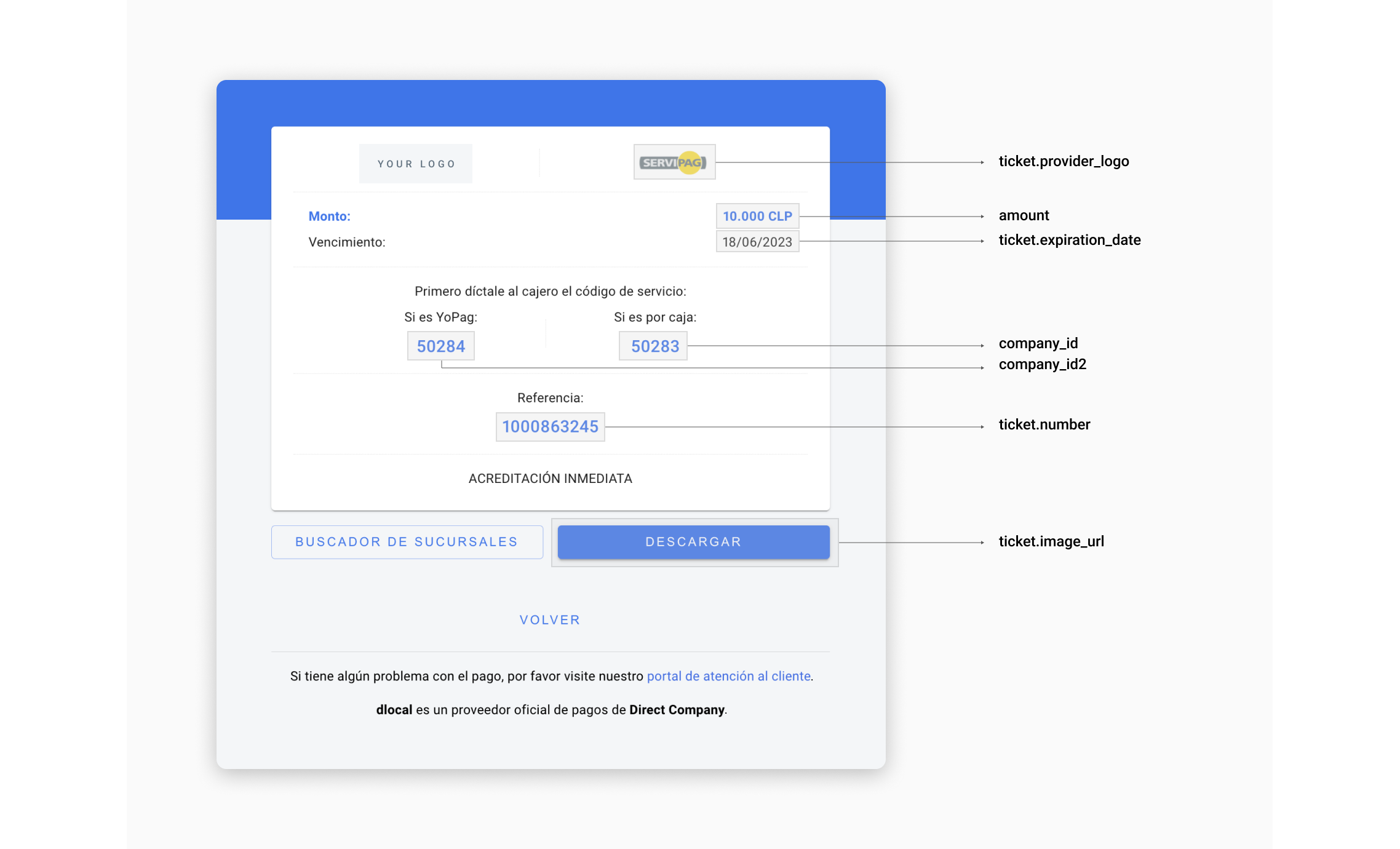
Example Servipag UI built with the information in the example above.
User Interface Tips UI
If you are using this payment method through a DIRECT integration, follow the tips below in order to make it easier for your customers to complete payments, boosting your conversion rates.
| Element | Tip |
|---|---|
| Ticket Number | It is the number that payers must dictate to the cashiers in order to complete payment. Name it "Referencia" and separate it this way so it is easier to read: 3 digits - 3 digits - 4 digits. |
| Currency and Amount | Should be relevant elements in the ticket. Users need to have that information very clearly. |
| Currency Symbol | $ |
| Type of payment | Include company_id2 and company_id numbers, as they are important for payers that pay in physical stores. |
| Expiration date | Display this element clearly and visible enough. In Chile, the date format is DD/MM/YYYY. |
| Accreditation delay | Let users know that their payment will be credited immediately. This brings confidence and a sense of security that helps conversion rates. |
| Payment instructions | Although most users are familiarized with Servipag, it is a good practice to help those who are not. The image above is an example of instructions, but if needed, our team will be happy to help you with more personalized instructions. |
| Store locator | Link it to google.com/maps/search/servipag/. |
| Save button | It helps users to have their tickets always on their phones, making it needless to take notes or keep the browser open. |
| Print button | It is useful for some users who need to have their tickets printed. |
Updated 19 days ago